


An executive opens a chat window and asks for a snapshot and the summary of last quarter’s regional performance. The assistant returns the dashboard view itself, alongside a written summary of what it shows. Nobody logged into Tableau. Nobody built anything.
That is Tableau’s hosted MCP, and it is now roughly a few clicks to turn on. Until recently, connecting an AI agent to Tableau meant running your own MCP server and issuing a personal access token per user, each with an expiry date and a manual refresh. That work is gone.
Which is the interesting part. When the setup barrier disappears, what remains are the questions the setup barrier was hiding: who can already see what, which capabilities you are comfortable exposing to a language model, and whether your dashboards are actually described well enough for an AI to summarise them correctly. This piece is about those.
What Tableau Hosted MCP Actually Changes
Hosted Tableau MCP is a managed service, run by Tableau at mcp.tableau.com, that connects MCP-compatible AI agents to a Tableau Cloud site. There is no server to deploy and no credential to issue. You point a supported client at the URL and sign in with your Tableau Cloud identity.
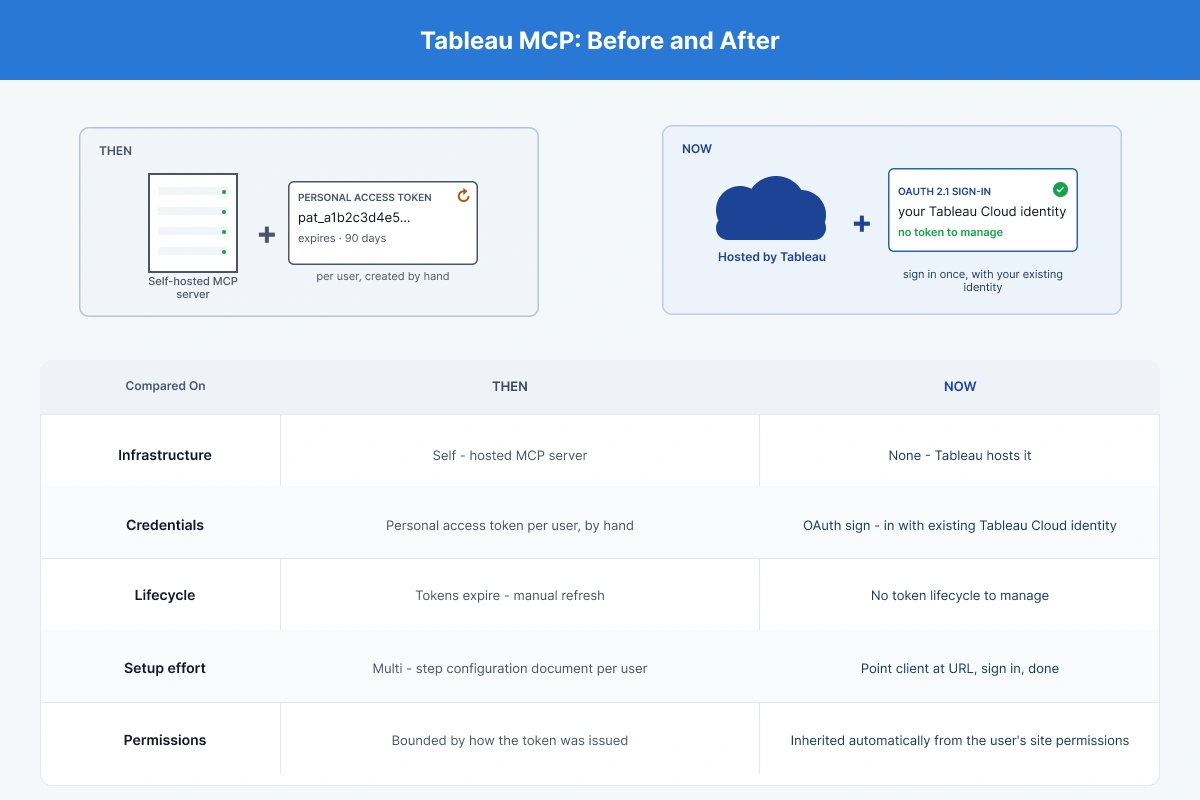
The change is in the authentication model. The previous approach required a self-hosted MCP server plus a personal access token created manually by each user, configured step by step, carrying an expiry, and needing a refresh every time it lapsed. Every user, in every organisation, did that themselves.
Hosted MCP replaces it with OAuth 2.1. Each user signs in as themselves, and the server makes its API calls as that authenticated user.
Before and after
-
Infrastructure. Then: self-hosted MCP server. Now: none, Tableau hosts it.
-
Credentials. Then: a personal access token per user, created by hand. Now: OAuth sign-in with the existing Tableau Cloud identity.
-
Lifecycle. Then: tokens expire and must be manually refreshed. Now: no token lifecycle to manage.
-
Setup effort. Then: a multi-step configuration document per user. Now: point the client at the URL, sign in, done.
-
Permissions. Then and now: whatever the user already has on the site, but now inherited automatically rather than bounded by how the token was issued.
What You Can Do With Tableau Hosted MCP
The demonstration case is the one that sells it internally. Ask for a snapshot and the summary of a dashboard’s first view, and the agent returns the view as an image together with an overview of what the numbers say, no Tableau session, no navigation, no knowing which workbook it lived in. For an executive who wants the answer rather than the dashboard, that is the entire value proposition in one exchange.
Underneath, hosted MCP exposes fourteen tool groups: Data Q&A, Workbooks, Views, Jobs, Projects, Tasks, Pulse, Content Exploration, Flows, Admin Insights, Tableau Knowledge, Token Management, Content Management, Users.
Read that list again, because the important detail is easy to skim past. This is not a read-only reporting bridge. Workbook, users, content management, and token management are all write & delete-capable surfaces. An agent connected this way can publish workbooks and act on user and token administration, subject entirely to what the signed-in user is permitted to do.
Which agents it works with
Claude, ChatGPT, and Slack are supported, alongside custom agents. A custom agent needs some additional configuration on the agent side, but the authentication still happens at Tableau, and the permission model is unchanged. Which agent an organisation uses is usually settled by whichever enterprise plan it already holds rather than by a fresh evaluation.
Permissions Are Inherited, Not Granted
The security model is the strongest thing about hosted MCP, and it is worth being precise about why.
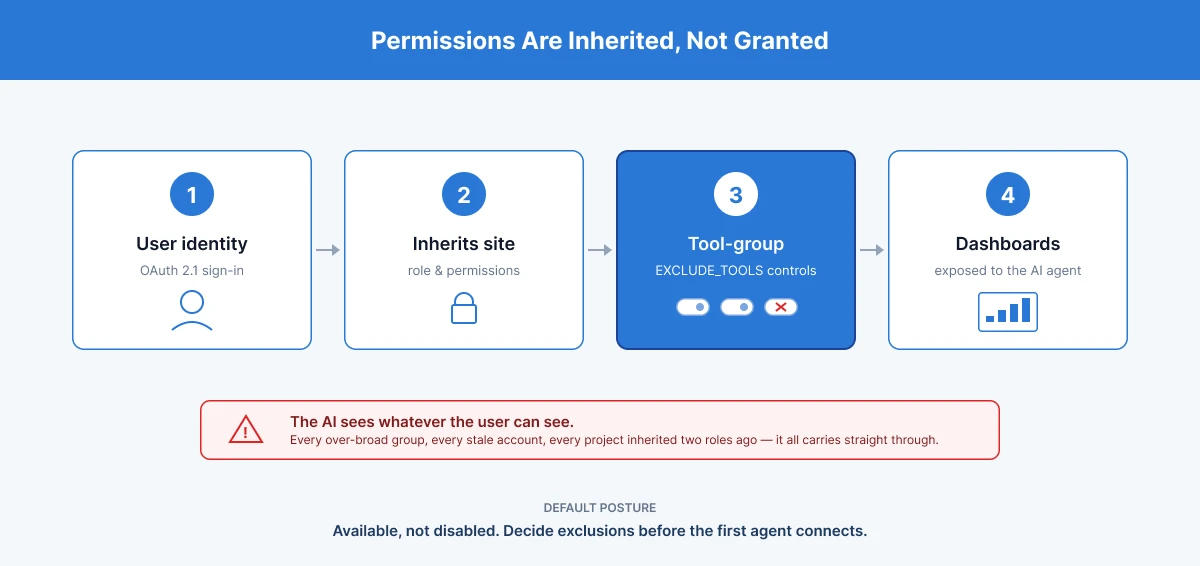
Every call the server makes is made as the signed-in user. Hosted MCP respects that user’s existing site role and permissions; it does not hold its own service identity and does not store data, proxying requests to Tableau’s existing APIs with the user’s own access token. OAuth sign-ins and tool calls are written to the standard activity logging pipeline.
What that means in practice is cleaner than most integrations manage. If a user has no download permission on a workbook, the connector cannot download that workbook for them, even though a download tool exists and is listed. The tool is present; the permission is not; the permission wins.
Tableau’s hosted MCP does not grant access, it inherits it. Every call is made as the signed-in user, which means the connector is exactly as safe, and exactly as messy, as the permission model underneath it.
That inheritance is also the limitation, and it is the one that catches people. A connector that faithfully reproduces your existing permission model will faithfully reproduce its errors. Every over-broad group membership, every stale contractor account, every project inherited by someone who changed roles two years ago, all of it carries straight through.
The difference is retrieval speed. Latent over-permissioning in Tableau has historically been protected by friction: someone had to know a workbook existed, find it, and open it. Conversational access removes that friction entirely. A user who could technically always reach something they should not now only has to ask a plain-language question.
The Setting Most Teams Will Not Know About
Here is the detail that should be on every site administrator’s list this quarter, and almost certainly is not.
A site administrator cannot disable hosted MCP. The service is available across Tableau Cloud SKUs, and there is no master switch to turn it off. What an administrator can do is exclude specific tool groups, using an EXCLUDE_TOOLS site setting applied through the REST API, a comma-separated list of the group names.
So the governance question is not whether to allow AI access to your Tableau site. That decision has already been made for you. The question is which of the fourteen tool groups stay reachable, and the default posture is that they all do.
A reasonable starting position for most enterprises:
-
Exclude the identity surfaces first. users and token-management are administrative capabilities. Very few organisations have a considered reason to make them reachable through a chat interface, and the blast radius if something goes wrong is not a wrong answer, it is an access change.
-
Think hard about the write surfaces. Authoring, content management, and workbook change published content. If your governance model has a review step before anything reaches a certified project, an agent that can publish routes around it.
-
Leave the read surfaces open. view, project, content, insights, pulse and datasource are where the value is, and they inherit permissions exactly as the rest of Tableau does.
The threshold is this: an exclusion decision should be made before the first agent connects, not after. Once users have discovered that they can ask for things, withdrawing a capability reads as a service being taken away rather than a control being applied, and that is a much harder conversation than a considered default on day one.
Site administrators cannot switch Tableau’s hosted MCP off. They can only decide which of its fourteen tool groups to exclude, which makes the default posture available, not disabled.
Tableau Cloud Only, And Other Eligibility Realities
Three constraints decide whether any of this is available to you at all.
It is Tableau Cloud only
Hosted MCP does not support Tableau Server. For enterprises running self-managed deployments, commonly for data residency or regulatory reasons, this is a hard gate, not a configuration gap. The conversation there is about migration economics, not about connectors.
SKU entitlements still apply
The service is available across Cloud SKUs, but individual tools can require additional entitlements. A tool group being listed is not the same as it being usable on your site.
Your IAM has to already be right
The only infrastructure an organisation needs is a Tableau Cloud instance with identity already configured, and an MCP-capable agent. The individual user needs their Tableau Cloud credentials and the server link. That is genuinely all, which is precisely why the quality of the identity configuration underneath it now matters more than it did.
Where The Real Work Is
Nobody needs help clicking Connect. It would be dishonest to suggest otherwise, and anyone evaluating this will see through it immediately. Four things do take real work, and none of them are the connector.
A permission audit that precedes the rollout
Given that access is inherited wholesale, the rollout is a good forcing function for the review of group memberships, project permissions, and dormant accounts that most Tableau estates are overdue. Do it before, not after.
A considered tool-group exclusion policy
Which of the fourteen groups your organisation exposes is a governance decision with a security dimension, and it needs an owner. Defaulting to all fourteen because nobody knew the setting existed is not a decision.
Dashboard and metadata readiness, the one nobody anticipates
This is the sleeper problem. An agent summarising a dashboard reads the metadata it is given: field names, descriptions, workbook and view titles, data source certification. A dashboard with fields called measure_3 and calc_final_v2 does not produce a bad summary, it produces a confident, fluent, plausible summary that is wrong, delivered to an executive with no easy way to tell. Conversational access raises the cost of poor metadata hygiene from mild irritation to misinformed decisions.
The same discipline extends to the data layer beneath the dashboard: clean, certified, well-named models are what an agent reads correctly, and Tableau's composable data sources make that governed, reusable layer easier to maintain as one source of truth across teams.
Agent estate and access design
Which agents connect, for which user populations, and under whose approval, and the audit posture around it, given that sign-ins and tool calls land in the activity log and somebody should be reading them.
Conversational access to dashboards turns metadata hygiene from a cosmetic problem into an accuracy problem. A well-governed Tableau estate summarises well; a poorly named one produces fluent, confident, wrong answers.
Getting these four right before the first agent connects is what separates conversational access that is trustworthy from access that is merely impressive, and it is the readiness work our Tableau consulting team runs with enterprises ahead of an AI rollout.
Where To Start
The sequence that works is not the obvious one. The obvious one is to connect an agent, demonstrate the dashboard summary to leadership, and deal with the governance afterwards, which means deciding exclusions once people are already using capabilities you intended to remove.
Better: audit permissions first, set tool-group exclusions before the first connection, pick a small set of well-governed dashboards for the initial rollout, and expand as metadata quality catches up.
One limitation is worth naming plainly, and it is Tableau’s rather than anyone’s implementation. What hosted MCP can do today is bounded by the current feature release, and that boundary moves as Tableau ships. Anything you read about its limits, including this article, carries a date on it.
The question worth asking before any of this starts is not whether to enable AI access to Tableau. It is which capabilities you have consciously decided to leave switched on.
Frequently Asked Questions
1. What is Tableau MCP?
A managed service hosted by Tableau that connects MCP-compatible AI agents to a Tableau Cloud site, letting users query and act on Tableau content through natural language in tools like Claude, ChatGPT, and Slack.
2. How do I connect Claude to Tableau?
Point the client at Tableau’s hosted MCP endpoint and sign in with your Tableau Cloud credentials. Authentication uses OAuth 2.1, so no personal access token is created or maintained.
3. Is Tableau MCP secure?
The model is sound: every call is made as the signed-in user, existing site roles and permissions are enforced, no data is stored, and sign-ins and tool calls are audit-logged. The caveat is that it inherits your permission model wholesale, including any errors in it.
4. Does Tableau MCP work with Tableau Server?
No. Hosted MCP supports Tableau Cloud only.
5. Can administrators disable Tableau MCP?
Not entirely. Site administrators cannot switch the service off, but they can exclude specific tool groups using an EXCLUDE_TOOLS site setting applied through the REST API.
6. Do we need help setting it up?
For the connection itself, no, it is a sign-in. The work is in the permission audit, the tool-group exclusion policy and the dashboard metadata quality that determines whether AI summaries are accurate.