

Overview
Our client, a multinational organization, relied heavily on NetSuite Saved Searches to generate operational reports. Saved Searches served as a vital tool for extracting, filtering, and organizing NetSuite data for day-to-day decision-making. The project aimed to replicate NetSuite Saved Searches in Google BigQuery by translating their logic and configurations into SQL queries. This required a deep understanding of Saved Search logic, accurate mapping of fields, and precise joining conditions between tables to ensure outputs in GBQ matched those generated by NetSuite. The objective also included enabling seamless visualization of these reports in external analytics tools such as Tableau.
Customer Challenges
After migrating raw NetSuite data to Google BigQuery (GBQ), the client faced difficulties in maintaining reporting continuity. Replicating Saved Searches Netsuite in GBQ for integration with BI tools like Tableau posed key challenges, particularly in translating complex logic and ensuring result accuracy.

Translating Saved Search Logic
Saved Searches in NetSuite often involve intricate logic, including custom filters, formulas, and dependencies across multiple tables. Translating these configurations into SQL while preserving their intent required a deep understanding of NetSuite’s backend structure. Misinterpretation of logic could lead to discrepancies in the recreated reports, potentially affecting business decisions.

Eliminating Data Duplication
Incorrect joining of tables during query development led to data duplication, which distorted the recreated Saved Search outputs. These issues required careful debugging and restructuring of joins to ensure data accuracy.

Ensuring Data Accuracy
Ensuring that the outputs of SQL-based Saved Searches in GBQ matched the original Saved Search results in NetSuite was a critical but labor-intensive task. The validation process involved manual comparisons of multiple datasets, increasing time and effort.
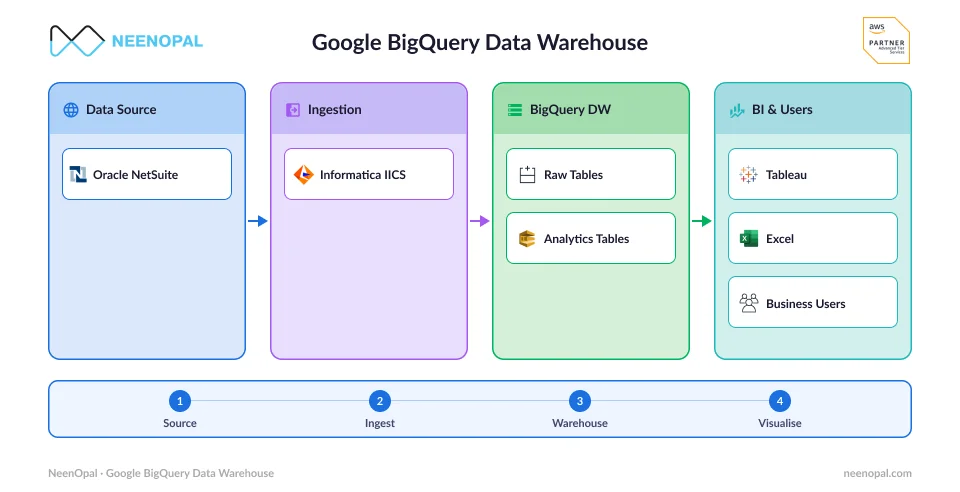
BigQuery Architecture for NetSuite Reporting
NetSuite data is replicated in Google BigQuery, where SQL queries rebuild Saved Searches and enable seamless reporting through Tableau.
Solutions
NeenOpal successfully rebuilt Saved Searches in GBQ by translating NetSuite’s Saved Search logic into SQL. The team used custom field mappings from the client and NetSuite’s official documentation to establish accurate table relationships. By ensuring GBQ outputs matched NetSuite’s front-end results, the client achieved a seamless transition to GBQ-based reporting. To address key challenges, the team focused on accurately translating logic, resolving duplication issues, and validating results.
01.
Accurately Replicating Saved Searches
Conducted a detailed analysis of NetSuite Saved Search configurations, including filters, joins, and formulas. Using NetSuite documentation and client-provided mappings, SQL queries were meticulously structured to mirror Saved Search logic in GBQ. Broke down complex Saved Searches into smaller components and rebuilt them incrementally to minimize errors and ensure accuracy.
02.
Preventing Data Redundancy
Identified and implemented correct join paths, ensuring accurate table relationships. For instance, using the path Transaction > Transaction Line > Transaction Accounting Line prevented redundant data. Eliminated duplication issues and maintained data integrity.
03.
Streamlining Validation Processes
Conducted side-by-side comparisons between GBQ query results and NetSuite Saved Search outputs, sampling multiple datasets to ensure consistency. Implemented automated SQL scripts to streamline validation, reducing manual effort and increasing efficiency.
Replicate Complex NetSuite Saved Searches in Google BigQuery with Accuracy and Confidence!
Start Your Seamless MigrationServices


Recommendations for Future Projects

Streamline Logic Decoding
Develop a systematic approach for translating Saved Search logic into SQL, such as creating reusable templates or workflows for common configurations.

Automate Validation
Use automated scripts or tools to validate recreated Saved Searches against NetSuite outputs, reducing manual comparisons and speeding up validation.

Enhance Documentation
Maintain detailed documentation of Saved Search logic, SQL translations, and table relationships to support future scalability and similar migration efforts.
Benefits

Seamless Saved Search Migration
Successfully analyzed and recreated the logic of 800+ Saved Searches using SQL in GBQ.

Eliminated Data Redundancy
Implemented accurate join paths to prevent duplication and maintain data integrity.

Consistent and Reliable Reporting
Conducted detailed comparisons between GBQ query outputs and NetSuite Saved Search results to guarantee consistency and reliability.

Enhanced BI Integration
Outputs from recreated Saved Searches were seamlessly integrated with Tableau and other BI tools, enabling advanced visualization and operational reporting.
Conclusion
NeenOpal successfully replicated NetSuite Saved Searches in Google BigQuery, ensuring operational continuity and seamless reporting. By integrating with BI tools like Tableau, the client gained advanced visualization and analytics capabilities, enhancing decision-making. The migration improved data agility, reducing reliance on NetSuite’s front-end and enabling faster, more flexible analyses. This project not only streamlined reporting but also established a scalable foundation for future analytics, positioning the organization for long-term data-driven success.
FAQ
Find quick answers about how NeenOpal rebuilt 800+ NetSuite Saved Searches in Google BigQuery
How did you prevent data duplication during migration?
Correct join paths (e.g., Transaction → Transaction Line → Transaction Accounting Line) were implemented to eliminate redundant records.
How was data accuracy validated?
Side-by-side comparisons between NetSuite outputs and BigQuery query results were conducted, supported by automated validation scripts.
Can recreated Saved Searches integrate with BI tools?
Yes. The SQL-based outputs were designed for seamless integration with Tableau and other external analytics platforms.
Authors



Contact Us
We’d love to hear from you.
Lets discuss how we can transform your business with AI. Talk to our AI expert team. Lets do AI journey together.