


The Meeting Nobody Wants to Have
A finance partner walks into a quarterly review with a printout. She slides it across the table. The data engineering manager, sitting across from her, leans forward and recognizes the numbers immediately, which he produced himself six months ago. A 38% reduction in Snowflake spend. His team's proudest win of the year.
Then he looks at the second sheet. The current month's bill. Up 22% from the baseline.
Both numbers are true. That's the part that stings.
This is the Snowflake cost optimization plateau, and it hits almost every enterprise team around the six-month mark. The auto-suspend is set to 60 seconds. The warehouses are right-sized. The resource monitors are in place. And yet the bill keeps climbing quietly, steadily, like it always did before the optimization project started.
The reason is simple: most Snowflake cost optimization guides stop at Layer 1. They give you the configuration checklist, you implement it, you recover the first 30–40% of wasted spend, and then the bill resumes growing because the structural problems, architectural inefficiencies, and governance gaps were never touched.
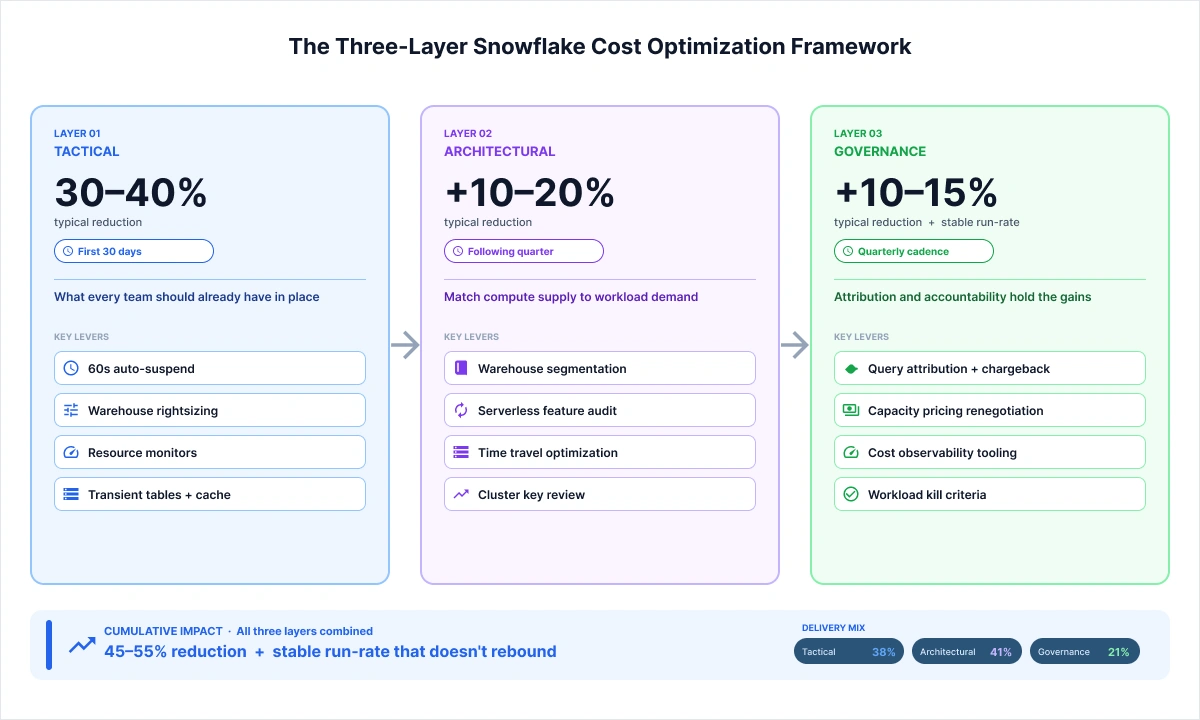
This guide is built differently. It maps Snowflake cost optimization across three layers: Tactical (the configuration levers every team should have pulled already), Architectural (the structural redesign that delivers the second round of savings), and Governance (the operating discipline that keeps the bill from rebounding). In 2026, with compute accounting for over 70% of the average Snowflake bill and serverless features quietly consuming another 8–15%, stopping at Layer 1 is not a strategy. It is a delay.
Why the Standard Snowflake Cost Optimization Checklist Stops Working
Every data engineering team doing Snowflake cost optimization for the first time follows roughly the same playbook. They audit the warehouse sizes, set auto-suspend timers, add resource monitors, switch eligible tables to transient, and drop a few stale objects that have been sitting around since the initial migration. Within 30 days, the bill drops. Sometimes dramatically.
Then the workload count grows. New pipelines get added. Three analysts who used to share a warehouse spin up their own. The data product team onboards. And six months later, that 38% reduction has been swallowed whole by growth.
This is not a configuration failure. It is an architectural one.
This is not a configuration failure. It is an architectural one. Tactical optimization fixes consumption per workload, but it does nothing to control the number of workloads, the proliferation of underutilized warehouses, the silent accumulation of serverless feature credits, or the absence of any system for snowflake spend management and cost attribution.
The cumulative savings curve from Snowflake cost optimization looks roughly like this: the tactical layer delivers 30–40% in the first month. Architectural intervention adds another 10–20% over the following quarter. Governance and contract restructuring contribute a further 10–15%, but more importantly, they stabilize the run-rate so the bill does not resume climbing.
The teams that sustain their Snowflake cost reduction treat Snowflake cost optimization as a quarterly discipline, not a one-time project. The teams that do not treat it that way are the ones scheduling the meeting with Finance every six months.
LAYER 1 (Tactical): Snowflake Cost Optimization Best Practices Every Production Tenant Should Have
Before covering what competitors miss, it is worth compressing the tactical layer tightly, because if you have been running Snowflake in production for six months or more, these Snowflake cost optimization best practices should already be in place. Following these is the foundation of any effort to reduce snowflake costs.
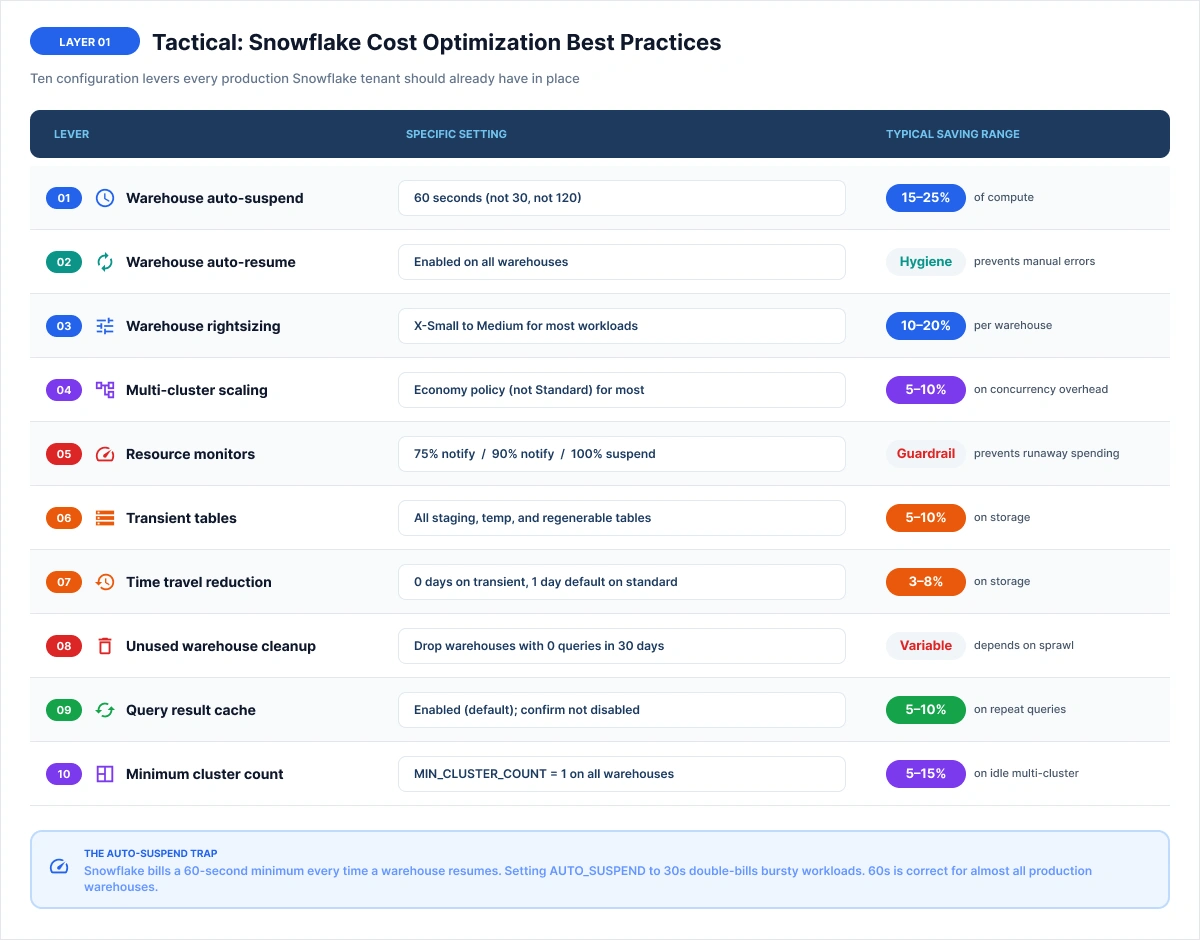
One opinionated note before moving on: if your tenant is missing any of these ten controls, the engagement is a configuration audit, not a Snowflake FinOps engagement. The interesting work starts in Layer 2.
The Auto-Suspend Trap (Why 30 Seconds Costs More Than 60)
This is the one tactical detail worth spending a full paragraph on, because most listicles get it wrong.
Snowflake bills a 60-second minimum every time a warehouse resumes. If AUTO_SUSPEND is set to 30 seconds on a warehouse with bursty, short-interval queries, the sequence looks like this: query fires, the warehouse resumes (the 60-second billing clock starts), the warehouse completes the query in 5 seconds, the warehouse suspends at 30 seconds, next query fires 20 seconds later, the warehouse resumes again (another 60-second billing clock starts). You have now paid for 120 seconds of compute to run two 5-second queries.
The correct setting is AUTO_SUSPEND = 60 seconds for almost all production Snowflake warehouses. Exceptions: low-latency BI warehouses where cache reuse matters can extend to 120–180 seconds. Ad-hoc analyst warehouses with infrequent queries should stay at 60 seconds exactly. This is the single most common mistake teams make when trying to reduce Snowflake costs through configuration.
Real client example: BI warehouse on 10-minute auto-suspend was idle 9 of every 10 minutes. Fixing it was one of four changes that cut the bill 40% in three weeks.
LAYER 2A (Architectural): Snowflake Warehouse Rightsizing and the End of the Shared Warehouse
Warehouse proliferation is one of the most consistent cost problems in enterprise Snowflake tenants, but its opposite, over-consolidation onto a single large warehouse, is equally expensive and far harder to diagnose. Snowflake warehouse rightsizing is not just about picking a smaller size; it is about matching the right compute profile to each workload type.
The two failure modes look like this:
- Sprawl: 40–60 warehouses, most running at 10–20% utilization, many owned by individual teams who resist consolidation because "their" warehouse is tuned for their workload.
- Over-consolidation: One XL or 2XL warehouse serving ETL loads, BI dashboards, ad-hoc analyst queries, and ML scoring simultaneously. None of them is getting the right resource profile; all of them are queued behind each other.
The right architecture sits between these extremes: four to eight workload-typed warehouses, each sized through proper snowflake warehouse rightsizing for a specific class of work:
A standard segmentation framework looks like this:
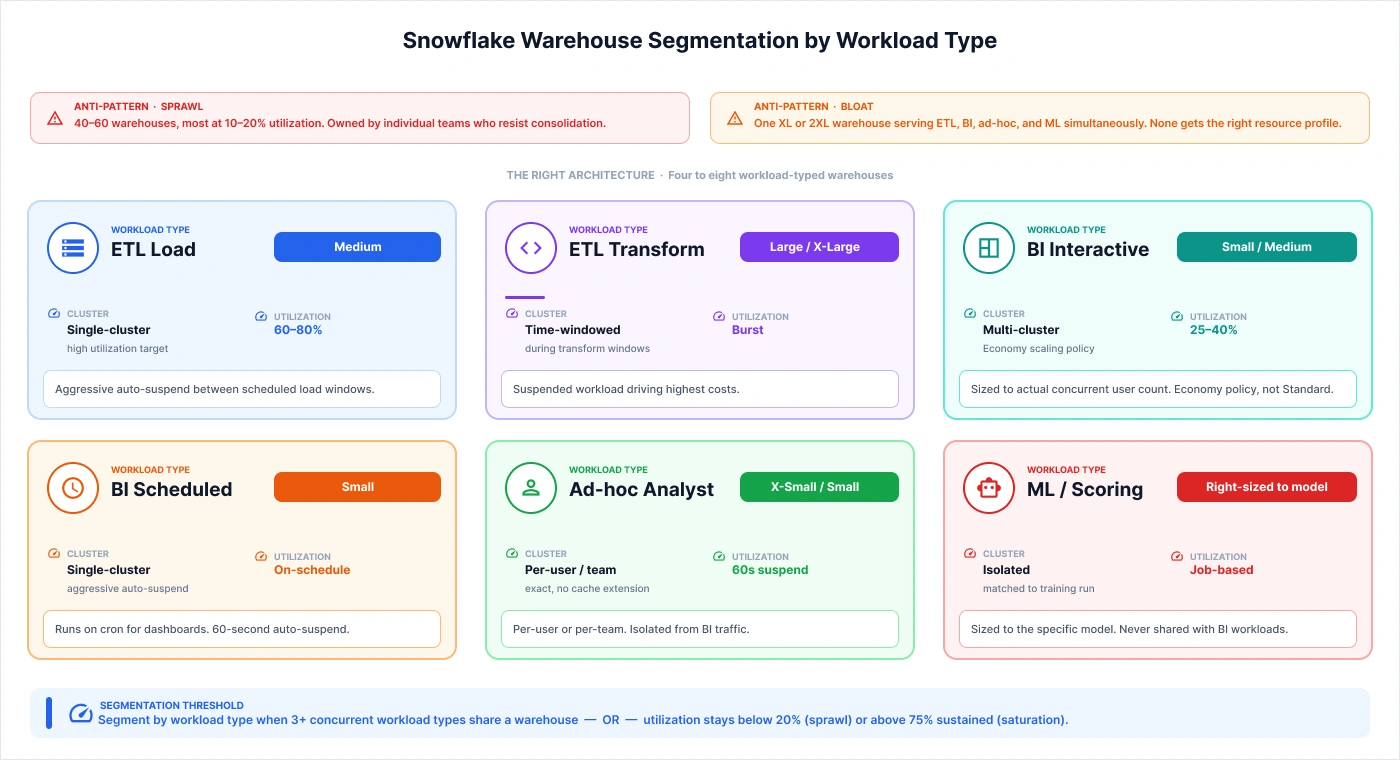
- ETL Load warehouse: Medium, high utilization target (60–80%), single-cluster
- ETL Transform warehouse: Large or X-Large during transform windows, suspended outside those windows
- BI Interactive warehouse: Small or Medium, multi-cluster with an economy policy, utilization target 25–40%
- BI Scheduled warehouse: Small, single-cluster, runs on schedule with aggressive auto-suspend
- Ad-hoc Analyst warehouse: X-Small or Small, per-user or per-team, 60-second suspend
- ML/Scoring warehouse: Right-sized to model, isolated from BI traffic
In NeenOpal's engagement with a major off-road vehicle manufacturer, the initial Snowflake deployment followed a common pattern: a single shared warehouse handling the full data pipeline from raw ingestion through DBT transformations to Power BI population alongside analyst ad-hoc queries. As the analyst team grew and began running parallel queries, the shared warehouse was scaled up to compensate. Credit consumption climbed even though the actual workload value had not changed proportionally. The segmentation redesign, combined with proper Snowflake warehouse rightsizing per workload type, resulted in a more predictable cost profile with no degradation in query performance because each workload now had resources matched to its actual demand.
The segmentation redesign isolated the ETL transform workload onto a dedicated warehouse that ran only during defined windows and suspended aggressively between them. BI interactive queries moved to a smaller multi-cluster warehouse sized to the actual concurrent user count. The result was a more predictable cost profile with no degradation in query performance because each workload now had resources matched to its actual demand rather than competing with adjacent workloads.
According to Snowflake's own architecture guidance, virtual warehouses are independent compute clusters. meaning you pay exactly for what is running and nothing more. Snowflake warehouse rightsizing is how you make that promise real.
The decision threshold for warehouse segmentation is clear: segment by workload type when concurrent workload count exceeds three on a shared warehouse, OR when warehouse utilization stays persistently below 20% (sprawl) or above 75% sustained (saturation). Either condition indicates the shared model is working against your Snowflake spend management goals.
For a deeper dive into workload-typed warehouse architecture, see our warehouse segmentation framework guide.
LAYER 2B (Architectural): The Serverless Feature Audit Nobody Runs
Here is the honest question: when did you last look at how much automatic clustering is costing you?
Most teams enable serverless features during setup, automatic clustering for high-volume tables, materialized views for slow-running BI queries, and search optimization for selective filters and then never look at them again. They do not show up on warehouse credit dashboards because they are billed separately, against a serverless compute budget that runs independently of warehouse activity. This is the hidden dimension of Snowflake compute optimization that most teams miss entirely.
In a mature Snowflake deployment, serverless features typically represent 8–15% of the monthly bill. That share is growing in 2026 as Cortex AI features are adopted at scale. Effective snowflake credit optimization requires auditing these features regularly, not just at setup. The specific features to audit:
- Automatic clustering: billed per re-clustering operation. Tables queried fewer than 100 times per week typically consume more in re-clustering credits than the queries save in scan cost. The default-on assumption is the trap most teams never audit.
- Materialized views: billed for maintenance compute when the base table changes. High-churn base tables make materialized view maintenance more expensive than the query benefit. The economics flip quickly on frequently updated tables.
- Snowpipe: billed at 0.0037 credits per GB of data loaded (uniform rate as of 2026) plus 0.06 credits per 1,000 files. Teams that batch well on volume but generate high file counts, many small files from Kafka or event streams, pay more on file count than on data volume.
- Dynamic tables: refresh frequency drives cost. Tables refreshed every minute in a near-real-time pipeline can accumulate significant serverless spend if the downstream query savings do not justify the refresh cadence.
- Search optimization service: worth enabling only on selective filter patterns at scale (high-cardinality point lookups on large tables). On lower-volume tables, the maintenance cost consistently exceeds the query saving.
A related serverless cost pattern appears in the time travel configuration. Enterprise tenants that have upgraded to Business Critical edition and set retention to the 90-day maximum on heavily-modified operational tables can accumulate significant storage costs. The change log for a table updated thousands of times per day grows faster than most teams realize. Auditing INFORMATION_SCHEMA.TABLE_STORAGE_METRICS and comparing ACTIVE_BYTES to TIME_TRAVEL_BYTES is the quickest way to surface this pattern and is a core step in any serious Snowflake credit optimization audit.
LAYER 3A (Governance): Query Attribution and the Chargeback Model
Cost without attribution is not manageable. It is just visible. This is the core principle behind effective Snowflake FinOps, you cannot govern what you cannot attribute.
Most teams enable QUERY_TAG at some point during their Snowflake cost optimization work, tag a handful of queries manually, build no report, and forget about it within 60 days. The organizational condition that actually drives costs, individual teams consuming shared resources without accountability, remains completely untouched. Sustainable snowflake spend management requires closing that accountability gap.
A working attribution system has four components:
- A taxonomy: not just "tag something," but a consistent structure: team:marketing, pipeline:daily-etl, env:prod, workload:bi. Every query has a tag. Every tag follows the schema.
- Enforcement at the tool layer: tags injected at the dbt model level (via config(query_tag=...)) and at the Looker connection string level (via connection-level QUERY_TAG parameters). Manual tagging does not scale past three teams.
- A reporting query: against ACCOUNT_USAGE.QUERY_HISTORY joining on QUERY_TAG, aggregating CREDITS_USED_CLOUD_SERVICES and estimated compute cost by tag dimensions, with a rolling 30-day window.
- A quarterly review cadence: attribution data presented to team leads, not just the platform team. Cost without a review meeting is still not accountability.
The universal failure mode is the orphan query. Service accounts, third-party integrations, and analyst direct connections that run queries without tags. In most tenants, 20–30% of query volume is orphaned by the time of the first attribution audit. Identifying the source of orphan queries (typically via USER_NAME and APPLICATION fields in QUERY_HISTORY) and assigning ownership is the first output of the attribution rollout.
When NeenOpal implemented query attribution for the Yanmar deployment's analyst layer, the first chargeback report surfaced a pattern that was invisible on the shared warehouse dashboard: a single analyst team running exploratory queries against unpartitioned historical tables was generating four times the compute cost per query of the BI scheduled workload that served the entire executive dashboard. The cost was not malicious. The team simply had no visibility into what their query patterns were consuming. Once the attribution system was live and the chargeback report was reviewed in a monthly platform meeting, query patterns changed within two weeks.
LAYER 3B (Governance): Capacity vs On-Demand Pricing and the Renewal Negotiation
This is the highest-dollar lever in the entire Snowflake cost optimization framework, and it is the one almost no SERP competitor explains in full, because most of them sell tools, not do contract work.
Snowflake offers two pricing models:
- On-demand: Credits billed at the published rate, no commitment, full flexibility.
- Capacity pricing (pre-purchase): Credits purchased upfront at a discounted rate, typically 15–25% below on-demand pricing in exchange for a 1–3 year commitment.
At $20K/month on-demand spend, a 20% discount saves $48,000 per year. That is not a rounding error. For enterprises above the $250K/year threshold with predictable consumption, capacity pricing is almost always the right structure.
But the risk is real: over-commitment. Snowflake credits purchased under a capacity contract do not roll over indefinitely. Teams that project consumption growth too optimistically end up burning unused credits at the end of the contract period. Most enterprises overcommit on their first capacity contract because they benchmark against optimistic growth projections rather than their rolling six-month consumption baseline.
The break-even conditions for snowflake credit optimization through capacity pricing are clear:
- Is your monthly on-demand spend stable within ±15% over a rolling six-month window?
- Is the projected annual spend above $250K?
If both answers are yes, capacity pricing typically earns its discount comfortably. If consumption is volatile, seasonal workloads, rapid platform growth, and uncertain team expansion on demand preserve optionality at a manageable premium.
The 2026 nuance: Snowflake's capacity contracts increasingly carve out selected Cortex AI features from standard credit discounts. If your roadmap includes significant Cortex Analyst or Document AI usage, confirm the coverage terms before committing to a capacity contract that prices those credits separately.
Renewal timing is leverage. Snowflake's sales cycles respond to documented competing platform evaluation (Databricks, BigQuery), multi-cloud deployment flexibility, and renewal timing that is initiated 90+ days before the contract end date. Teams that wait for Snowflake to reach out at renewal leave discount points on the table.
The Optimization Plateau: What to Do When the Bill Starts Growing Again
You have done the tactical work. You have segmented the warehouses. You have audited the serverless features. You have built the attribution system. The bill dropped 45–50% from its peak. Finance is happy. The project is declared a success.
And then, around month six, the bill starts climbing again.
This is the Snowflake optimization plateau, and it is not a sign that the optimization failed. It is a sign that the optimization was a project, not a system.
At the plateau, the structural forces driving cost growth are different from the ones you addressed in Layers 1 and 2:
- Data volume continues to grow: more source tables, longer retention windows, more historical backfills.
- Workload count continues to grow: new teams are onboarded, new pipelines are added, and new BI reports are requested.
- Cortex AI adoption begins generating new serverless costs: that were not in the original cost model.
- The first attribution chargeback reports surface datasets that cost more than the business value they produce: and nobody wants to have that conversation.
The intervention at the plateau level is governance, not configuration. Specifically:
- Workload kill criteria: What is the standard for retiring a pipeline or dashboard that generates X credits per month but has Y active users? Without a defined threshold, nothing ever gets retired.
- Dataset cost-to-value analysis: According to Gartner, 20% of enterprise data assets drive 80% of analytical consumption. The inverse is also true: 5–10% of datasets typically cost more to maintain than the business decisions they inform. The dataset retirement conversation is the hardest one in Snowflake FinOps, and it is the one that holds gains at the plateau.
- Cost observability tooling decision: At the plateau, the question of whether to invest in a paid cost observability tool becomes concrete. The threshold is approximately $30K/month Snowflake spend, assuming the team lacks deep ACCOUNT_USAGE proficiency. Below that, a well-built dashboard on QUERY_HISTORY and WAREHOUSE_METERING_HISTORY delivers equivalent visibility.
In NeenOpal’s recent engagement, the plateau conversation surfaced an important pattern: a set of historical quality assurance tables from a deprecated product line was being maintained in Snowflake with full-time travel and automatic clustering active. The tables were queried fewer than ten times per month, all by a single analyst running exploratory lookups. The monthly cost of maintaining those tables, clustering credits plus time travel storage, exceeded the cost of the analyst's entire ad hoc query workload. The business decision to archive the data to lower-cost long-term storage freed meaningful compute and storage budget that was redirected to actively used analytical workloads.
The cost-of-cost-optimization question matters here too. Paid observability tools such as SELECT, Revefi, Metaplane, CloudZero, Seemore, and Unravel offer real-time alerting, cost anomaly detection, and team-level dashboards that are genuinely valuable above the $30K/month threshold. Below it, the licensing cost is difficult to justify against the SQL-based alternative. The decision is not which tool to buy; it is whether the team has the in-house analytics maturity to build and maintain the dashboards themselves.
Snowflake Cost Optimization Is Not a Project
The three-layer framework maps to three different questions:
- Layer 1 (Tactical): Have we pulled all ten configuration levers? (If not, do this first.)
- Layer 2 (Architectural): Is the platform structured to match compute supply to workload demand? (Warehouse segmentation at three concurrent workload types; serverless feature audit when serverless is above 8% of the bill.)
- Layer 3 (Governance): Do we have attribution, accountability, and a cost structure that matches our consumption profile? (Query attribution at $15K/month; capacity pricing at $250K/year; observability tooling at $30K/month.)
The compounding effect across all three layers in a well-run engagement produces a 45–55% cumulative reduce snowflake costs, resulting from a misconfigured baseline. In the NeenOpal delivery pattern, approximately 38% of savings come from the tactical layer, 41% from warehouse segmentation and serverless audit, and 21% from contract restructuring and governance. Most teams stop after the first.
The bill does not stop growing because you ran out of snowflake credit optimization opportunities. It stops growing because you built a system including a quarterly review cadence, a tag taxonomy that your DBT models enforce, a warehouse segmentation design that routes workloads to the right compute, and a capacity contract negotiated with the right leverage and timing.
That is the difference between Snowflake cost optimization as an incident response and Snowflake cost optimization as an operational discipline.
Frequently Asked Questions
1. How can I reduce Snowflake costs?
Snowflake costs are reduced across three layers: tactical (auto-suspend at 60s, warehouse right-sizing, resource monitors, transient tables), architectural (warehouse segmentation by workload type, serverless feature audit), and governance (query attribution, chargeback model, capacity contract structure). Most teams recover 30–40% of spend through tactical configuration alone in the first 30 days, but the bill resumes growing within six months because data volume and workload count outpace per-workload efficiency gains.
2. What is the biggest cost driver in Snowflake?
Virtual warehouse compute is the dominant cost driver in nearly all production Snowflake deployments, typically exceeding 70% of total spend. Serverless features like automatic clustering, materialized views, Snowpipe, search optimization, dynamic tables — account for 8–15% in mature deployments, and that share grows as Cortex AI adoption scales. Storage and cloud services together are usually under 15%.
3. Is Snowflake capacity pricing worth it?
Capacity pricing trades a 15–25% discount on credits for a 1–3-year commitment. It is the right structure when monthly on-demand spend is stable within ±15% over a rolling six-month window, and projected annual spend exceeds $250K. Below either threshold, on-demand preserves optionality at a manageable premium. The primary risk is over-commitment. Most enterprises on their first capacity contract overestimate consumption and burn unused credits.
4. How does Snowflake auto-suspend actually work?
Snowflake bills a 60-second minimum every time a warehouse resumes. Setting AUTO_SUSPEND below 60 seconds on warehouses with bursty, short-interval query patterns causes double-billing. The warehouse suspends, resumes for a brief query, and bills another full 60-second minimum. The correct AUTO_SUSPEND setting is 60 seconds for almost all production Snowflake warehouses. Low-latency BI warehouses where cache reuse matters can extend to 120–180 seconds. This is the most common Snowflake cost optimization mistake found in enterprise tenants.
5. How much can I save by optimizing Snowflake?
Most enterprises recover 30–40% of monthly spend through tactical configuration in the first 30 days of a Snowflake cost optimization engagement. A further 10–20% is typically available through architectural intervention — warehouse segmentation and serverless feature audit. Governance and contract restructuring contribute an additional 10–15%.

