

A Synapse to Fabric migration is not one project. It is up to four distinct workload paths running in parallel, each with different tooling, parity gaps, and sequencing priorities. The hard problem is not migrating any single workload in isolation. It is sequencing all of them together, redesigning your Power BI layer for Direct Lake, and building a framework that survives the next platform move after Fabric.
On one NeenOpal engagement, the Direct Lake redesign alone took a single production dashboard from a 1.5-hour refresh to 15 seconds. That result did not come from switching platforms. It came from making the right architectural decisions across Spark, Lakehouse design, and the Power BI layer. This article walks through the framework behind those decisions.
The four workload paths covered are:
-
Dedicated SQL Pool to Fabric Warehouse,
-
Synapse Spark to Fabric Data Engineering
-
Synapse Pipelines and ADF to Fabric Data Factory
-
Azure Synapse Data Explorer to Fabric Eventhouse.
Is Azure Synapse Being Retired? The Honest 2026 Answer
A lot of vendors use the retirement question to manufacture urgency. The actual picture is more specific, so here is the factual breakdown.
1. Azure Synapse Data Explorer was formally retired on October 7, 2025. After that date, workloads running on Synapse Data Explorer were deleted, and associated data was lost. Migration to Fabric Eventhouse is already mandatory for this workload.
2. Dedicated SQL Pools, Synapse Spark, and Synapse Pipelines have not been officially retired by Microsoft as of 2026. These services remain supported. However, Spark 4.0 is coming to Fabric only, and the latest Delta Lake features are being built into Fabric, not Synapse. Organizations that stay put will not face a forced shutdown, but they will fall behind on the tooling that drives modern data engineering.
"Synapse has not been officially announced as retired, but it is very much known within the community that it is reaching its end of life. Synapse, as a separate platform, does have support, but the future is Fabric. We will not have Spark 4.0 in Synapse; we will have Spark 4.0 in Fabric. The latest features of Delta table projects, which are the cornerstone of Fabric, are also going to be within Fabric. As we move forward, we will start seeing feature disparity between Synapse and Fabric.” — NeenOpal Data Engineering Team
If a vendor used the retirement claim to close your budget, that budget was closed on shaky ground. The real reason to migrate is simpler: Fabric has the roadmap. Synapse has the maintenance. That framing means you have time to approach the migration properly, with no reason to rush into avoidable mistakes.
The Four Migration Paths Hiding Inside Your Synapse Workspace
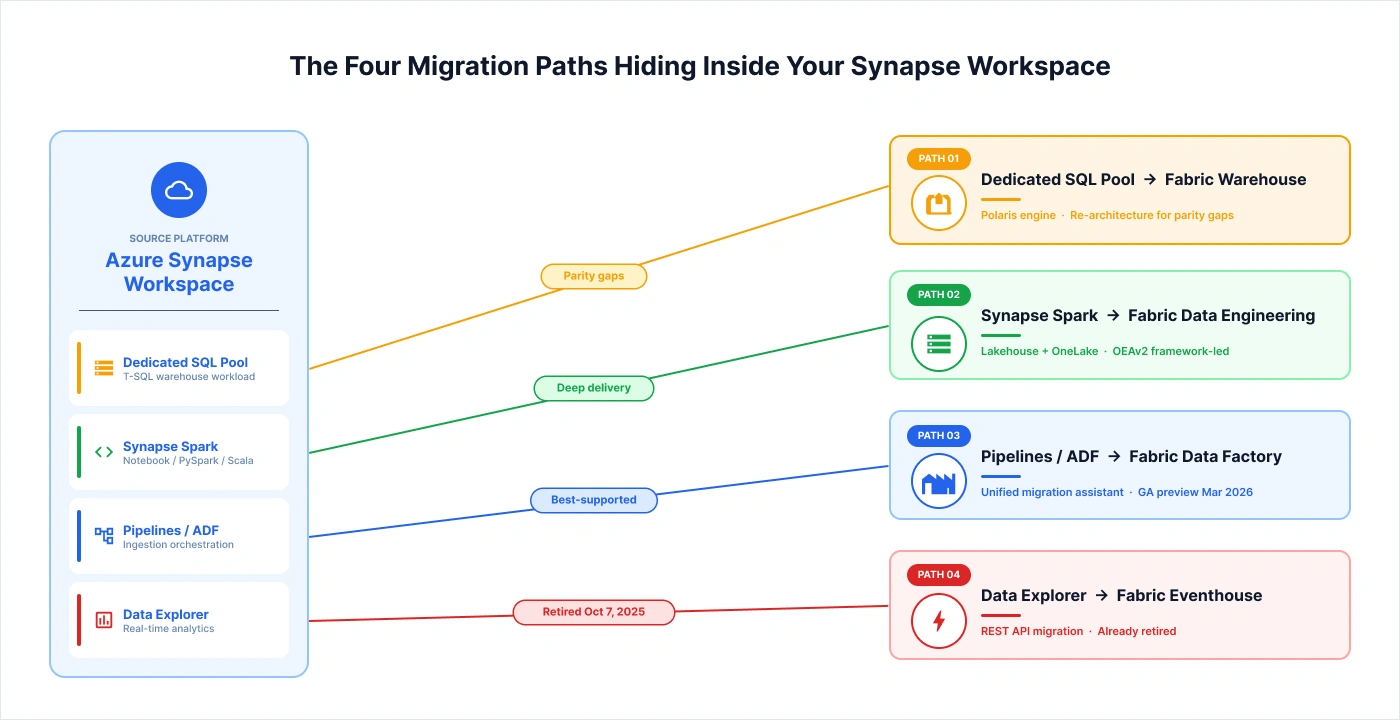
Most production Synapse footprints contain two, three, or all four of the following workload types. Each migrates to a different Fabric target, uses different tooling, has a different parity status, and carries different urgency. Treating a Synapse to Fabric program as a single project is one of the most common reasons these migrations run over time and over budget.
On a NeenOpal engagement for an EdTech client processing educational data for approximately 50 U.S. school districts and state organizations, the in-scope migration covered Synapse Spark (notebooks, transformation logic, Lakehouse target) and Synapse Pipelines (ingestion orchestration, target: Fabric Data Factory). The client's architecture had previously moved from SSIS to Synapse, and now to Fabric. The full delivery is documented in our Medallion architecture migration case study.
Here is how the four paths break down:
|
Path |
Source Workload |
Fabric Target |
Tooling Maturity |
NeenOpal Delivery Depth |
|
Path 1 |
Dedicated SQL Pool |
Fabric Warehouse |
Moderate, with parity gaps |
Limited. Lakehouse-first is NeenOpal's pattern |
|
Path 2 |
Synapse Spark |
Fabric Data Engineering (Lakehouse) |
Strong. Spark Migration Assistant in preview |
Deep. OEAv2 framework-led migration |
|
Path 3 |
Synapse Pipelines / ADF |
Fabric Data Factory |
Strongest. Unified assistant GA preview (March 2026) |
Deep. Including Airbyte-on-AKS for external ingestion |
|
Path 4 |
Azure Synapse Data Explorer |
Fabric Eventhouse |
REST API migration only |
Covered for completeness. ADX already retired |
For readers earlier in their Fabric journey, our Microsoft Fabric Migration Services overview walks through the broader scope of a Microsoft data platform consolidation. This article assumes Synapse is the source platform.
Path 1: Dedicated SQL Pool to Fabric Warehouse
Fabric Warehouse shares more lineage with Synapse Serverless SQL than with Dedicated SQL Pool. Both are built on Microsoft's Polaris engine and use Delta Parquet as the underlying format. For organizations running heavy Dedicated SQL Pool workloads, this is a meaningful parity gap because several T-SQL features require re-architecture rather than a direct port. NeenOpal's deepest delivery experience is in Fabric Lakehouses, not Fabric Warehouse. For Dedicated-Pool-heavy footprints, a specialist evaluation is the right first step. You can learn more about NeenOpal's Microsoft Azure expertise and how it informs our Fabric delivery approach
Path 2: Synapse Spark to Fabric Data Engineering
This is NeenOpal's deepest path. The Fabric Spark Migration Assistant handles straightforward notebook migrations, but framework-led migrations may not require it at all. The target is the Fabric Lakehouse, built on Delta and OneLake. The OEAv2 framework that makes this migration different from a notebook-by-notebook port is covered in the next section.
Path 3: Synapse Pipelines and ADF to Fabric Data Factory
At FabCon 2026 in March, Microsoft released a public preview of the unified migration assistant for ADF and Synapse Pipelines, making Path 3 the best-supported of the four from a tooling perspective. On the EdTech engagement, NeenOpal rebuilt ingestion using Airbyte; deployed to an AKS container rather than porting Pipelines directly. That architecture is covered in the phased migration section.
Path 4: Azure Synapse Data Explorer to Fabric Eventhouse
Path 4 is already resolved. Azure Synapse Data Explorer was retired on October 7, 2025, making migration mandatory. The migration path is REST API only, and the target is Fabric Eventhouse. If your organization has not yet migrated, that work is overdue.
The OEAv2 Framework: Why NeenOpal Did Not Use the Spark Migration Assistant
The Spark Migration Assistant copies notebooks, Spark job definitions, pools, and lake databases from Synapse to Fabric. For notebook-centric workloads where business logic lives directly in PySpark code, it does that job well. For framework-led migrations, it misses the point entirely.
NeenOpal's data engineering team explains: "The first thing we had to do was create a framework so that we are not doing anything just out of PySpark or notebooks. We wanted a standardized framework; that's how we created a YAML specification.
We will be defining the source, destination, and transformation logic. This is what we call OEAv2. The goal was cloud-agnostic as well; so that if we move from one platform to another, say Fabric to Databricks, or one cloud to another, say Azure to AWS, we can just change the connector; and everything will work seamlessly."
The practical implication for the EdTech engagement was significant. Migrating the transformation logic was not simply a matter of porting notebooks. The framework itself became the migration unit. By swapping the Fabric connector, the workload moved with minimal disruption. The Spark Migration Assistant's automation was unnecessary because the framework abstraction had already done the heavy lifting. This approach is central to how NeenOpal delivers enterprise data engineering services at scale.
Here is what the framework-led approach gives you in practice:
-
Migration Becomes a Connector Swap: The YAML specs define source, destination, and transformation logic abstractly, so changing the target platform does not require rewriting business logic.
-
The Same Code Runs Across Platforms: Cloud-agnosticism is built into the design, not retrofitted, so the same framework runs on Fabric, Databricks, or other targets without modification. NeenOpal's multi-cloud delivery credentials substantiate this capability across AWS and Azure.
-
Future Platform Moves Stay Cheap: Whatever comes after Fabric, the framework survives it. The next migration is a connector swap, not a re-implementation.
-
The Migration Assistant Becomes Unnecessary: When the framework abstraction handles portability, notebook-level automation adds no value.
When to use the Spark Migration Assistant?
Your Synapse Spark workloads are notebook-centric, with business logic embedded directly in PySpark code and no abstraction layer on top.
When to use a framework-led migration?
Your transformations are large, complex, or likely to move platforms again. The framework abstraction makes the next migration cheap, and it is the right approach when your team is already maintaining a standardized data engineering layer.
What the Migration Assistant Does Not Do: The Honest Limits Reference
The Spark Migration Assistant is a genuinely useful tool, and Microsoft is transparent about its boundaries. The problem is that several consultancy pages describe the assistant as if it handles the full migration. It does not.
NeenOpal's delivery team confirmed this directly: "We did not use any particular pre-made tool for migration. Our framework is very much Spark; it has a lot of transformations, and migrating transformation of business logic from one platform to another is not something that any migration assistant tool can provide." — NeenOpal Data Engineering Team
Here is a consolidated view of what the assistant covers and what it leaves for you to handle manually.
|
Category |
Migrates |
Does Not Migrate |
|
Notebooks |
Notebook content and structure |
Custom Spark configs, executor settings, library dependencies |
|
Spark Jobs |
Spark job definitions |
VNET-bound Synapse workspaces (blocked entirely) |
|
Code Format |
Synapse JSON → Fabric .py / .scala / .ipynb |
Git pipeline integration (requires manual reconnection) |
|
Utilities |
Item metadata and definitions |
mssparkutils references (must be refactored to notebookutils) |
|
Connections |
Identifies linked services |
Linked services themselves (must be recreated as Fabric Connections) |
|
Data |
Nothing |
All data movement is a separate step (OneLake shortcuts, ADF, pipelines) |
NeenOpal has delivered a production Synapse to Fabric migration using a framework-led approach, with the Direct Lake redesign that took one client dashboard from a 1.5-hour refresh to 15 seconds.
The Multi-Tenant Lakehouse Pattern and the Direct Lake / RLS Trade-Off
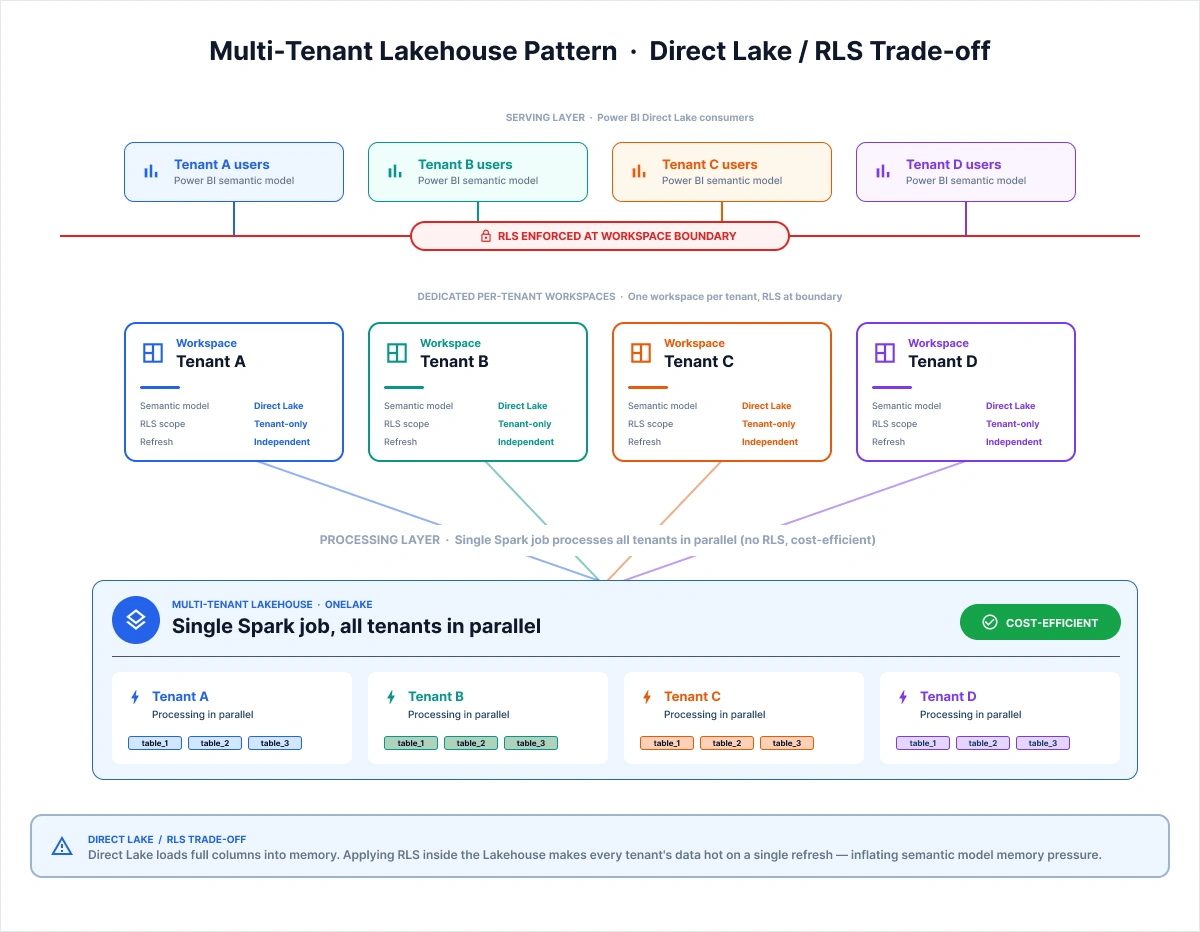
When your Fabric tenant serves multiple customer organizations, the obvious pattern is one Lakehouse per tenant. It is also one of the more expensive patterns at scale. NeenOpal built a multi-tenant Lakehouse architecture for the EdTech engagement specifically to solve this cost problem. The architecture comes with a real trade-off that no published page currently documents.
NeenOpal's data engineering team describes the evolution: "Now our clients are fed by multi-tenant Lakehouses so that we can use a single Spark job for multiple tenants or multiple customers; effectively increasing resource utilization and efficiency. Instead of sequencing the clients one-to- another, we are processing many clients together now. This makes the overall cost significantly less." — NeenOpal Data Engineering Team
The pattern works well for processing. A single Spark job processing 50 school district organizations in parallel rather than sequentially is meaningfully cheaper than running 50 sequential jobs. You can see how this pattern plays out in our multi-tenant analytics case study. However, the multi-tenant Lakehouse creates a hard problem at the Power BI serving layer, and this is where the architecture diverges from what most teams assume.
The team explains the trade-off: "Right now, we are offering dedicated workspaces to clients. We do have RLS per workspace, but we are not applying RLS in the multi-tenant Lakehouses simply because there are a lot of limitations with Fabric right now; it's the Direct Lake behavior. If a single column is referenced in Direct Lake, it will load the entire column. It won't optimize the data loading part in terms of partitioning, in terms of how a filter is applied. So in order to make these optimizations cost-friendly, we decided that each and every tenant will have their own workspace and their own data.
That way, if any one tenant triggers a refresh, it won't cause all the records for that particular column for all the tenants to become hot, which would increase memory pressure. The purpose is to reduce memory footprint in semantic models and make it cost-friendly." — NeenOpal Data Engineering Team
The architecture this produces has three clear layers:
-
Multi-tenant Lakehouse for data processing: A single Spark job processes all tenants in parallel. Cost-efficient, with no RLS applied at this layer.
-
Dedicated per-tenant workspace for serving: Each tenant organization has its own Fabric workspace with its own data.
-
RLS applied at the workspace boundary: Because each workspace contains only one tenant's data, row-level isolation is enforced architecturally, not by a filter inside a shared semantic model.
In Microsoft Fabric Direct Lake, referencing a single column loads the entire column into memory. There is no partition pruning or filter pushdown at the loading layer. Applying Row-Level Security (RLS) inside a multi-tenant lakehouse therefore, causes every tenant’s data to become hot during a single tenant refresh, increasing memory pressure on the semantic model.
The production-grade pattern is to use a multi-tenant Lakehouse for centralized processing, combined with a dedicated per-tenant workspace for serving. In this model, RLS is enforced at the workspace boundary rather than inside the Lakehouse itself. Teams that discover this trade-off midway through implementation often face expensive architectural rework.
F-SKU Capacity Sizing: Start at F4, Not F64
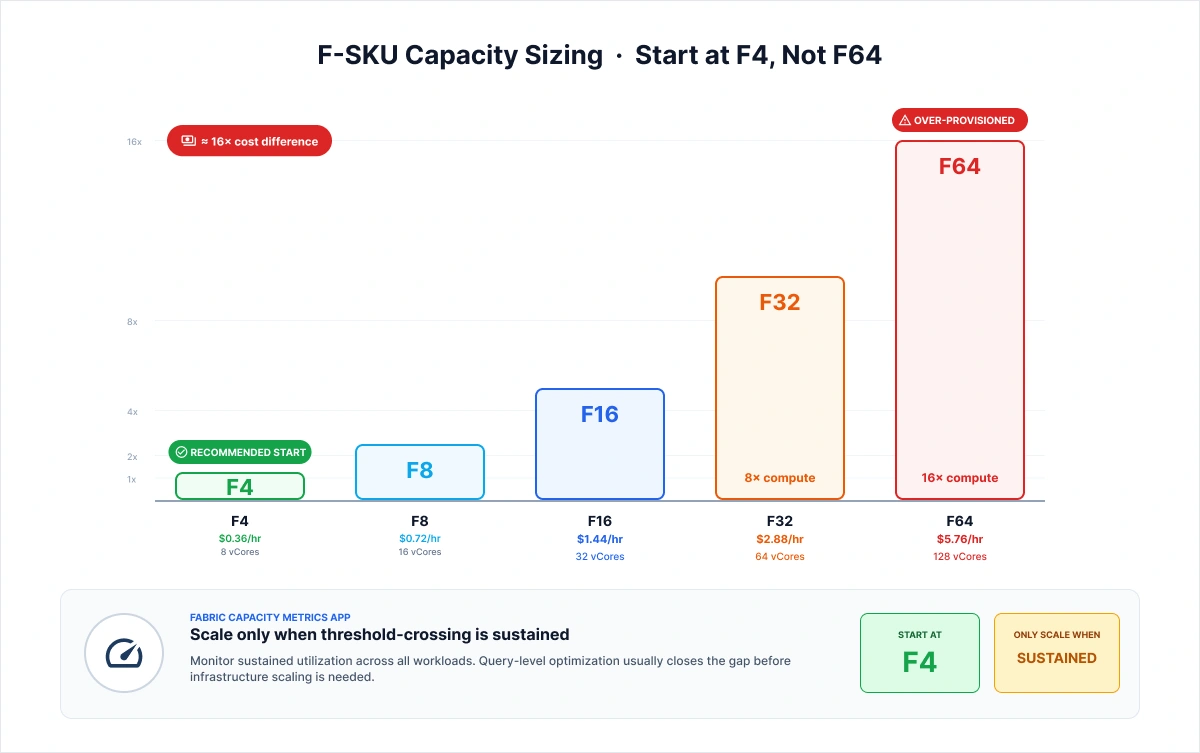
Across the SERP, the default recommendation for Fabric capacity sizing is to start at F64, the Power BI Premium-equivalent SKU. It is also the wrong starting point for most production migrations. NeenOpal's verified delivery discipline is the opposite.
The team describes the methodology in full: "We use F-SKUs for most of the workloads since it provides both data engineering and Power BI experiences. According to the sizes, we always do a POC. We start from the smallest possible size where we can have the minimum viable features.
Mostly; we start from F4; F4 is basically going to translate to 8 vCores in Spark. It gives us enough compute to set up a very small Spark cluster, use Python notebooks, and even use Power BI.
We start from F4, and when we start scaling out; we use the Fabric Capacity Metrics App. There is a dedicated metrics app that shows us the utilization. If we see we are constantly crossing the threshold, constantly over-utilizing capacity, then we scale out so that multiple developers can work and multiple production workloads can be supported." — NeenOpal Data Engineering Team
There are three reasons this discipline is correct:
-
The cost difference between F4 and F64 is roughly 16x: F-SKU pricing scales approximately linearly. Starting at F64 as a default means paying for 16x the compute before you know whether you need it.
-
The Fabric Capacity Metrics App removes the guesswork: The app shows sustained utilization across all workloads. Scale up when threshold-crossing is sustained, not as a precaution.
-
Query-level optimization usually closes the gap: The goal is to make optimizations at the query level so you do not have to scale out the infrastructure. On the EdTech engagement, query-level optimization combined with the Direct Lake redesign took one production dashboard from a 1.5-hour refresh to 15 seconds.
A fair caveat: F4 is right for POCs and small-team production tenants. Complex multi-team enterprise environments with active Power BI Premium consumption across many concurrent users will eventually need F32 or higher. The discipline is to start low and earn the scale, not to assume F4 is always sufficient.
Start at F4 for any POC or small-team production tenant. Use the Fabric Capacity Metrics App to monitor utilization. Scale only when threshold-crossing is sustained across multiple workloads. The cost difference between F4 and F64 is roughly 16x. Query-level optimization usually closes the gap before infrastructure scaling is needed.
Phased Migration, Cost Levers, and the Features You Wait For
A real production Synapse to Fabric migration is not a big-bang cutover. It is a phased program across months, with different workloads migrating at different times and deliberate decisions about which features to adopt in production versus which to wait on.
The team describes the current state of the EdTech engagement: "We have migrated almost everything to Fabric. The one component still pending is the ingestion phase, getting data from external sources to Fabric." — NeenOpal Data Engineering Team
Cost Lever 1: Database Mirroring
For database sources, Fabric Database Mirroring is a low-cost ETL alternative to Spark-based ingestion. The team's framing: "Database mirroring is a low-cost ETL solution; what it does is we save a lot of cost during the ingestion phase." — NeenOpal Data Engineering Team
For organizations with heavy Spark-based ingestion pipelines, evaluating database mirroring before defaulting to Pipelines or Spark ETL can deliver meaningful savings.
Cost Lever 2: Airbyte on AKS for External Ingestion
For external-source ingestion across APIs, files, and third-party SaaS, NeenOpal deployed Airbyte on an AKS container running in the client's own Azure environment, with a custom OneLake destination connector.
As the team describes it: "It's a separate AKS container deployed in the client's AKS environment with their custom OneLake destination and custom Fabric connector; basically like Fivetran." — NeenOpal Data Engineering Team
This gives the engineering team a Fivetran-style ingestion capability at open-source cost, with data landing directly in OneLake.
The Preview-Feature Discipline
One of the most consequential decisions in a production migration is knowing which features to wait for. NeenOpal's rule is clear: preview features do not power production workloads where client SLAs are at stake.
-
On Schema-enabled Lakehouses: "Schema-enabled Lakehouses is something we have always wanted to work on. For most of the last year; it was in preview and we cannot have production workloads in a feature that is in preview, because then we lose the guarantees from Microsoft in terms of SLAs. We wanted to ensure SLAs with our clients as well, so we went ahead and chose schema-disabled Lakehouses." — NeenOpal Data Engineering Team
-
On Event Streaming: "There were moments when, for real-time analytics, we were considering Event Streaming as a major tool. But doing event streaming for all the tables is expensive. We chose Kafka, an open-source version, instead of going with the in-built solution to save cost.”
That trajectory, from native Eventstream to Kafka for cost and maturity reasons, and now back toward Event Hub as the native solution matures, reflects the kind of operational reality a multi-phase migration program must navigate. No vendor page covers it because it requires having been in production across multiple Fabric releases. Our real-time data ingestion with Microsoft Fabric Streaming case study walks through how this streaming layer was built in production.
A production Synapse to Fabric migration is not a single project. It is a phased program across four parallel workload paths, a BI-layer redesign for Direct Lake, a capacity-sizing discipline, and the framework decisions that determine whether your next platform move is expensive or cheap.
NeenOpal designs the architecture, owns the framework, sequences the paths, and ships the Direct Lake redesign as an integrated engagement. Book an architecture conversation at /contact-us
The Direct Lake Redesign and the Sequencing Logic Across All Four Paths
Direct Lake is the highest-leverage capability in Microsoft Fabric for Power BI performance. It is also the most disruptive to existing Power BI patterns. In every Synapse to Fabric program NeenOpal has delivered, the architectural shift the team underestimated was not the Spark migration. It was the Power BI redesign that Direct Lake required.
What Direct Lake Forces You to Rethink
The team describes the core constraints:
"Mostly we follow the principle of Direct Lake in Power BI. When we are using Direct Lake, we cannot use Power Query. A lot of logic had to be migrated to Lakehouse instead of Synapse."
And on measures: "In Fabric Power BI, you cannot create measures" in the way Power Query and classic Import mode allow.
On the architectural consequence, “We performed the major heavy lifting of calculations on the Fabric side, which is actually a best practice. This approach allows Spark to handle the computational workload, while Power BI simply consumes the calculated metrics for visuals and analytics. Initially, there was also an option to use Views, but Views and Direct Lake do not work seamlessly together at the moment.”
"If we use Views, we always fall back to DirectQuery. We wanted to use the benefits of Direct Lake since it provides features like incremental framing and on-demand column loading that we do not get in DirectQuery and Import mode. Import mode caches everything; Direct Lake caches parts of the tables. As the underlying table changes, it does a very cheap refresh, so it refreshes the underlying table without causing the heavy Import-mode refresh timeline." — NeenOpal Data Engineering Team
The pattern this forces is straightforward but disruptive if your Power BI layer was built with heavy Power Query transformations and View-based semantic models:
-
SQL Views fall back to DirectQuery: Materialize everything as tables.
-
Power Query transformations and the DAX measure patterns that depend on them do not carry forward into Direct Lake: Move heavy logic to Spark and the Lakehouse.
-
Power BI consumes pre-calculated metrics: The BI layer becomes a visualization layer, not a transformation layer. This is also industry best practice. Direct Lake simply enforces it. With logic pushed down to the Lakehouse, the serving layer is also where capabilities like natural language querying in Power BI sit cleanly on top of the calculated metrics.
Sequencing the Four Paths
Given all four workload paths and the constraints above, here is a sequencing framework.
|
Path |
Default Sequence Order |
Move Earlier If |
Move Later If |
|
Path 4: ADX to Eventhouse |
Completed (already retired) |
N/A |
N/A |
|
Path 3: Pipelines and ADF to Fabric Data Factory |
First or second, as this has the strongest tooling |
Ingestion is a hard dependency for downstream paths |
External sources require custom connectors (Airbyte-on-AKS) |
|
Path 2: Synapse Spark to Fabric Data Engineering |
First or concurrent with Path 3 |
OEAv2 or equivalent framework is in place |
Framework needs to be built first |
|
Path 1: Dedicated SQL Pool to Fabric Warehouse |
Last, as it is the longest pole |
Parity gaps are resolved for your T-SQL usage |
Parity gaps block production. Evaluate Lakehouse-first as an alternative |
For organizations with heavy Dedicated SQL Pool workloads and a Power BI layer built on Views and Power Query, Path 1 and the Direct Lake redesign are jointly the long pole of the program. Starting the BI-layer architecture work in parallel with the Spark migration, rather than after it, is what keeps the overall program on schedule.
Closing Synthesis
A Synapse to Fabric migration is a four-workload enterprise program, not a single project. The sequencing logic, the F-SKU discipline, the framework-led migration philosophy, and the Direct Lake redesign are each individually important. They are even more important together, because the decisions interact. NeenOpal's three verified delivery differentiators on this program type:
-
The OEAv2 YAML framework: A cloud-agnostic, source-destination-transformation abstraction that makes the migration unit the framework, not individual notebooks. The same framework survives a future move to Databricks, AWS, or whatever comes after Fabric.
-
The multi-tenant Lakehouse pattern with its honest Direct Lake and RLS trade-off: Single Spark jobs process multiple tenants in parallel for cost efficiency, with dedicated per-tenant workspaces for serving and workspace-boundary RLS to avoid memory pressure from Direct Lake's full-column-load behavior.
-
The F4-up F-SKU discipline: Start at the smallest viable SKU, monitor with the Fabric Capacity Metrics App, optimize at the query level first, and scale only when threshold-crossing is sustained. The cost difference between F4 and F64 is roughly 16x.
All new projects with this client are now taken exclusively in Fabric, with Synapse retained for legacy support only, a result that came not from following a checklist, but from getting the architecture right from the start.
Frequently Asked Questions
Q1. Is Azure Synapse being retired?
Azure Synapse Data Explorer was formally retired on October 7, 2025, and migration to Fabric Eventhouse is already mandatory. Dedicated SQL Pools, Synapse Spark, and Synapse Pipelines have not been officially retired as of 2026, but are end-of-roadmap: Spark 4.0 and the latest Delta features are Fabric-only, so migrate for the roadmap, not a retirement deadline.
Q2. Should you use the Fabric Migration Assistant?
Use it when your Synapse Spark workloads are notebook-centric with business logic in PySpark. Skip it when transformations are managed through a framework-led migration because no tool can port a custom transformation layer.
Q3. Does the Fabric Migration Assistant move data?
No. The Spark Migration Assistant copies metadata and item definitions only. Data movement is a separate step using OneLake shortcuts, ADF, or pipeline bulk copy.
Q4. How do you handle multi-tenant data in Microsoft Fabric?
Use a multi-tenant Lakehouse for processing and a dedicated per-tenant workspace for serving, with RLS applied at the workspace boundary. Applying RLS inside the Lakehouse causes Direct Lake to make every tenant's data hot on any single refresh, inflating semantic model memory pressure.
Q5. What is the right F-SKU capacity for migrating Synapse?
Start at F4 and monitor with the Fabric Capacity Metrics App. Scale only when threshold-crossing is sustained, since F4 to F64 is a roughly 16x cost difference. Query-level optimization usually closes the gap before infrastructure scaling is needed.

