
A Domo to Tableau migration is more than a dashboard rebuild. Because Domo often stores your data and runs your data pipelines, you first need a new home for that data, usually a cloud data warehouse. Then Beast Mode calculations are rewritten as Tableau calculated fields, PDP policies become row-level security, and cards and pages are rebuilt as Tableau dashboards. Planned well, the move leaves you with governed data you own and dashboards your team trusts from day one.
This guide covers why companies move from Domo to Tableau, how each Domo component maps to Tableau, the main challenges, and the step-by-step approach behind NeenOpal's Domo to Tableau Migration Accelerator.
Why Companies Migrate from Domo to Tableau
● Pricing model fit: Domo uses consumption-based credits; tables ingested or updated, DataFlow runs, and storage when Domo holds the data all use credits. Domo also charges fractional credits for AI and workflow usage. Tableau is priced per user role (Creator, Explorer, Viewer) and by edition (Standard, Enterprise or Tableau+). Data Management, which includes Prep Conductor, Tableau Catalog, virtual connections and data policies, is included in Enterprise and Tableau+ but not in Standard. Which model costs less depends on your data volumes, user count and the edition you need, so it is worth modelling both.
● Owning your data: Moving off Domo is a chance to put data and business logic in your own warehouse, where any tool can use it.
● Salesforce ecosystem: Tableau is a Salesforce product and connects to Salesforce Data 360, Tableau Next and Agentforce.
● Analytical depth: Tableau offers level of detail (LOD) expressions, Tableau Prep, Tableau Pulse and a large talent pool.
● Domo ownership change: Progress Software completed its acquisition of substantially all the assets of Domo’s AI and data platform business on 22 September 2026. For some customers, a change of ownership is a natural point to review their BI platform and contract.
Domo vs Tableau: Key Differences
|
Area |
Domo |
Tableau |
|---|---|---|
|
Data storage |
Often stores data inside Domo (unless Cloud Amplifier is used) |
Connects to your databases and warehouses, live or as extracts |
|
Data prep |
Magic ETL, SQL DataFlows |
Tableau Prep, or SQL/dbt in the warehouse |
|
Calculations |
Beast Mode (SQL-style syntax) |
Calculated fields, LOD expressions, table calculations |
|
Visuals |
Cards and pages |
Worksheets and dashboards |
|
Row-level security |
PDP (Personalized Data Permissions) |
User filters, entitlement tables, virtual connection data policies |
|
Pricing |
Consumption credits |
Per user role (Creator, Explorer, Viewer) and edition (Standard, Enterprise, Tableau+) |
How Domo Components Map to Tableau
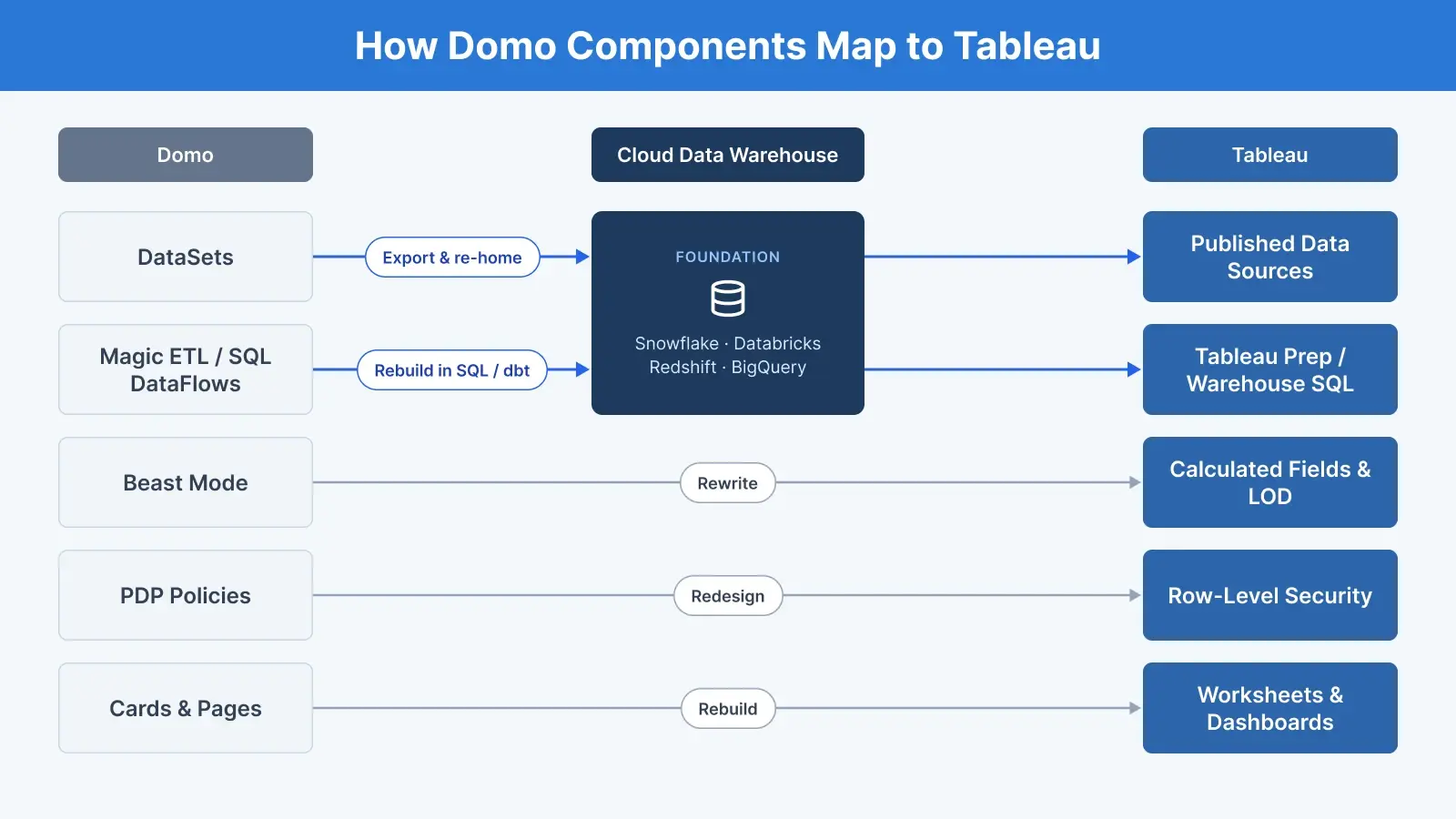
There is no tool that imports Domo cards or pages into Tableau. Each component is either reconfigured, rewritten or rebuilt.
|
Domo component |
Tableau equivalent |
Migration approach |
|---|---|---|
|
DataSets |
Published data sources on your warehouse |
Export data, re-home it, then rebuild |
|
Connectors |
Native Tableau connectors |
Check each connector |
|
Workbench (on-premises agent) |
Usually not needed once data is in cloud warehouse. Tableau Bridge (Tableau Cloud only) if private network sources remain. |
Replace, or reconfigure if sources stay on-premises. |
|
Magic ETL and SQL DataFlows |
Warehouse SQL or dbt, or Tableau Prep (scheduled with Prep Conductor) |
Rebuild the logic; confirm Prep Conductor licensing |
|
DataSet Views |
Warehouse views or data source relationships |
Rebuild |
|
Beast Mode calculations |
Calculated fields |
Rewrite |
|
Beast Mode FIXED functions |
LOD expressions |
Rewrite and test results |
|
Variables |
Parameters |
Rebuild |
|
Cards and pages |
Worksheets and dashboards |
Rebuild priority content |
|
Drill paths |
Hierarchies and dashboard actions |
Rebuild |
|
PDP policies |
User filters, entitlement tables or data policies |
Redesign and test |
|
Groups and roles |
Groups, site roles and permissions |
Map and recreate |
|
Scheduled reports |
Subscriptions |
Recreate |
|
Alerts |
Data-driven alerts, Tableau Pulse |
Recreate (fewer delivery channels) |
|
Domo Everywhere (embedding) |
Tableau Embedding API |
Rebuild the integration |
|
App Studio and Buzz |
Partial: dashboard navigation and Slack integration cover some use cases |
Rebuild what is needed |
Common Challenges In a Domo to Tableau Migration
1. Your data lives inside Domo
Unless you use Domo Cloud Amplifier with Snowflake or another supported warehouse, Domo stores your data. Before Tableau can use it, the data must be exported and loaded into a warehouse, with new pipelines to keep it fresh. Domo's CLI, the pydomo SDK and the DataSet API can export data.
Use the client’s existing cloud warehouse where one exists; where there is none, compare Snowflake, Databricks, Amazon Redshift and Google BigQuery on cloud footprint, team skills and cost. Decide before migration starts.
2. Historical data in snapshot DataFlows
Recursive or snapshot DataFlows store history inside Domo. If that history is not exported before Domo is switched off, it is lost.
3. Beast Mode does not translate directly
Beast Mode uses SQL-style syntax, while Tableau has its own function library, so every calculation is rewritten. Domo FIXED functions and Tableau LOD expressions also treat filters differently, which can quietly change totals. In Domo, all card filters apply to a FIXED function unless you add Filter None or Filter Allow logic. In Tableau, FIXED expressions ignore regular dimension filters unless those filters are added to context.
Domo Beast Mode: SUM(`Total Sales`) / SUM(SUM(`Total Sales`) FIXED (BY `Region`))
Tableau: SUM([Total Sales]) / ATTR({FIXED [Region] : SUM([Total Sales])})
Tableau view setup: put [Region] (or a finer dimension) in the view, and set any dimension filters on the card, such as [Year], to Add to Context.
Without Region in the view, ATTR returns * instead of a value. Without context filters, the FIXED expression ignores the dimension filters, and the share of total no longer matches Domo.
Domo FIXED calculations do not work on federated datasets, with window functions, or as card and dashboard filters, so existing Beast Modes may contain workarounds that should not be carried over.
4. PDP needs a row-level security design
Domo PDP applies row and column policies to each dataset. Tableau handles row-level security through user filters, entitlement tables in the warehouse, or data policies on virtual connections. Tableau recommends data policies in most cases where they are available, but they require Data Management, which is included in Tableau Enterprise and Tableau+ but not in Standard. Column-level masking has no documented equivalent in Tableau data policies, which cover rows only, so plan to handle it in the warehouse.
Where the client’s edition includes Data Management (Enterprise or Tableau+), use data policies on virtual connections, with an entitlement table mapping users to groups to the filter column. Where it does not, use a dynamic user filter against an entitlement table in the published data source, with permissions set so users cannot download or edit it.
5. ETL logic is hidden in Magic ETL
Business rules often sit inside Magic ETL flows. There is no converter for Magic ETL, but the flow definitions can be exported as JSON with the Domo CLI or by copying tiles to the clipboard, which makes review easier. Each flow still needs to be rebuilt as a data pipeline in SQL, dbt or Tableau Prep. If you choose Tableau Prep, remember that scheduling flows on Tableau Cloud or Server needs Prep Conductor, which is part of Data Management and so comes with Enterprise or Tableau+. On other editions, flows have to be run manually or scheduled outside Tableau, so confirm the edition before choosing Prep over warehouse SQL or dbt.
6. Dashboard sprawl
Many Domo instances hold years of unused cards. Moving them all adds cost without value, so usage-based rationalisation is essential.
How to Plan the Migration: What to Inventory In Domo
Domo provides several ways to build a complete inventory before you start:
-
Domo Governance Datasets connector: cards, Beast Modes, datasets, dataset schemas, DataFlows, pages, users, groups and PDP policies.
-
DomoStats: activity, content health, refresh status and Beast Mode reuse. The Activity Log report keeps only a 30-day rolling window, so schedule it early to build usage history.
-
Activity Log API: audit log of user activity, including page views. Its documented object-type filter is narrow, so use DomoStats for card-level usage.
-
Domo CLI and pydomo: export dataset and card data for migration and validation.
Domo to Tableau Migration: A 7-step Approach
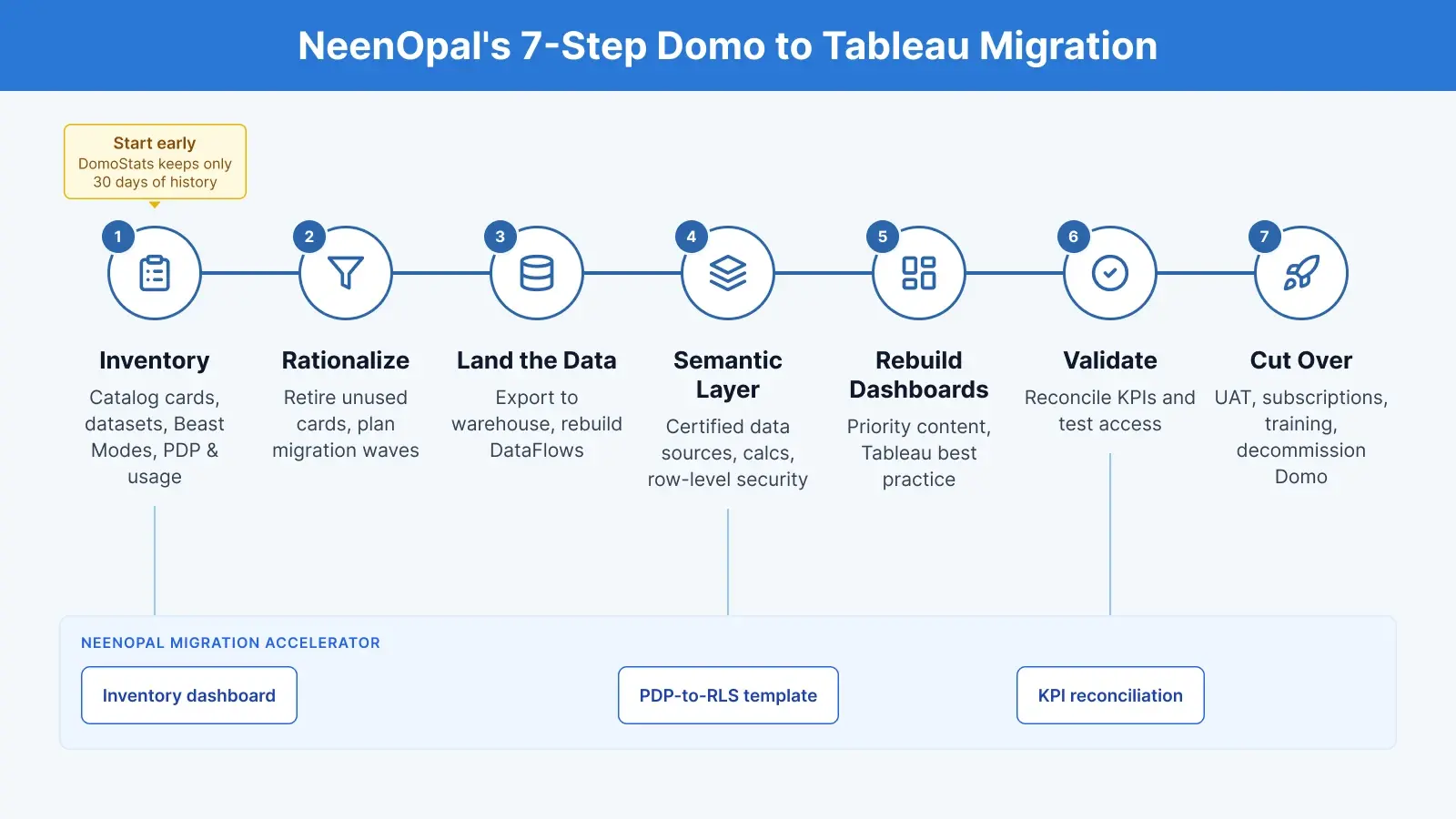
1. Inventory: Pull governance datasets and activity logs into a migration catalogue covering cards, datasets, Beast Modes, DataFlows, PDP, owners and usage. Schedule the DomoStats Activity Log report early, because it only keeps 30 days of history.
2. Rationalise: Retire unused and duplicate cards. Group the rest by data source and complexity, and plan migration waves.
3. Land the data: Set up the warehouse, export datasets and snapshot history, and rebuild DataFlows as SQL, dbt or Tableau Prep flows.
4. Build the semantic layer: Create certified Tableau published data sources, rewrite Beast Modes as calculated fields, and rebuild PDP as row-level security.
5. Rebuild dashboards: Rebuild priority cards and pages through proper Tableau dashboard development, not a pixel copy of Domo.
6. Validate: Compare row counts, totals and KPIs between Domo exports and Tableau views, and test access for every user group.
7. Cut over: Run user acceptance testing, recreate subscriptions and alerts, train users, and decommission Domo.
How NeenOpal's Domo to Tableau Migration Accelerator helps
NeenOpal’s accelerator applies the method behind our Tableau migration services to Domo, so the move is easier to scope and lower risk to run. It combines:
-
Domo inventory and usage dashboard built from governance datasets and activity logs.
-
Beast Mode to Tableau conversion guide covering common calculation patterns.
-
PDP to row-level security template for designing and testing access.
-
Automated KPI reconciliation comparing Domo exports with Tableau view data.
-
Cutover checklist covering subscriptions, alerts, training, and decommissioning.
What you receive: a Domo inventory and usage report, a rationalisation plan and migration waves, a component mapping document, a warehouse-based data layer, certified Tableau data sources, rebuilt Tableau dashboards, a KPI reconciliation report, security test results, and training and handover documentation.
Frequently Asked Questions
1. Can Domo dashboards be converted to Tableau automatically?
No. There is no tool that imports Domo cards or pages into Tableau. Inventory, data export and validation can be automated, but dashboards are rebuilt.
2. Where does our data go after leaving Domo?
Usually into a cloud data warehouse such as Snowflake, Databricks, Amazon Redshift or Google BigQuery. Tableau then connects to it live or through extracts.
3. Do we lose historical data when moving off Domo?
Not if it is exported first. Snapshot and recursive DataFlows hold history inside Domo, so they must be exported before Domo is switched off.
4. How are Beast Mode calculations moved to Tableau?
Each Beast Mode is rewritten as a Tableau calculated field or LOD expression, then tested against Domo results to make sure numbers match.
5. Is Tableau cheaper than Domo?
It depends. Domo charges consumption credits and Tableau charges per user role and edition, so the answer depends on your data volumes, number of users, and the edition you need, because Data Management (including Prep Conductor and data policies) is included in Enterprise and Tableau+ but not in Standard. Model both before deciding.
6. How long does a Domo to Tableau migration take?
It depends on the number of cards, datasets, DataFlows, and PDP policies. A short assessment gives a fixed scope and timeline. Plan your Domo to Tableau migration
Plan your Domo to Tableau migration
Moving from Domo to Tableau is a chance to own your data, clean up years of unused content, and give teams dashboards they trust. Book a Domo to Tableau migration assessment with NeenOpal to see what to move, what to retire, and how your data and dashboards would work in Tableau.