
Tableau Migration Services, Without the Fidelity Loss

NeenOpal is a certified Tableau Partner. Our Tableau migration services cover Power BI to Tableau, Qlik to Tableau, Looker to Tableau, MicroStrategy to Tableau migrations, and other BI platforms, plus legacy Tableau upgrades. We rebuild dashboards, data sources, and logic before validating every number against the source.

Tableau platform migration illustration

Platform Migration vs. Cloud Migration: Which Tableau Migration You Need

A Tableau platform migration moves you off another BI vendor (Power BI, Qlik, Looker, legacy Tableau, or more) onto modern Tableau, rebuilding the analytics layer, the calculated fields, LOD expressions, and data source migration work, since almost none of it carries over directly. The risk to manage is fidelity when numbers drift from source.

A Tableau Cloud migration keeps the platform the same and changes only where it runs (server-to-cloud). Most content moves across largely as-is, often using Tableau's own migration tooling, with some rework for data connections and authentication. Moving Server to Cloud? See our Tableau Server to Tableau Cloud migration service.

Often, both happen at once. We keep the two risk types separate so a fidelity issue never gets mistaken for an infrastructure one.

Migration path from a legacy on-prem or cloud BI environment through discovery and assessment, environment setup, data source migration and cutover to a fully managed Tableau Cloud

Outcomes Enterprise Leaders Measure Us By

$750M+
Financial Impact Delivered to Clients
85%
Of engagements reached North Star outcomes within 90 days
60%
Average cloud cost savings across client operations
900+
Tableau dashboards delivered by 30+ certified Tableau experts

How We Rebuild Every Dashboard Without Losing a Number

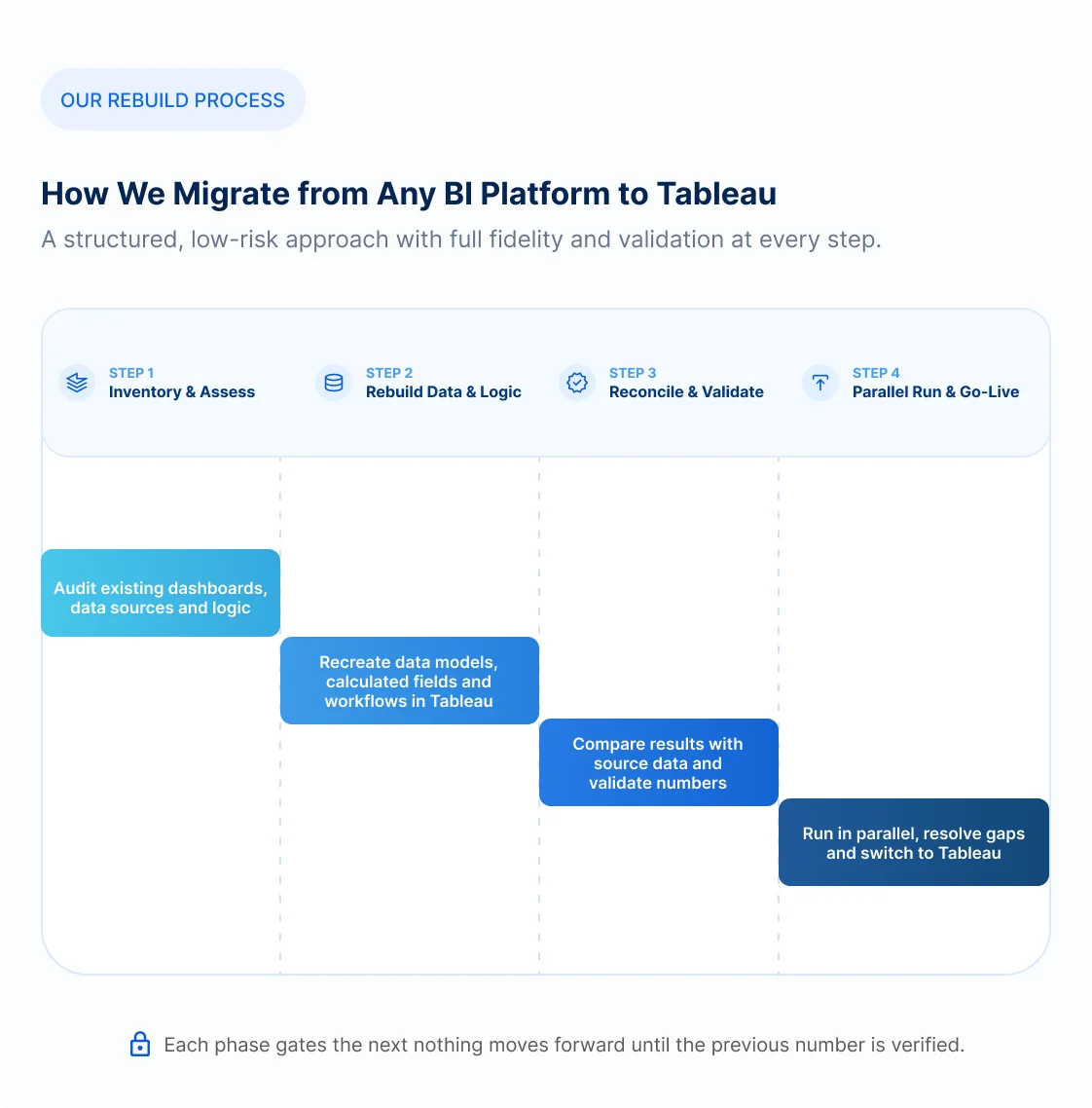
Fidelity is mostly won before any dashboard gets rebuilt. Migrating a BI platform means rebuilding the analytics layer in a fixed sequence, so the result holds up to scrutiny instead of just looking close enough. Here are the steps we run, and why.

1

Rationalize before you rebuild

We inventory every dashboard down to its usage data, data sources, calculated fields, parameters, filters, and row-level security, before we touch a single rebuild. This helps us remove the dead weight to keep the migration lean when moving ahead.

2

Rebuild the data layer first

The data layer comes first. Sources are rebuilt as certified Tableau published data sources, covering relationships, joins, extract-vs-live decisions, and semantic logic. Heavy logic moves into the warehouse, Snowflake or BigQuery, instead of living in the BI tool.

3

Re-express the logic, not translate it

Platforms diverge most here. DAX, Qlik scripting, and LookML get re-expressed in Tableau's own paradigm: LOD expressions and table calculations, matched to intent and output.

4

Rebuild visuals for intent, not pixels

Pixel-for-pixel replication is the wrong goal. It wastes effort and inherits the old tool's compromises. We preserve analytical intent, match the visuals stakeholders recognize, and standardize on clean, Tableau-native patterns.

5

Reconcile every number against the source

Each rebuilt dashboard is validated against the source: same filters, dates, and dimensions, confirming totals and key KPIs match within tolerance, automated wherever the source allows export.

6

Rebuild and test row-level security as its own gate

Entitlement models rarely carry over, and the cost of getting them wrong is high, so row-level security is rebuilt and tested separately, never assumed alongside the dashboards.

7

Parallel run, then decommission

A short parallel run, old and new side by side, lets users catch anything reconciliation missed before the source goes dark. Rationalizing, rebuilding, re-expressing, reconciling, and running old and new in parallel is what makes the result trustworthy.

A Representative Tableau Migration

A mid-market company running Qlik Sense on a self-managed cluster faced a license renewal and an infrastructure refresh. We rationalized their estate, rebuilt on Tableau Cloud with Tableau Bridge, and validated every number against Qlik before decommissioning the cluster.

150 → 40
Apps rationalized
0
Clusters left to maintain
25 to 40%
Combined spend cut

Power BI to Tableau: When a Switch Makes Sense

Tableau and Power BI both handle enterprise reporting well. These three situations are where switching to Tableau consistently pays off.

Dimension
Power BI
Tableau
Calculation language
DAX measures and Power Query (M), tightly bound to one governed semantic model
Calculated fields, table calculations and LOD expressions that set granularity independent of the view
In-memory engine
VertiPaq columnar store, Import mode
Hyper in-memory engine; extracts or live connections
Query modes
Import, DirectQuery or Composite
Extract (Hyper) or live connection to the source
Licensing model
Pro, Premium Per User, or Fabric capacity
Creator, Explorer and Viewer roles; Server or Cloud per-user
Governance & semantic
Central semantic model with dataset endorsement
Published data sources, certified and governed on the site
Ecosystem fit
Native to the Microsoft, Fabric and Azure stack
Platform-agnostic, strong standalone visual analytics

Three Signals You're Ready to Switch

If your team is already running into one of these, the case for switching is already made.

A Multi-Cloud Stack

Your architecture spans Snowflake, Databricks, Redshift, or BigQuery, and Microsoft-first coupling has become a constraint. Tableau connects to all of them natively, so your reporting layer isn't tied to one cloud ecosystem.

Analyst-Led Self-Service

Business analysts, not central IT, build the dashboards, and Tableau's self-service heritage, Pulse and Tableau Agent, fits that model better. Analysts ship dashboards without an IT queue.

Deployment and Sharing Friction

Power BI Report Server is feature-reduced, external guests each need a license, and export caps begin to bite.

Cost is rarely the trigger. Tableau is usually pricier per seat, and licensing surfaces only after the visualization or ecosystem decision.

Tableau Services

At NeenOpal, we provide specialized Tableau solutions that enhance data visualization and analytics. Our offerings help businesses unlock the full potential of their data.

Tableau Embedded Analytics Services

Embedding governed Tableau visualizations directly into your own products, portals, and customer workflows.

Discover More

Tableau Dashboard Development Services

Custom, KPI-driven Tableau dashboards delivering accurate, reliable insights for smooth, confident daily operations.

Discover More

Choose the Tableau Migration Engagement Model That Fits Your Needs

Managed Migration Engagement

A dedicated project manager plus the Tableau migration team your estate needs, owning inventory, rebuild, reconciliation, and handover end-to-end.

Request a migration assessment

Embedded Tableau Migration Developers

Certified Tableau developers join your existing team for the migration work, calculation rebuilds, or reconciliation you don't have in-house bandwidth for.

Find available Tableau experts

Fixed-Scope Migration Sprint

One platform or workload migrated, fixed scope, fixed price, and milestone-based delivery, so you know the cost, timeline, and outcome before work begins.

Get a project estimate

Tableau Platform Migration FAQs

Direct answers to the concerns that matter before committing time and budget.

A platform migration changes the BI vendor, moving off Power BI, Qlik, or Looker onto Tableau, and rebuilds the analytics layer since the calculation language and modeling layer have no direct equivalents. A cloud migration keeps Tableau in place and changes only where it runs (Tableau Server to Tableau Cloud), where content is largely portable.

No direct file conversion exists for a Power BI to Tableau migration or a Looker to Tableau migration. DAX, Qlik scripting and LookML are re-expressed in Tableau's own paradigm, LOD expressions and table calculations, by matching intent and output rather than translating syntax line for line.

Every rebuilt dashboard is reconciled numerically against the source at several slice levels: same filters, dates and dimensions. A short parallel run then lets users catch anything before the old system is decommissioned.

No. We rationalize using real usage data and migrate only what's actually used. On a typical estate, a large share of content is dead or duplicated, and cutting it is the single biggest lever on both cost and quality.

It depends on the source platform. For Qlik, Cognos, SAP BO, and MicroStrategy, the usual trigger is cost and total cost of ownership at a license renewal or end-of-life. For Power BI, cost is rarely the reason; teams switch for multi-cloud flexibility, analyst-led self-service, or sharing and deployment limits. Consolidating several tools onto one after sprawl or an acquisition is a common driver across all of them.

Entitlement models rarely carry over, so we rebuild and test row-level security as its own validation gate rather than assuming it transfers with the dashboards.