Assess readiness
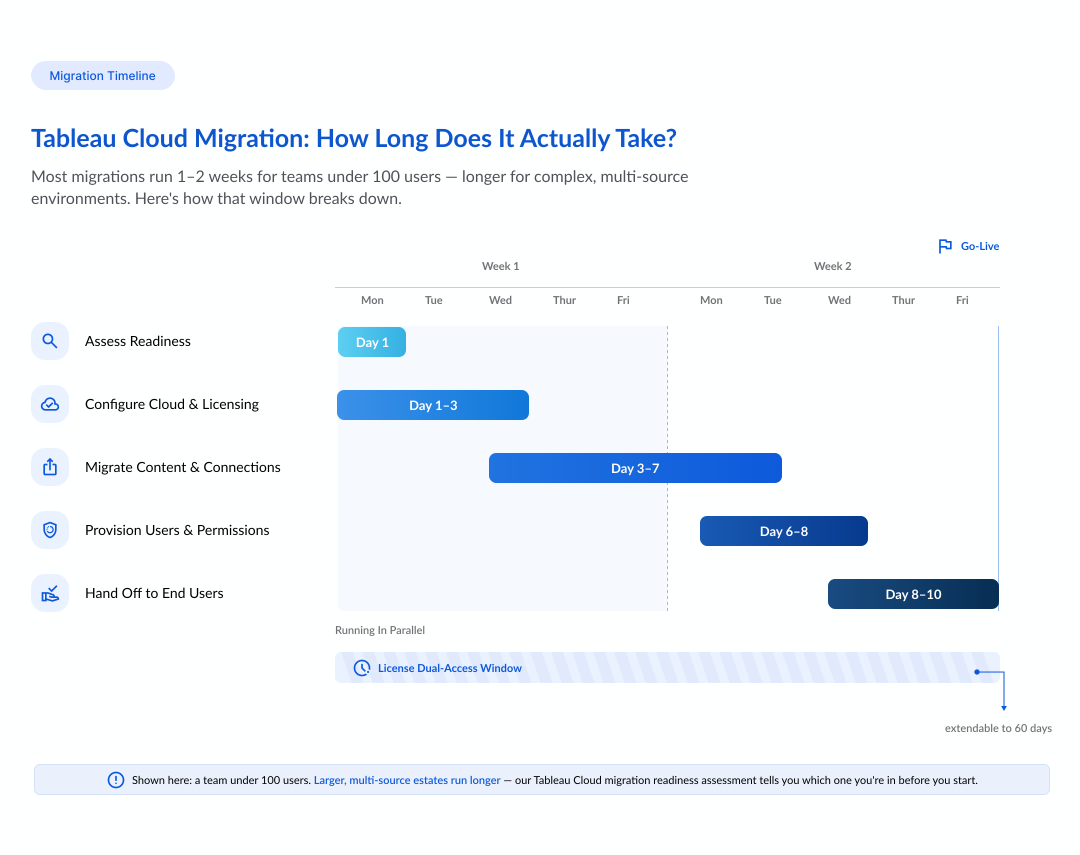
Run the Tableau Cloud Migration Readiness Assessment to confirm your data sources, compliance posture, and authentication model are compatible with Tableau Cloud before a single item moves.
NeenOpal is a certified Tableau Partner. We migrate Tableau Server to Tableau Cloud end-to-end, covering content, data connectivity, identity, and refresh schedules, checking each one against your live Server environment before a single report goes live.

Migrating from Tableau Server to Tableau Cloud touches content, data connectivity, identity, and scheduling as one connected process, each with its own way of breaking if it's rushed. We map that risk upfront, for the leads who drive this move ahead of a licensing renewal or version end-of-life. Here are the Tableau Server to Cloud migration steps we run, and why.
Run the Tableau Cloud Migration Readiness Assessment to confirm your data sources, compliance posture, and authentication model are compatible with Tableau Cloud before a single item moves.

Convert your perpetual or core-based licenses to role-based subscription licensing and run both in parallel for 60 days while you switch. Extendable through your Account Manager.

Set up authentication (SAML or OIDC with Okta, Azure AD, or another supported identity provider), multi-factor authentication, project structure, and site settings.

Virtual connections don't export and import directly. We manually recreate each one on Tableau Cloud so nothing breaks.

Download workbooks and data sources from Tableau Server and republish them to Tableau Cloud, automating the process for larger content libraries.

Extract refresh schedules don't carry over automatically. We rebuild each one natively inside Tableau Cloud, so refreshes keep running on time.

Provision users via SCIM, SAML, or manual import, and reconfigure site roles and permissions in the new site to match your governance model.

Guide users through reconfiguring personal items like webhooks, subscriptions, embedding, and API scripts that don't migrate automatically.
Most Tableau Server to Cloud migrations start for one of two reasons. Either because staying on Server costs too much in licensing, or because a Server environment stops delivering expected outcomes. That business case is usually the easy part. The bigger risk sits in the technical details below where a self-run migration loses the most time.
For Server-to-Cloud moves, Tableau recommends the Tableau Migration SDK or the Cloud Migration App. The Content Migration Tool is meant for Server-to-Server or Cloud-to-Cloud transfers and isn't recommended for Server-to-Cloud. Because the SDK relies entirely on the REST API, any content type without REST API support has to be migrated manually.
Some items simply can't be automated, so we migrate them manually. Here's how we handle each of the six categories:

We manually rebuild collections, site/server customizations, data policies, and data roles against your new Cloud governance model.

We reconfigure and retest data-driven alerts, URL actions, and extensions once content is live on Cloud.

We recreate these natively in Cloud as part of the migration as the SDK doesn't carry them over.

Comments, revisions, saved user filters, and personal settings reset for end users on Cloud. We flag this before cutover so it doesn't land as a surprise support ticket later.

The SDK skips these unless they're published to a project first. We coordinate with your team so owners publish before migration day.

We rebuild usage/engagement history and data-quality warnings via Admin Insights, and re-point embedded solutions to Cloud URLs and authentication.
NeenOpal is a certified Tableau Partner, with 30+ certified Tableau experts who've delivered 900+ Tableau dashboards for enterprise clients. Hear directly from the analytics and cloud engineers at NeenOpal on what building and maintaining enterprise data platforms actually takes.
At NeenOpal, we provide specialized Tableau solutions that enhance data visualization and analytics. Our offerings help businesses unlock the full potential of their data.

End-to-end Tableau implementation, governance, and dashboard development for reliable, enterprise-wide reporting on one platform.
Discover More
Embedding governed Tableau visualizations directly into your own products, portals, and customer workflows.
Discover More
Custom, KPI-driven Tableau dashboards delivering accurate, reliable insights for smooth, confident daily operations.
Discover More
A dedicated project manager plus the Tableau migration team your estate needs, owning inventory, rebuild, reconciliation, and handover end-to-end.
Request a migration assessment
Certified Tableau developers join your existing team for the migration work, calculation rebuilds, or reconciliation you don't have in-house bandwidth for.
Find available Tableau experts
One platform or workload migrated, fixed scope, fixed price, and milestone-based delivery, so you know the cost, timeline, and outcome before work begins.
Get a project estimateDirect answers to the concerns that matter before committing time and budget.
Under 100 users, Tableau's manual path takes one to two weeks. Larger, more complex estates run for several weeks to months and benefit from a professional-services engagement backed by a proper Tableau Cloud migration readiness assessment.
No. Virtual connections can't be exported from Tableau Server and imported into Tableau Cloud; they must be manually recreated as part of your migration checklist.
No. Extract refresh schedules don't carry over; they need to be rebuilt natively in Tableau Cloud after content is republished.
Unsupported authentication (AD, Kerberos, LDAP), unsupported connections (cube sources, .taco connectors, Kerberos DB auth), stale IP allowlists post-Hyperforce, and legacy perpetual licensing are the usual blockers. A readiness assessment catches all of them before cutover.
Yes. Tableau's license transition gives you 60 days of dual access to both environments, extendable through your Account Manager if your migration timeline runs long.
The Tableau Migration SDK (and its Migration App) is the right tool for Server-to-Cloud moves. It's API-driven and built for a one-time migration. The Content Migration Tool is for Server-to-Server or Cloud-to-Cloud content moves, not for migrating Tableau Server to Tableau Cloud.
Yes. Tableau Cloud is the current name for the product formerly called Tableau Online; Tableau renamed it in 2022. If your team or your documentation still refers to Tableau Online, the migration steps on this page are the same ones that apply.