
Title insurance is a data business. Every order throws off records at each step (search, exam, commitment, closing, wire, policy), and plenty of them come with a deadline attached. Miss a deadline or step and a closing slips, a referral source moves to a competitor, or funds go to a fraudster. A report that shows up days later can’t prevent any of it.
Title insurance analytics can close that gap, and dashboards are a direct way to start. A Power BI dashboard connected to a company’s own data refreshes on a schedule, applies one set of definitions across every office, and puts current numbers in front of the people who act on them before the day begins.
Below, we walk through where manual reporting still hides in title operations, and where title insurance analytics fits alongside. We also showcase five Power BI dashboards we built for title agencies catering to sales reps, metrics on underwriters, escrow, operations, closings, and more. Every number you’ll see in them is sample data.
Where Manual Work Still Hides in Title Operations
Most of the manual effort we see lives in the checks that cut across every open file. ALTA’s Best Practices Framework requires some of these. Others are simply how managers keep the month on track.
|
Where Manual Work Hides |
Why It Keeps Coming Back |
|---|---|
|
Daily orders and closings vs. plan |
Each company sets its own plan, office groups and segments, and someone has to match them to production counts |
|
File aging and turnaround vs. target |
Residential, commercial and builder files run on different targets, so one company-wide number flags the wrong offices |
|
Examiner workload and rework |
You need counts by person and office across every file in the period |
|
Referral and account trends |
Only one referral source gets credit (buyer agent, seller agent, or lender), and a quiet account only shows up when you compare periods |
|
Post-closing survey results |
Ratings sit in a survey tool, cut off from file, office, and closer data |
|
Verification-call follow-up |
Calls are triggered at set order stages, and someone has to confirm they happened on every open file before money moves |
|
Escrow reconciliation reviews |
ALTA expects daily reconciliation of receipts and disbursements, a 3-way reconciliation within 10 business days of each month’s bank statement, and management approval before funds move on balances dormant for more than six months. |
Every row is reporting work built on data that production has already created. With title insurance analytics, most of these checks can be tracked via a Title insurance dashboard instead of being compiled by hand.
Where Does Title Insurance Analytics Fit in Your Operations?
For most title teams, technology investment starts with the production system, and for good reason. That’s where the core work of a title file happens, and where AI in title insurance is already making a difference: orders are opened, exams are completed, and the Closing Disclosure and settlement statement are prepared. Protecting funds against title company wire fraud is a separate effort. Wire fraud prevention relies on callbacks to independently verified phone numbers, multi-factor authentication, and a wire verification service.
Title insurance analytics is often the last piece to get the same attention. In multiple client engagements behind this guide, the teams told us cross-file reporting was where they most wanted help, and that’s the gap Title Insurance reporting dashboards are built to fill.
Title company analytics builds on the work your team already does in production. Dashboards pick up the status changes, dates, and dollar amounts each file records and present them consistently every morning, so decisions start from the same numbers.
How Do Dashboards Reduce Manual Work in Title Insurance Operations?
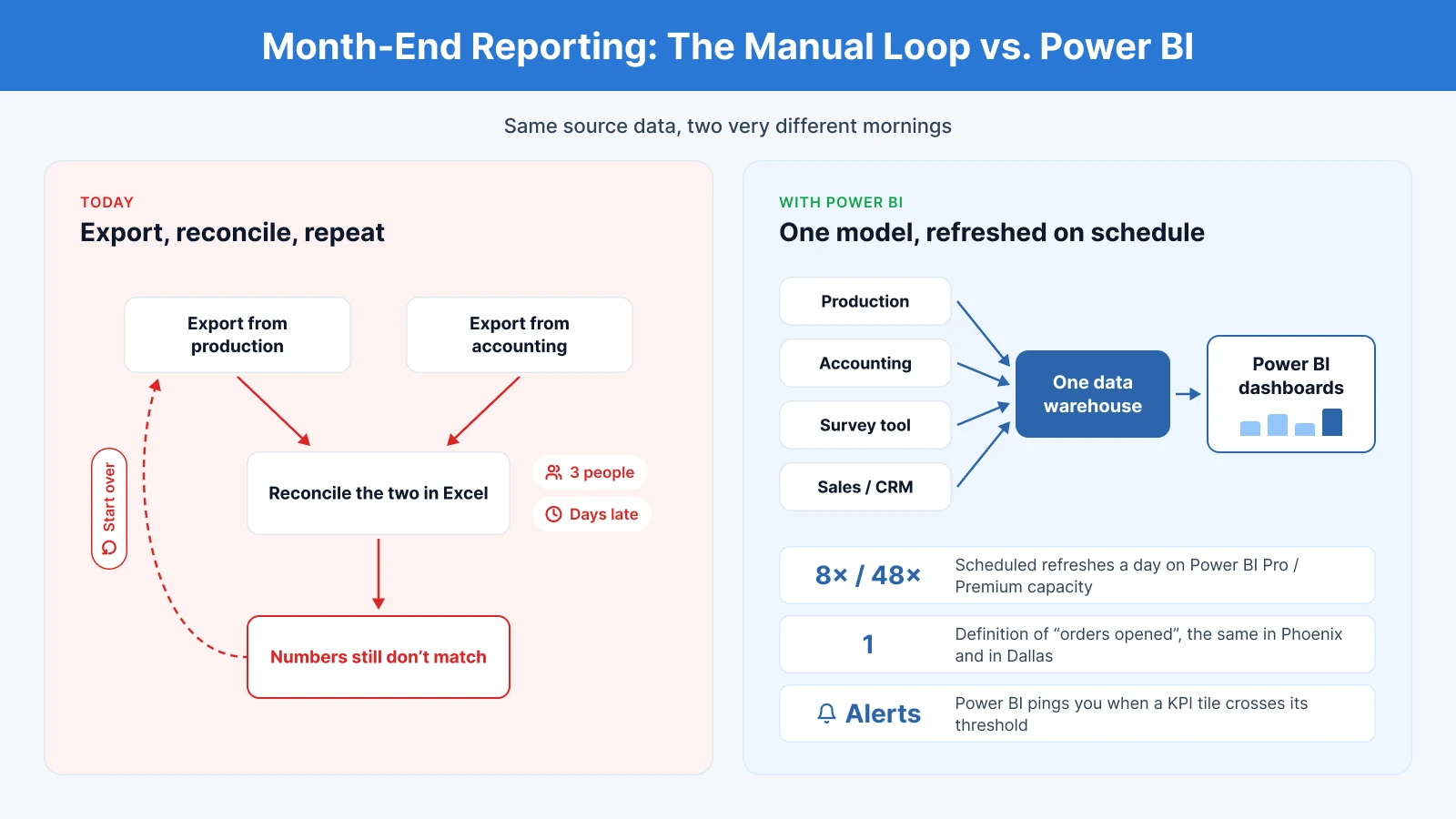
Picture how the month-end pack comes together today. Someone exports from production, someone else from accounting, a third person reconciles the two in Excel, and the numbers still don’t match. Title insurance reporting via Power BI cuts out that loop.
Here’s what it does once the build is live:
- Scheduled data refresh: Power BI Pro allows up to 8 refreshes a day from source. Premium capacity allows up to 48.
- One consolidated model: production, accounting, survey, and sales data all go into one warehouse. That’s how “orders opened” ends up meaning the same thing in your Phoenix office and in Dallas.
- Data alerts: Put a threshold on a card, gauge, or KPI tile pinned to a dashboard, and Power BI pings you when it’s crossed.
The 5 Title Insurance Dashboards at a Glance
Each below report in this title company analytics suite opens on an index page with one question at the top. The pages behind it answer that question piece by piece.
|
Dashboard |
What it answers |
Who opens it |
|---|---|---|
|
Closing and Daily Ops |
Will we make the month? If not, where’s it slipping? |
Closing managers, execs |
|
Title Operations Review |
What KPI moved, did it hit our thresholds, who carried it? |
Ops managers |
|
Sales Performance |
How much revenue did we write, and who wrote it? |
Execs, sales managers, reps |
|
Wire Fraud Prevention |
Were the protection calls made? Who’s still waiting? |
Escrow and closing managers, compliance |
|
Customer Survey |
How are we scoring, who earned it, what went wrong? |
Leadership, office managers |
1. Closing and Daily Ops: Are We Going to Make the Month?
This is the report meant for closing managers to open first thing in the morning. It lines up actuals against the operating plan, prorated by business day, and shows where the month ends up if the current pace holds.
SCREENS & THEIR PURPOSE
- Report Index: The month at a glance: orders and closings month-to-date against plan, projected month-end orders and files open today. Questions are grouped into Today, The Month, The Work, and Detail, and each one links to the page that answers it.
- Daily Snapshot: Yesterday’s orders and closings, month-to-date against plan and business days left, broken out by reporting group and segment.
- Orders Overview: Order pace against last year, cancellation rate and busiest weekdays, with a waterfall showing which segment drove the change.
- Budget & Projection: Variance to budget by reporting group, plus the offices projected to finish more than a set percentage below plan and where the gap will come from.
- Closings & Premium: Files closed, net premium, average premium per closing, and escrow fees against last year, ranked by office.
- Pipeline & Cycle Time: Days to close, an age profile of open files, and a list of every file open past 90 days, with its closer and premium at risk.
- Closer Performance: Each closer’s volume, cycle time, open files, and cancel rate, plotted to show who’s carrying the load.
- Customers & Referrals: Referral companies tagged growing, declining, or gone quiet, plus how much premium the top ten bring in.
- Order Detail: A drill-through to any order, searchable by order number and filterable by status. This page can also be packaged as a standalone order lookup report for every employee in the company, so anyone can pull up the full details of an order in seconds. Users can customize their view, keeping the fields they need and removing components irrelevant to their role.
- Measures & Data Notes: Defines every measure and lists what the report can’t tell you.
How Does Closing and Daily Ops Help a Title Company?
-
Know whether the month is on track. The Daily Snapshot and Budget & Projection replace the manual morning count with a plan comparison and month-end projection that update themselves.
-
Fix the shortfall while there’s still time. Offices projected to miss plan by more than 2% are flagged mid-month, and the segment waterfall shows where the gap sits, so leadership can move closers or follow up with referral sources before month-end.
-
Stop stalled files before they cancel. The 90-day list and the age profile show aging files early, and a right-click drills into the closer and the order behind each one.
-
Spot a quiet referral source in days, not quarters. Gone-quiet tagging shows which companies have stopped sending files, so the follow-up happens while the relationship is still warm.
Best fit for: closing managers, office managers, and executives. Closers can be given the same report limited to their own files, while budget and projection pages stay with leadership.
2. Title Operations Review: Did We Clear Our Thresholds?
This report follows work through production (orders, examinations, policies, and Ownership & Encumbrance (O&E) reports) and checks each stage against target, by segment, office, and examiner.
SCREENS & THEIR PURPOSE
- Report Index: Headline numbers for orders year-to-date, turnaround time against target, on-time delivery, and policy compliance. Questions are grouped by what moved, thresholds, workload and coverage, and book of business.
- Operations Overview: Orders, examinations, policies, and O&E reports side by side, each with year-to-date, month-to-date, and current-week counts against the prior year. Monthly charts split each stage by segment, and a toggle switches the comparison between prior year and prior period.
- Operations Health: The scorecard overview where the turnaround time, measured from order opened to commitment delivered, is shown against target for the year, the month, and the current week, alongside office revenue against the premium plan. A segment health table adds on-time delivery, policy compliance, and revisions per 100 orders.
- Health by Office & Examiner: Every office is measured against its own turnaround target and its own premium plan, each marked critical, behind or on track. Below that, examiner rework is ranked by error rate, and each examiner is marked support needed, review, or on track. This lets managers see which offices need help and which examiners need coaching,
- Where the Volume Lands: Orders by office against last year, what each office produces (examinations, policies or O&E), and a map of where orders come from that drills from state to county.
- Coverage & Production Staff: A coverage map of which examiners work which offices, and total output by staff member, split by examinations, policies and O&E reports.
- Book of Business: Orders and policies by underwriter against last year, plus O&E volume by customer company, named contact and county.
- Measures & Data Notes: How turnaround time and revenue against plan are calculated, standings are assigned, and the turnaround target for each segment.
How Does Title Operations Review Help a Title Company?
-
Judge each office against the right target. Thresholds are read per segment and per office, so a commercial-heavy office isn’t flagged against residential targets.
-
Find the cause behind a slow office. Rework is traced to the examiner’s own errors, kept separate from customer changes or late documents, so coaching starts from facts.
-
See single-person risk before it becomes a problem. The coverage map shows offices where most exams depend on one examiner, which helps with backup and capacity planning.
-
Understand underwriter and customer concentration. Book of Business shows how orders and policies split across underwriters and which customers drive O&E work.
Best fit for: operations managers, production leads, and executives tracking service levels.
3. Sales Performance: How Much Did We Write, and Who Is Writing It?
This is the revenue view leadership uses for board and shareholder updates. It works at three levels: company, team, and individual.
SCREENS & THEIR PURPOSE
- Report Index: Net premium and orders opened against last year, with questions grouped by company, team, and individual.
- Executive Overview: Orders opened and closed, net premium, average days to close, premium per closed order, open orders, premium still in the pipeline and not yet invoiced, cancellation rate, and premium per active rep. Office performance includes close rate, and the order pipeline is shown by status from open through cancelled.
- Accounts & Referrals: Active accounts, new accounts, gone-quiet accounts (No orders in 120 days), repeat order rate, and top-ten premium concentration. A Pareto chart shows how much premium the top 20 accounts carry, with the largest referral companies ranked by orders.
- Team Performance: A rep scoreboard ranked by credited net premium, showing close rate, commission, and this month’s orders against last month’s. A top-reps view shows top performers and how concentrated revenue is across the team.
- Rep Scorecard: A drill-through to one rep’s full book. It shows their profile and commission plan, orders opened and closed, net premium, close rate, performance against plan, and the status of files for each company they work with.
- Rep Relationships: The referral companies and contacts behind a rep’s book, plus cooperating orders, where that rep’s contacts appear on another rep’s file.
- Commissions: Commissionable revenue, commission earned and effective rate, by month, company and contact, down to order-level detail including splits.
- Order Detail: Every order behind the numbers, filterable by status (open, title work, commitment, scheduled, closed, or cancelled), with a search by order number.
- Measures & Data Notes: Defines how credit, splits, close rate, and gone-quiet accounts are calculated, so performance is judged by the same rules.
How Does Sales Performance Help a Title Company?
-
One version of revenue for leadership and reps. Executives see the whole company, each rep sees their own book, and everyone works from the same numbers.
-
Protect accounts before they slip away. Gone-quiet tracking and premium concentration show which accounts need attention and how exposed revenue is to a handful of customers.
-
Keep reps current on what they’ve earned. Reps want up-to-date numbers, not a commission statement weeks after the file closes. Each rep sees their own orders and the commission earned on every one as soon as the data refreshes, which keeps them motivated.
-
Build healthy competition across the company. The same data model can power gamified leaderboards by rep and by region, with rankings against target that turn monthly goals into a friendly contest.
-
Make credit and commission transparent. In title, referral credit goes to one party. The report shows primary-rep credit, splits, and cooperating orders, so commission conversations rest on clear rules.
-
Turn one-on-ones into a two-click process. A manager goes from the team scoreboard to a rep’s scorecard, relationships, and commissions without a separate spreadsheet.
Best fit for: executives, sales managers, and individual reps
4. Wire Fraud Prevention: Were the Protection Calls Made?
This report won’t stop title company wire fraud on its own, and we don’t pitch it that way. What it tells you is whether your callback procedure actually happened on each file before money moved.
SCREENS & THEIR PURPOSE
- Report Index: It leads with the four KPIs that show where title company wire fraud exposure sits (reminder and buyer call completion against a fixed target, parties waiting on files closing within three days, and offices exposed), then links each common question to the screen that answers it.
- Wire Fraud Prevention: This screen helps track four calls usually made over the life of an order. The buyer or borrower calls when the order opens, the seller calls when the commitment goes out, the funds verification call when funds are requested, and a pre-closing reminder days before closing.
- Protection by Office: This screen shows each office’s completion rate on every call, the median wait, and how many parties are still waiting right now. Offices get marked, exposed, or covered based on that last reminder call.
- Completion by Closer: Does the same per person, and you can drill straight into the calls a closer still owes. Escrow and closing managers use it to decide who gets a call today. Compliance uses it as proof the wire fraud prevention procedure is in use.
- Calls to Make: A drill-through work list. Right-click any closer, office or segment to see their outstanding calls, ordered by how soon each file closes. The views switch between still to call, open over three days, called, and everything. Nobody has to build a follow-up list by hand, and the most urgent calls get made first.
- Measures & Data Notes: Defines each call and when it’s raised, and explains that a call counts as made only if it’s logged before the money moves. It makes completion rates hold up when compliance or leadership reviews them, the same discipline our BI dashboard documentation kit brings to every report.
How Does Wire Fraud Prevention Help a Title Company?
-
Close the gap before funds move. Calls to Make gives every closer a prioritized list of who still needs a call, starting with files closing soonest.
-
See the risk a completion rate hides. A high completion rate can still include buyers who waited days for their call. The exposure window shows how long that gap stayed open.
-
Coach the right person, not the whole office. Closer-level completion against the company figure shows exactly who needs follow-up.
-
Show the procedure is followed. ALTA’s Best Practices Framework calls for documented wire verification procedures. This report adds a running record of whether each call happened and when, which is useful for internal reviews and underwriter conversations.
Best fit for: escrow and closing managers, compliance leads, and operations executives.
5. Customer Survey: How Are We Scoring, and What Went Wrong?
Every closing generates feedback from buyers, sellers, agents, and lenders. This report turns those surveys into a scorecard by office, closer, signing agent, and respondent role.
SCREENS & THEIR PURPOSE
- Report Index: Average rating, Net Promoter Score (NPS), surveys returned and detractor rate, with questions grouped into how you’re scoring, where it comes from, what went wrong, and individual customers.
- Overview: Average rating and NPS against target, the full spread of every answer split into promoters, passives, and detractors, the detractor rate and the severe rate, each with a monthly trend against last year.
- Office, Role & Category: The best and worst office and the best and worst respondent role, on both rating and NPS. Scores are also broken down by question category and by individual question, lowest first.
- Deep Dive pages: Compare any office, respondent role, closer, or signing agent against the company on rating and NPS, with change over time and reliability flags for small groups.
- Poor Ratings: Switch between severe, poor, or both to see how many surveys and closings were affected and where low scores cluster.
- What Went Wrong: Which questions draw the most poor ratings, what most influenced the rating on poor surveys compared with all surveys, and a comments list showing whether anyone followed up with the customer.
- Survey Lookup: One row per survey, newest first. Right-click any row to open the full response.
- Survey Detail: Every answer and comment from a single survey, color-coded by rating.
- Measures & Data Notes: How surveys, responses, NPS, and the rating bands are defined, and how reliability thresholds work.
How Does Customer Survey Help a Title Company?
-
Pinpoint the cause of a weak score. Drill from company to office to closer or signing agent to see whether a problem is local or company-wide.
-
Close the loop with unhappy customers. Poor ratings are listed with their comments and follow-up status, so no detractor is left without a response.
-
Focus on how problems get handled. Recovery questions, about how the team handled things when they went wrong, are scored separately. That’s often where improvement pays off most.
-
Judge offices fairly. Reliability flags keep small offices from being ranked on a handful of surveys.
Best fit for: leadership, office managers, and client-experience teams.
Which Title Dashboard Should You Build First?
Start where your biggest gap is:
- Closing and Daily Ops: if month-end keeps surprising you.
- Title Operations Review: if turnaround complaints are rising or work keeps getting redone.
- Sales Performance: if growth, not throughput, is the constraint, or revenue depends on a few accounts.
- Wire Fraud Prevention: if you can’t prove the verification calls were made before funds moved.
- Customer Survey: if you hear about service problems only after a referral source goes quiet.
If your biggest gap isn’t on this list, start with a custom dashboard. The same data model and shared definitions extend to whatever question matters most to your operation, whether that’s underwriter remittance, claims exposure, or a report your team still builds by hand every week
Start Using Title Insurance Analytics in Your Business
You’ve seen what each dashboard answers and where to start. The next step is seeing how title insurance analytics would fit your offices, your production system, and your definitions.
See the dashboards in full. The Title Insurance Dashboards Playbook walks through the dashboards title companies use to run operations, revenue, and compliance, so you can choose your starting point with your team.
Download the Title Insurance Dashboards Playbook →
Scope your first build. Bring your biggest reporting headache, whether that’s unproven wire calls, month-end surprises, or turnaround complaints. In one working session, we’ll map your data sources, agree on the definitions your reports should share, and outline the first dashboard worth building.
Book a consultation with NeenOpal →
FAQ
1. What is title insurance analytics?
Title insurance analytics is the use of data from your title operations to track and improve performance across every file. It brings together order, production, closing, and revenue data from production platforms and accounting systems into dashboards in tools like Power BI. That way, teams can see open orders, turn times, fallout, and revenue by office or client without compiling reports by hand.
2. Do Power BI dashboards automate title production?
No. Dashboards automate the reporting and monitoring built on the data those systems produce.
3. How often can a title company's Power BI data refresh?
Scheduled refresh runs up to 8 times a day on Power BI Pro and up to 48 times a day on Premium capacity, per Microsoft Learn.
4. Which KPIs should a title company track first?
Start your title company analytics with orders opened and closed vs. plan, cancellation rate, days to close, files open past 90 days, net premium, and turnaround time vs. target by segment.