

Most Salesforce teams didn't build their CRM Analytics setup in a week. It grew over years. Dashboards sit on record pages, recipes run every night, and somewhere in the SAQL there's a calculation nobody wants to touch. So when Salesforce launched Tableau Next, the first question for many teams was simple: do we need to move, and how much work will it be?
The gap is easy to see in Salesforce’s latest State of Data and Analytics report. 76% of business leaders feel pushed to get more value from data, but only 49% can count on timely insights. Almost everyone (93%) wants to ask data questions in plain English. And 84% of data leaders say their data strategy needs a full rethink before AI can deliver.
Tableau Next is Salesforce's answer to that gap. But a CRM Analytics to Tableau Next migration is a phased move, not a lift-and-shift. Your recipes and data can carry over to Salesforce Data 360. Your SAQL logic, dashboards, and security have to be rebuilt. Plan it in waves, and your teams get conversational, AI-ready analytics without losing the dashboards they rely on today.
In this guide, we cover what Tableau Next is, how it compares with CRM Analytics, what moves and what doesn't, what it costs to run, and the step-by-step approach we follow with our CRM Analytics to Tableau Next Migration Accelerator.
What is Tableau Next?
Tableau Next is Salesforce’s AI-powered analytics platform. It launched in April 2025 and is built on Salesforce Data 360, which you may know by its old name, Data Cloud. The easiest way to understand it is to look at its three layers:
- Data: This is where your information lives. It includes Data 360 objects and zero-copy access to platforms such as Snowflake and Databricks, so you don’t have to move data around.
- Semantics: Tableau Semantics is the Tableau Next semantic layer. You define your business terms, calculations, and metrics once, and every dashboard and AI agent uses them.
- Action: This is the part people actually see. Dashboards, visualizations, and AI answers show up right inside Salesforce and Slack.
The AI side is handled by Tableau Agent (previously called Agentforce for Analytics). It has three capabilities:
- Concierge answers business questions in plain language. Tableau Next Concierge is the feature most business users notice first.
- Data Pro helps analysts build semantic models.
- Inspector watches your data and sends proactive alerts. It is still in Beta.
Is CRM Analytics being retired?
No, Salesforce hasn't announced an end-of-life date for CRM Analytics. It positions the two products as interoperable, so you can run them side by side.
That changes how you should plan a CRM Analytics to Tableau Next migration. You don't need to move everything at once. Move a use case when Tableau Next clearly does it better, and leave the rest where it is until it's ready.
CRM Analytics vs Tableau Next: Key Differences
Here's how CRM Analytics vs Tableau Next compares across the areas that matter most in a migration.
|
Area |
CRM Analytics |
Tableau Next |
|
Data layer |
CRMA datasets, recipes and dataflows |
Salesforce Data 360 objects, data streams and zero-copy |
|
Business logic |
SAQL, compare tables, bindings |
Tableau Semantics calculations and metrics |
|
AI |
Einstein Discovery |
Tableau Agent: Concierge for Q&A, Data Pro for semantic modelling, Inspector for proactive alerts (Beta) |
|
Authoring |
Analytics Studio |
Browser-based Visualization Builder |
|
Where insight appears |
Dashboards, Lightning pages |
Dashboards, Lightning pages, Slack, natural-language answers |
|
Governance |
Set per dataset and dashboard |
Set once in a shared semantic layer |
Why Companies Move from CRM Analytics to Tableau Next
- Answers, not just dashboards. People can ask a question in plain language instead of learning yet another dashboard.
- One version of the truth. Metrics are defined once in Tableau Semantics. Dashboards and AI agents both use the same definitions.
- Proactive insight. The inspector flags changes in the data before someone has to go looking for them.
- Analytics where work happens. Dashboards and metrics sit on Salesforce record pages and in Slack.
- Data stays where it lives. Data 360 connects to lakehouses and warehouses without copying data across.
For most teams, these benefits are the business case for a CRM Analytics to Tableau Next migration. The trick is to capture them without disrupting reporting along the way.
What moves and what must be rebuilt
Salesforce documents one clear bridge. A CRM Analytics recipe output node can write data straight to a Data 360 data lake object. That's the only automated path today. There's no converter for SAQL, dashboards, or security predicates.
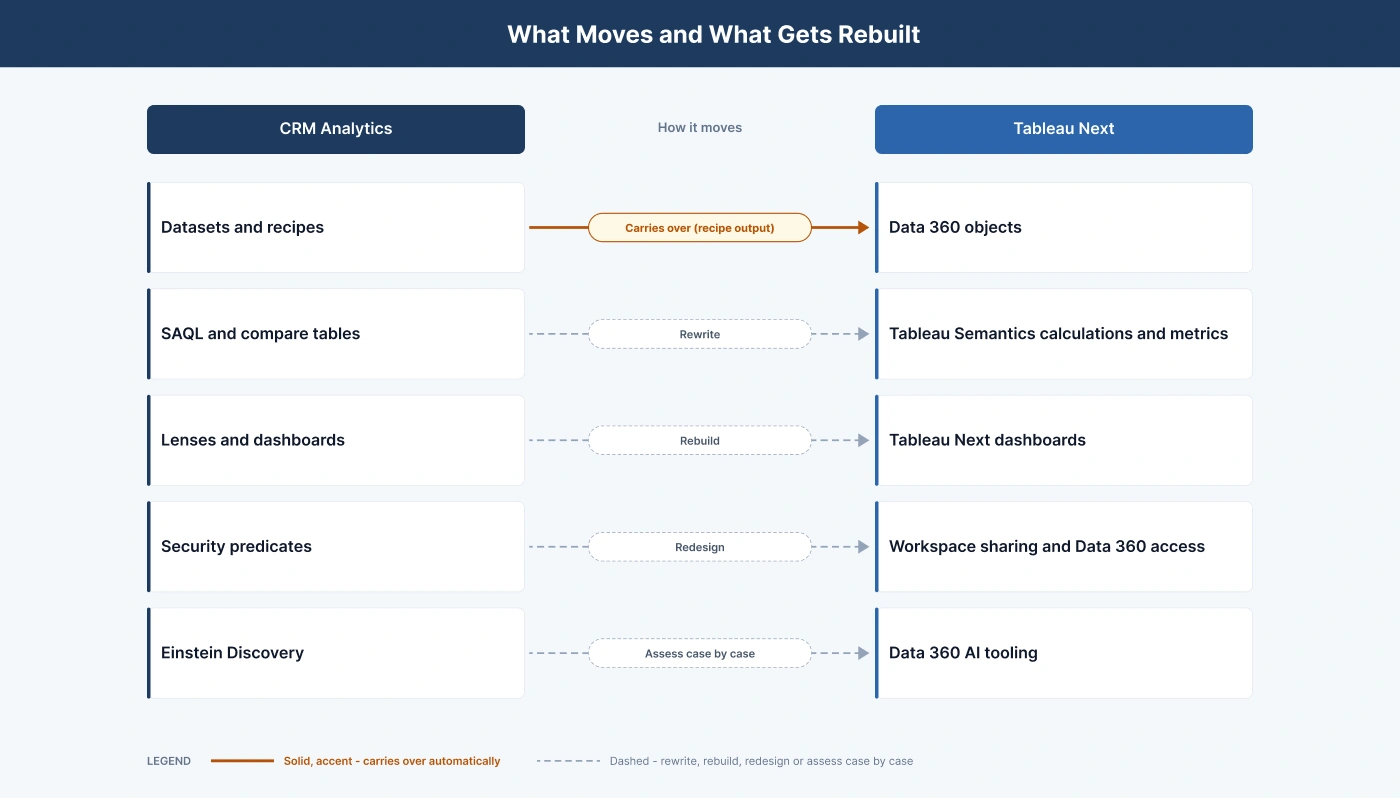
So when you migrate CRM Analytics, your data can travel, but the logic and the experience on top of it need rebuilding. The table below shows how each component maps in a CRM Analytics to Tableau Next migration.
|
CRM Analytics |
Tableau Next equivalent |
Migration approach |
|
Apps |
Workspaces |
Recreate and reorganise |
|
Datasets and recipes |
Data 360 data lake and data model objects |
Reuse through recipe output |
|
Data sync and connectors |
Data 360 data streams and connectors |
Reconfigure |
|
SAQL queries and compare tables |
Calculated fields and metrics in the Tableau Semantics model |
Rewrite by hand (no SAQL converter exists) |
|
Bindings and dashboard interactions |
Dashboard filters, filter actions and parameter actions in Tableau Next |
Rebuild and test |
|
Lenses and dashboards |
Visualisations and dashboards |
Rebuild priority dashboards, retire the rest |
|
Security predicates and sharing inheritance |
Workspace sharing and Data 360 access controls |
Redesign and test per user group |
|
Dashboards on Lightning pages |
Tableau Next components in Lightning App Builder |
Re-embed |
|
Einstein Discovery |
Data 360 AI tooling |
Assess case by case |
Common challenges in a Tableau Next migration
Every Tableau Next migration we've scoped has run into some version of these:
- SAQL has no converter. SAQL migration is manual. Each SAQL step and compare table has to be translated into semantic model calculations.
- Security needs a redesign. CRM Analytics security predicates don't map one-to-one. Access rules have to be redesigned and then tested.
- Data 360 comes first. Tableau Next runs on Data 360, which has its own setup, storage, and credit considerations.
- Authoring is browser-only. There's no Tableau Desktop client for Tableau Next. That changes how analysts build content.
- Some features are still in Beta. Inspector, the Salesforce Connector, and automatic semantic model creation are examples. Scope your project around what is generally available.
- Dashboard sprawl. Years of unused or duplicate dashboards add cost if you move them without a review.
None of these are blockers. They just mean CRM Analytics to Tableau Next migration needs a proper plan, not a weekend sprint.
Licensing and Cost Considerations
Tableau Next pricing is one of the first things finance teams ask about. Here's what to know:
- How it's sold. Tableau Next is available on its own, in the Tableau+ bundle with Tableau Cloud, and inside some Sales Cloud, Service Cloud and Industry Cloud editions.
- Pricing model. It's priced per user role, with Standard Creator and Standard Consumer licences. Analytical queries, data transforms and AI usage aren't metered.
- Data 360 costs. Data 360 storage and some credits are still metered. Review data volumes and refresh schedules during the assessment.
- Existing entitlements. Some Salesforce editions already include Tableau Next. Check what your current contract covers with your Salesforce account team before you set a budget.
Getting this right early keeps the cost of a CRM Analytics to Tableau Next migration predictable.
Using Tableau Cloud alongside Tableau Next
Tableau Next doesn't replace Tableau Cloud. Many organisations will run both, linked through Tableau Semantics.
- Published data sources in Tableau Semantics. Tableau Cloud published data sources can be used in Tableau Semantics without moving them.
- One semantic layer, used from both sides. Tableau Semantics sits inside Tableau Next, on Data 360. You can still reach it from Tableau Desktop and Tableau Cloud (version 2025.2 or later) with the Tableau Semantics connector. Your analysts and business users then work from the same metric definitions, not two slightly different versions. There are a few limits to know about: the connector doesn’t support extracts, blending or filter actions.
- Plan to rebuild, not import. You can’t bring Tableau workbooks straight into Tableau Next, and there’s no documented workaround yet. Any dashboard you move will need to be rebuilt, so count that in your timeline.
- Our recommended split. Move the dashboards your teams check every day inside Salesforce over to Tableau Next. Leave the deeper analysis workbooks in Tableau Cloud, where your analysts already do their best work.
How to migrate from CRM Analytics to Tableau Next: a 7-step approach
This is the sequence we use on every CRM Analytics to Tableau Next migration.
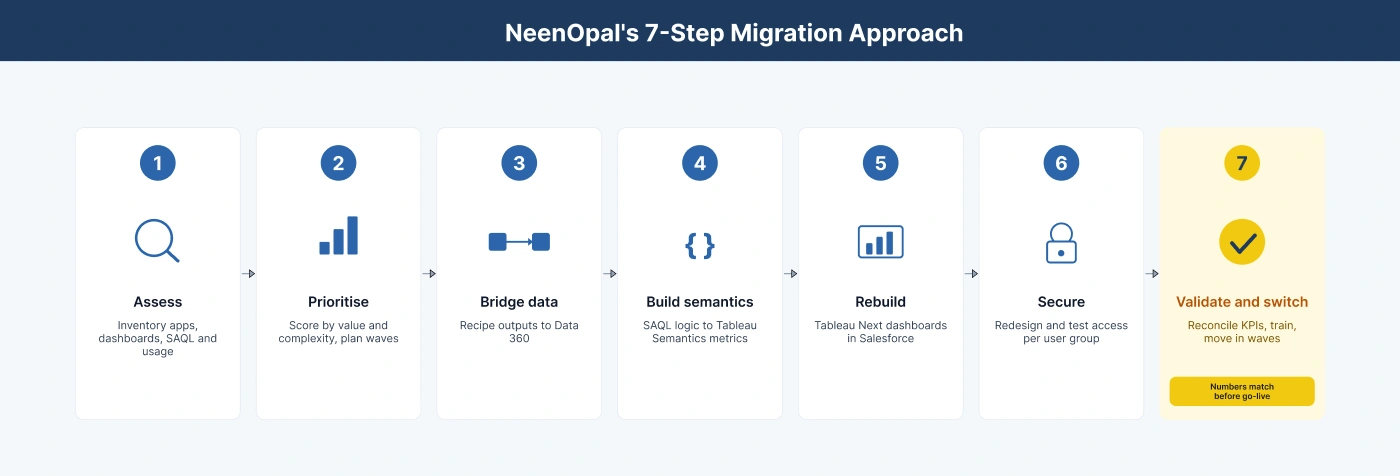
- Assess. List every app, dashboard, dataset, recipe, SAQL query, security predicate, owner, and usage figure in your CRM Analytics org. The Analytics REST API exposes this metadata, so you can extract the inventory instead of building it by hand.
- Prioritise. Score each dashboard on business value, usage, and complexity. Retire what nobody uses and pick the first use cases to move.
- Bridge the data. Point existing recipe outputs to Data 360 so your current pipelines keep running.
- Build the semantic layer. Translate SAQL logic and KPIs into Tableau Semantics models and certified metrics with clear, business-friendly names.
- Rebuild the experience. Rebuild priority dashboards in Tableau Next, embed them in Salesforce, and set up Concierge and Inspector.
- Secure. Redesign row-level access and test it for every user group.
- Validate and switch over. Compare KPIs, totals, filter results, and sample records across both platforms. Test access for each user group. Then run user acceptance testing, train users, and move them in waves while both platforms run in parallel.
Step 7 is where most of the trust is won. If the numbers in Tableau Next, don't match what sales leaders saw last quarter in CRM Analytics; adoption stalls. That's why reconciliation is built into every CRM Analytics to Tableau Next migration we run.
How NeenOpal's CRM Analytics to Tableau Next Migration Accelerator helps
We didn’t want every migration to start from a blank page, so we turned the seven steps above into a repeatable method. That makes projects faster to scope and lowers the risk once work begins. Here’s what’s inside:
- Automated inventory. We pull a full list of your CRM Analytics apps, dashboards, datasets, recipes, and SAQL, along with how often each one is used.
- Complexity scoring. Each dashboard gets a score, which tells us what to move first, what can wait, and what to retire.
- SAQL-to-semantics patterns. Common SAQL logic has already been mapped to Tableau Semantics, so your team isn’t solving the same problems from scratch.
- Security mapping template. This is a ready framework for redesigning access rules and testing them group by group.
- KPI reconciliation. We check that the numbers match on both platforms before anyone switches over.
What you get at the end:
- An inventory and usage report
- A prioritized migration roadmap
- A component mapping document
- A Data 360 data layer connected to your existing recipes
- Tableau Semantics models
- Rebuilt Tableau Next dashboards, embedded in Salesforce
- A KPI reconciliation report and security test results
- Training and handover documents, so your team can run it on their own
In short, the accelerator takes the guesswork out of a CRM Analytics to Tableau Next migration.
Plan your CRM Analytics to Tableau Next migration
You don’t have to start over to get to Tableau Next. A solid inventory, a governed semantic layer, and careful KPI checks let you move one phase at a time, with no disruption to day-to-day reporting. Book a CRM Analytics migration assessment with NeenOpal, and we’ll show you what to move first and what to leave behind. We'll show you what to move, what to retire, and how Tableau Next would work for your top use cases.
Frequently Asked Questions
1. Can Salesforce migrate CRM Analytics dashboards to Tableau Next automatically?
No. Data can move to Data 360 through recipe outputs. SAQL logic, dashboards and security have to be rebuilt in Tableau Next. That's why any CRM Analytics to Tableau Next migration should be planned as a rebuild of the experience layer.
2. Do I need Data 360 to use Tableau Next?
Yes. Tableau Next runs on Salesforce Data 360. If you don't have it in place yet, setting it up is usually the first phase of the project.
3. Can CRM Analytics and Tableau Next run at the same time?
Yes. Salesforce supports both. Most organisations move in phases and keep CRM Analytics running for the use cases that haven't moved yet.
4. Can analysts still use Tableau Desktop?
Tableau Next is built in the browser. Analysts who prefer Tableau Desktop can keep using it with Tableau Cloud and connect to the same Tableau Semantics models.
5. How is Tableau Next priced?
It's priced per user role. Analytical queries and AI usage aren't metered, but Data 360 storage and some credits are. Your total cost depends on data volumes and refresh patterns.

