

Tableau Pulse showed up in 2024 as a way to stop hunting for dashboards. It watches a KPI you care about and pushes you a note in Slack or your inbox the moment it moves. Tableau Agent arrived that same year too, as the broader conversational capability expanded across Tableau's surfaces. What arrived in 2026 was Tableau Agent in Pulse, specifically the rename of what Tableau had been calling Enhanced Q&A, now running on GPT-5.2. Instead of just reading the update, you can ask it a follow-up question.
A lot of the confusion here traces back to Salesforce's own documentation, which labels both of them "an analytics agent." Read that line by itself, and you'd assume they're two separate tools fighting for the same budget line. They're not. Tableau Agent in Tableau Pulse is the conversational piece sitting on Pulse's governed metrics, and it doesn't replace anything Pulse already does. This isn't a small distinction either. Tableau is currently the most-adopted BI vendor around, with 29% of organizations buying a BI tool choosing it as of July 2026, so plenty of teams are going to run into this exact naming question.
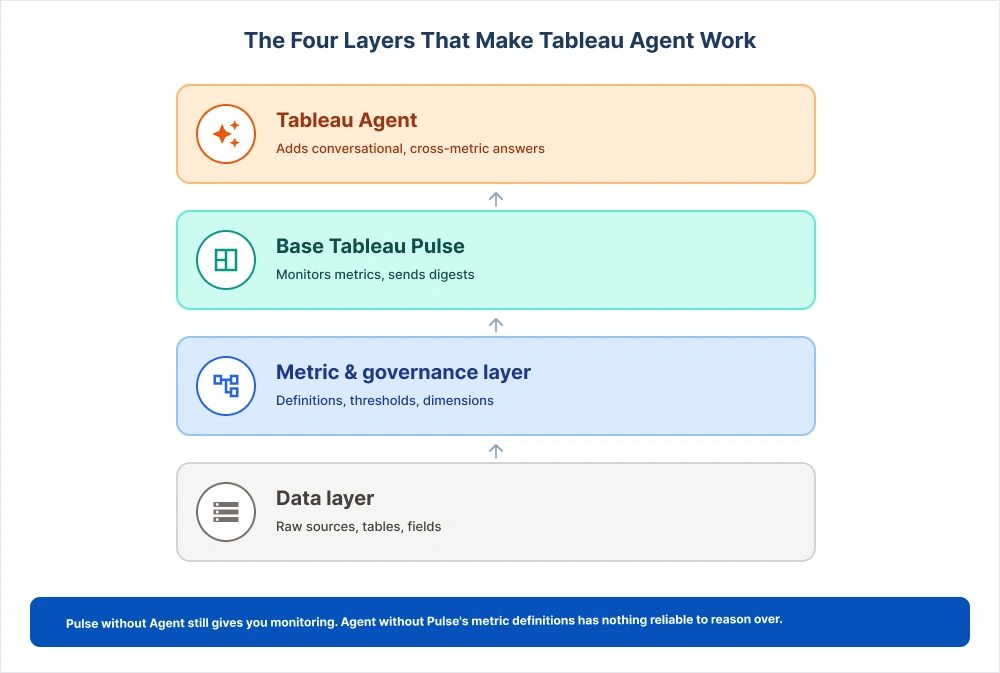
Strip it down further, and here's what's actually happening: base Pulse keeps an eye on the metrics you've set up and lets you know when something shifts. Tableau Agent in Tableau Pulse takes that same feed a step further. You can ask it why something happened, push back on the answer, and ask again. Pulse is the foundation. Agent is what you build on top of it once that foundation is solid.
Is Tableau Agent the Same as Tableau Pulse? (How They Actually Relate)
No, and the "versus" framing is the first thing to drop. Tableau Pulse is the base product: a governed metrics feed built into Tableau Cloud that tracks the KPIs your team defines and proactively flags when something needs attention. Tableau Agent in Tableau Pulse is the conversational layer added on top. It doesn't replace Pulse's metrics; it reasons over them.
Think of it as two jobs. Pulse watches defined metrics and tells you when they move. Tableau Agent, once turned on inside Pulse, lets you ask why they moved and answers in plain language instead of a static chart. Pulse without Agent still gives you monitoring; Agent without Pulse's metric definitions has nothing reliable to reason over. This is really the whole "Tableau Agent vs Tableau Pulse" question people search for, and the honest answer is that it isn't a versus at all.
One more wrinkle: "Tableau Agent" isn't exclusive to Pulse. It's the same underlying Agent, but the job changes with the surface: helping prep data in Prep, assisting with the build in Web Authoring, and working with metadata in Catalog. This article is scoped to Tableau Agent in Tableau Pulse, the surface most leaders ask about first because it's the one executives actually see.
The three names for one feature (Enhanced Q&A / Discover / Tableau Agent in Pulse)
The feature many still search for as Enhanced Q&A Tableau Pulse was renamed Discover and now sits under the Tableau Agent branding after the 2026 rename. All three names point to the same conversational capability inside Pulse; the name changed, but the job (natural-language follow-up on governed metrics) didn't.
What Base Tableau Pulse Handles On Its Own
Before deciding whether to turn on Tableau Agent in Tableau Pulse, it helps to know what base Pulse already does. A lot of what people credit to Tableau Pulse AI features is really just Pulse doing its normal job well.
Tableau Pulse is good at telling you what happened, nothing more. Pick a metric, say revenue, churn, or average handle time, and set a goal or threshold against it. From there, Pulse just watches. The moment it crosses that threshold or starts acting strange, you get a digest in your email, Slack, or phone. Nobody has to remember to log in and check a dashboard; the update finds you instead.
What Pulse won't do on its own is dig any deeper. It'll spot a trend fine, but it only slices a number one way at a time, and it has no way of telling you why something happened; that part's still on you to figure out. This is usually where teams get stuck. An executive reads the digest, asks, "Why did this happen," and gets nothing back. That gap, right there, is exactly what Tableau Agent in Tableau Pulse was built to close
Metric tracking, thresholds & automated digests
You attach a goal or threshold to a metric, Pulse checks it continuously, and delivers a short, readable summary through whichever channel your team already uses.
Out-of-the-box trend detection & single-dimension breakdowns
Pulse flags when a metric trends up or down against recent history and breaks it down along one dimension, say, revenue by region. It can't combine dimensions on the fly or explain how two metrics interact.
Practical takeaway: if your team is still standardizing the metrics behind these feeds, our guide to building a governed metric layer in Tableau covers the groundwork the rest of this article assumes.
What Tableau Agent Adds to Tableau Pulse
This is what most buyers want to understand: what Tableau Agent adds to Tableau Pulse that base Pulse cannot do. As of the 2026 update, Tableau Agent in Tableau Pulse runs on GPT-5.2, and what it actually adds is conversational, multi-metric exploration inside the same feed, turning the feed into genuine Tableau Pulse conversational analytics.
The practical shift: instead of tapping preset drill-down buttons, you type a follow-up question the way you'd ask a colleague, and Tableau Agent in Tableau Pulse answers in the feed with a chart attached where useful. Ask "why did support tickets spike last week," and you can get a narrative connecting ticket volume to a shipping delay in a different metric entirely, as long as those two metrics share a common dimension (more on that shortly).
Here's a side-by-side, since this is where most confusion clears up:
|
Capability |
Base Tableau Pulse |
Tableau Agent in Tableau Pulse |
|
Metric monitoring & thresholds |
Yes |
Yes (inherited) |
|
Proactive digests (email/Slack/mobile) |
Yes |
Yes (inherited) |
|
Breakdown depth |
Single dimension |
Multi-dimension, on request |
|
Follow-up questions |
No (preset buttons only) |
Yes, natural language |
|
Cross-metric reasoning |
No |
Yes, if metrics share dimensions |
|
Root-cause narrative with visuals |
No |
Yes, paired with a supporting visual |
|
License required |
Included in Tableau Cloud |
Requires Cloud+ Edition or above |
Natural-language exploration in the feed
Instead of clicking a fixed set of drill-down options, you ask a question directly in the Pulse feed and get an answer in the same thread, with room to keep asking follow-ups.
Cross-metric correlation
Where base Pulse shows one metric at a time, Tableau Agent in Tableau Pulse can connect two, a drop in customer satisfaction alongside a spike in delivery delays, for instance, if both are built on a shared dimension like region or product line.
Root-cause narratives + the trend visual
Rather than handing you a number and leaving interpretation to you, the agent layer writes a plain-language explanation and pairs it with Pulse's own built-in trend visual from the insight source.
Practical takeaway: the jump from preset buttons to typed follow-ups feels effortless in a demo. In production, it's only as reliable as the metric definitions underneath, which the next two sections cover.
The Licensing Gate: Base Cloud vs. Tableau+
"It's a Tableau+ feature" is the line you'll hear most, and it's not wrong, but it's an oversimplification worth correcting before you budget around it. Here's the fuller picture following the licensing restructure Salesforce announced at Tableau Conference 2026 on May 6.
Two questions settle most of the confusion here: which tier is it in, and is it metered?
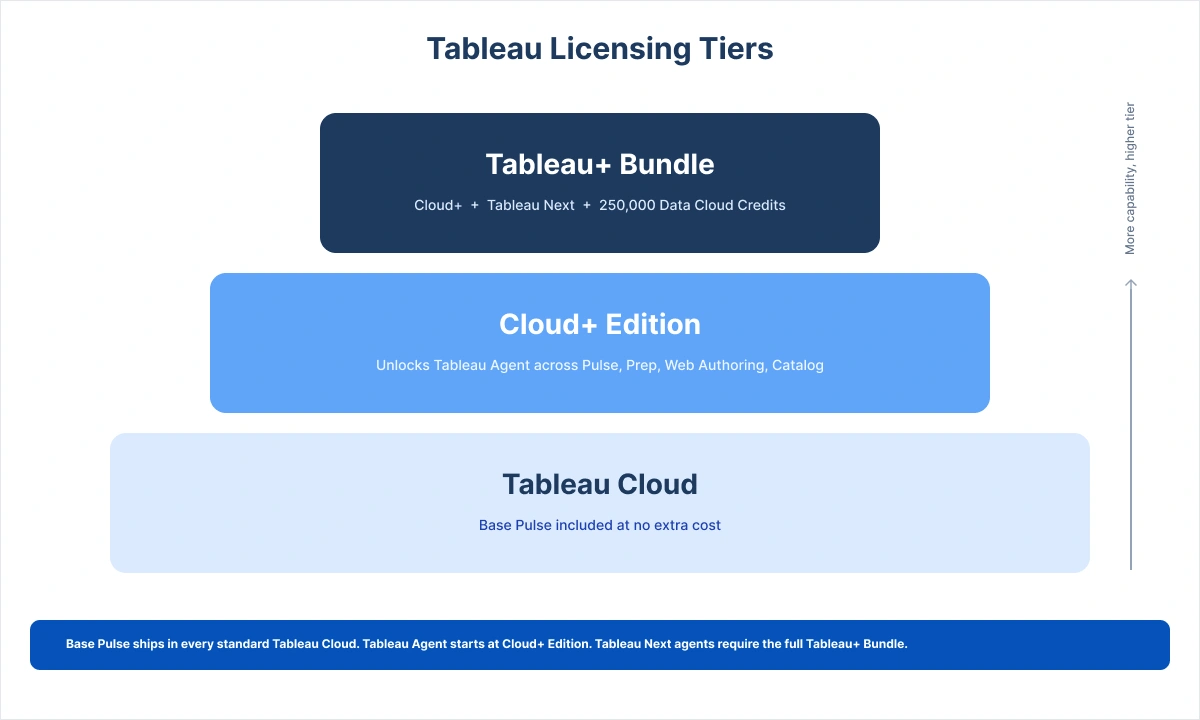
Which tier: Tableau Agent in Tableau Pulse is available from Cloud+ Edition up, that's Enterprise plus the Agent layer, not a separate rung above it, unlocking Tableau Agent across Pulse, Desktop, Web Authoring, Catalog, and Prep. Cloud+ alone covers it; Tableau Next isn't required. It's also included in the Tableau+ Bundle (Cloud+ plus Tableau Next), for teams that want the full agentic stack, not just conversational answers inside Pulse. The market still shorthands the whole jump as "Tableau+ licensing," close enough for a first budgeting pass but worth getting precise about before signing.
Metered or flat: Not per-query metered. Using Tableau Agent in Pulse doesn't carry a separate consumption charge, in either Tableau Cloud/Server or Tableau Next. What costs more is the tier itself: Cloud+ Edition is a contact-sales SKU priced above Standard or Enterprise. One 2026 pricing analysis year-one cost for ten internal users on Cloud+ Edition between $15,000 and $40,000, climbing to $45,000-$120,000 by year three, driven mostly by the tier premium and renewal uplift. None of that shows up in a simple per-seat quote.
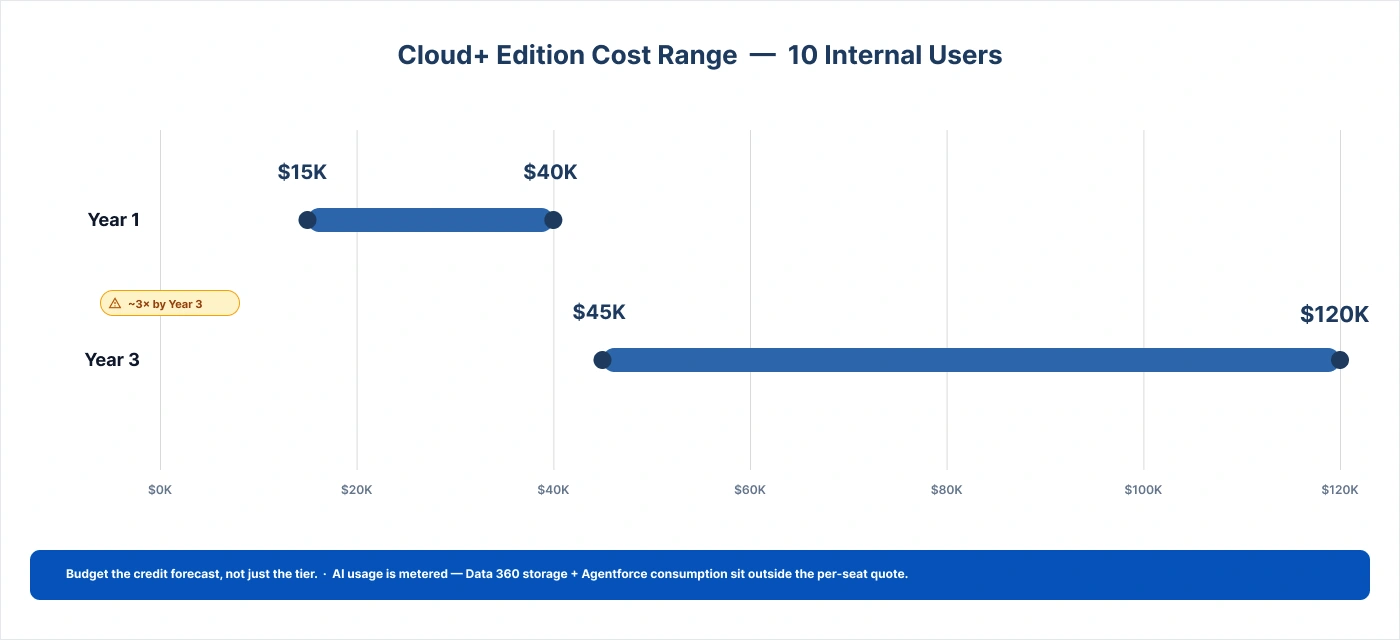
Practical takeaway: don't assume your current Standard or Enterprise per-seat rate carries over. Get a Cloud+ or Tableau+ quote specifically; Tableau Agent conversations themselves won't cost extra once you're on that tier . A limited "Try AI" trial on qualifying Cloud editions is the cheapest way to test the fit first.
The Setup Reality: What Tableau Agent Needs to Work Right
Here's what licensing pages don't mention: turning on Tableau Agent in Tableau Pulse isn't a settings toggle; it's a data-readiness decision. Every answer's quality traces back to how well your metric layer is built underneath it. This is a Tableau Pulse metric layer setup problem wearing an AI feature's name. Three things have to be true first.
Metric-layer standardization
Every metric the agent reasons over needs a consistent aggregation, a clear threshold, and agreed-upon dimensions. If "revenue" means something slightly different across three workbooks, the agent doesn't know which definition to trust, and neither will you.
Metadata hygiene (why the model picks the wrong field)
This is the quiet failure mode nobody puts in the marketing copy. Duplicate fields, vague names, and inconsistent descriptions force the model to guess which field you meant, and it sometimes guesses wrong. Clean catalog descriptions and trimmed, well-named fields stop the agent from confidently answering with the wrong column.
[SME insight, senior Tableau architect]: On one enterprise rollout, consolidating duplicate customer-ID fields and rewriting catalog descriptions changed the agent's field-selection accuracy overnight. Nothing about the model changed; the metadata did.
Shared dimensions for cross-metric reasoning
To connect two metrics (the CSAT-and-delivery-delay example earlier), those metrics need a common dimension the model can join on. Without it, the Agent can describe each metric individually but can't connect them.
Practical takeaway: treat this as an architecture decision, not a checklist item. Enable Tableau Agent in Tableau Pulse now if your metric layer clears this bar. If it doesn't, the prep work is the real project, worth scoping before you buy the tier.
Where Tableau Agent in Pulse Hits Its Limits
Most vendor pages skip this part: Tableau Agent in Tableau Pulse has real boundaries, and knowing them ahead of time keeps expectations realistic.
Wide, uncurated sources are the first wall. In our engagements, answer quality has dropped once a source crossed roughly 300 fields with a handful of duplicate or overlapping attributes, well before the model ran low on reasoning capability. It's picking the wrong field, not running out of reasoning power.
SME insight, senior Tableau architect: trimming the source down to just the fields actually used in governed metrics is what brought answer quality back on that engagement.
The second wall is scope. Tableau Agent in Tableau Pulse reasons within the metric boundaries you've defined; it isn't built to answer ad-hoc transactional questions like "Show me every line-item receipt from Tuesday. " That kind of query sits outside what Pulse's metrics were built to track, and the agent fails on it by design, not by defect.
Practical takeaway: Explain both limits to stakeholders up front, so "the AI got it wrong" conversations turn into "we need to curate this source" conversations instead.
Proof in Production: A Governed-Metrics Rollout
Here's what this looks like in practice. A commercial real-estate client NeenOpal worked with had data scattered across several systems before consolidating into a central data warehouse. Rather than turning on Tableau Agent in Tableau Pulse immediately, the team first built governed Pulse metrics: standardized definitions, cleaned metadata, and shared dimensions. Only once that foundation was in place did they enable the Agent layer.
[SME insight, senior Tableau architect]: the governance decision that mattered most wasn't technical. It was agreed, org-wide, on one definition per metric before anyone touched the agent settings. That single decision made cross-metric reasoning reliable once Agent went live.
[VERIFY before publishing: replace with this client's actual measured results, or label as illustrative.] Teams that reverse this order tend to enable Tableau Agent in Tableau Pulse against a messy foundation, then blame the AI for what is really a data-modeling gap.
Should You Enable the Agent in Pulse Yet? A Decision Framework
You've now got the full picture: Tableau Agent in Tableau Pulse is a conversational layer on Pulse's governed metrics, gated behind Cloud+ Edition or the Tableau+ Bundle, and only as reliable as the metric layer underneath it. Enable it now, or prepare first? A short readiness check answers it:
- Do your core metrics have single, agreed-upon definitions across the org?
- Is your metadata clean, with duplicate or vaguely named fields resolved?
- Do the metrics you want connected share common dimensions?
- Have you gotten a Cloud+ or Tableau+ per-seat quote, rather than assuming your current Standard or Enterprise rate carries over?
Four yeses, and enabling Tableau Agent in Tableau Pulse now is a reasonable, low-risk move. Two or more nos, and the honest next step is a semantic-layer sprint, not a purchase order. For most enterprises, that gap is smaller than expected; one focused sprint on metric governance usually separates a shaky rollout from a trustworthy one.
Weighing the Cloud+ or Tableau+ upgrade? Before committing to the tier and its Data 360 costs, book a 45-minute Tableau AI readiness review. We'll assess your metric layer and give you a straight answer on whether Tableau Agent in Tableau Pulse will deliver against your data today.
Frequently Asked Questions
1. How are Tableau Agent and Tableau Pulse different?
Pulse monitors defined metrics and pushes proactive digests. Agent adds a conversational layer on top of those governed metrics. They aren't competing tools; Agent runs inside Pulse, Prep, Web Authoring, and Catalog, too.
2. Is Tableau Agent in Pulse free?
No. It requires the Cloud+ Edition or the Tableau+ Bundle, though a limited "Try AI" trial is available on qualifying editions. Once you're licensed, using Tableau Agent in Pulse isn't per-query metered; it doesn't carry a separate consumption charge in either Tableau Cloud/Server or Tableau Next.
3. What license do you need for conversational analytics in Tableau?
Cloud+ Edition at minimum, or the Tableau+ Bundle if you also want Tableau Next. Base Pulse is already included in every standard Tableau Cloud edition.
4. Why does Tableau Pulse AI give inaccurate or irrelevant answers?
Almost always a metadata or metric-definition problem, not a model problem. Duplicate fields, vague naming, and uncurated sources degrade field selection, and shared dimensions are required for cross-metric reasoning.
5. What does Tableau Agent add over base Pulse?
Natural-language follow-ups, cross-metric correlation, and root-cause narratives with inline visuals layered on top of Pulse's existing monitoring and digests.z
6. What data setup does Tableau Agent in Pulse need?
Standardized metric definitions, clean metadata, and shared dimensions across the metrics you want connected. Semantic-layer work, not a settings toggle.
7. Can Tableau Agent answer ad-hoc transactional queries?
No. It reasons within the metric boundaries defined in Pulse, not raw line-item records. Queries outside those boundaries are a common early source of disappointment.

