

Why "lift and shift" fails for BI, and how to rebuild your reporting the right way.
Ask anyone who has been through a BI migration and you will hear the same thing: moving the dashboards is rarely the hard part. The hard part is everything underneath them: the calculations nobody documented, the security rules buried in a data model, and the hundreds of reports nobody has opened in a year.
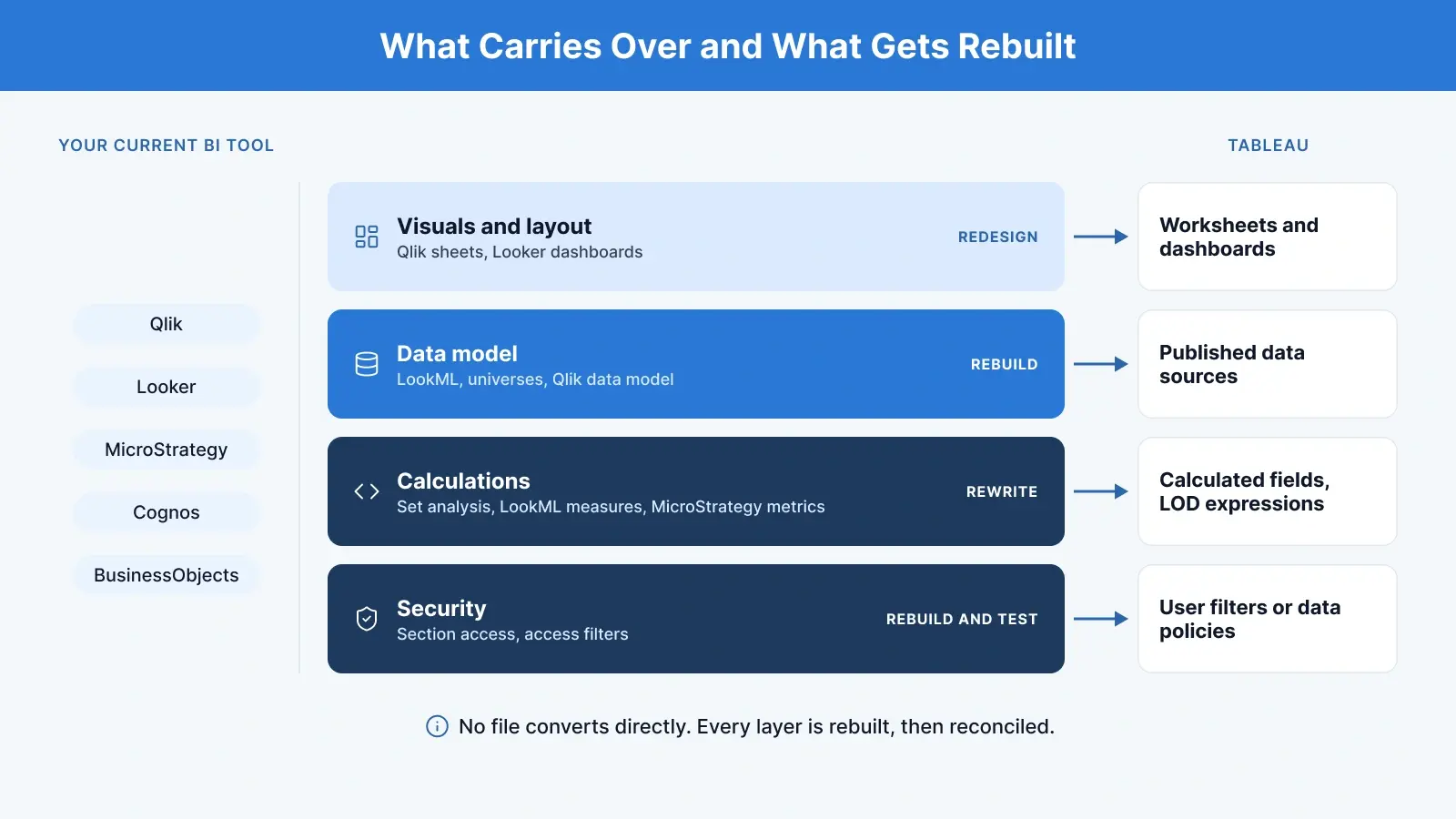
That is why, when you migrate to Tableau, there is no file you can convert. A Qlik app, a LookML project, or a MicroStrategy dossier cannot be opened in Tableau. Every BI tool stores data, writes calculations, and controls access in its own way, so the real work is rebuilding your reporting in a cleaner form and using the move to drop what is no longer needed.
This guide covers why teams move, how the concepts translate, what to expect from each source tool, a five-stage migration plan, and the pitfalls worth planning for. If you are moving from Power BI specifically, our Power BI to Tableau migration guide goes deeper on DAX, licensing, and performance.
|
In short
|
Why Organisations Migrate to Tableau
Companies rarely switch BI tools for the sake of it. The usual drivers are:
- Self-service exploration. Users can drag, filter, and explore data themselves instead of waiting for a new report to be built.
- Tool consolidation. Many companies run two or three BI tools across teams. Consolidating can reduce licence and support costs, and building on one governed data layer helps teams stop showing different numbers. The shared data source does that work, not the tool alone.
- Broad connectivity. Tableau connects to most databases, cloud warehouses and files, so it fits into most existing data stacks, including multi-cloud ones.
- Governed sharing. Dashboards are published to Tableau Cloud or Tableau Server and shared with the right people, with permissions in place.
- Legacy platform risk. Older tools such as QlikView and on-premises MicroStrategy, Cognos or BusinessObjects estates often come with ageing infrastructure, renewal deadlines and a shrinking pool of people who know them.
- Strategic decisions. Mergers, new vendor agreements, or a wider move toward the Salesforce ecosystem, which Tableau is part of.
For legacy tools, a license renewal is often what starts the conversation, but cost alone rarely carries the decision. Tableau is licensed per user by role (Creator, Explorer, Viewer), so the business case usually rests on consolidation, governance and what users can do, not on a cheaper seat price.
How BI Concepts Map to Tableau
The tools most often migrated to Tableau include Power BI, Qlik Sense and QlikView, Looker, MicroStrategy, SAP BusinessObjects, IBM Cognos, Domo and Excel-based reporting. The names differ, but most ideas have a Tableau equivalent.
|
What it does |
In other BI tools |
In Tableau |
|---|---|---|
|
Shared data model |
Power BI semantic models, Qlik data models, LookML and Explores, MicroStrategy schema objects, BusinessObjects universes, Cognos Framework Manager packages |
Published data sources (and virtual connections) |
|
Calculations |
DAX, Qlik set analysis, LookML measures, MicroStrategy metrics |
Calculated fields, LOD expressions, table calculations, parameters |
|
A single chart |
Power BI visual, Qlik chart, Looker Look |
Worksheet |
|
A page of charts |
Power BI report page, Qlik sheet, Looker dashboard |
Dashboard |
|
The whole file |
Power BI report, Qlik app |
Workbook (with optional stories) |
|
Data prep and ETL |
Power Query, Qlik load scripts, Looker PDTs |
Tableau Prep, or upstream in the warehouse |
|
Row-level security |
Power BI RLS roles, Qlik section access, Looker access filters |
User filters, entitlement tables, data policies |
|
Keeping data fresh |
Scheduled refresh, reload tasks |
Extract refreshes or live connections |
|
Organising content |
Workspaces, spaces, folders |
Projects and permissions |
The match is rarely one to one. A Qlik set analysis expression or a DAX measure usually has to be rewritten, not translated, to give the same result in Tableau. That is why the numbers must always be reconciled after rebuilding.
Migrating from Specific BI Tools: What Changes
The five-stage plan below applies to every source tool, but each one has its own sticking points.
Qlik Sense and QlikView to Tableau
Qlik's associative engine and load scripts do much of the modelling and transformation inside the tool. In a Qlik to Tableau migration, that script logic has to move to Tableau Prep or your warehouse first, then the front end is rebuilt on top. Set analysis expressions are re-expressed as LOD expressions, table calculations or filters, and section access rules become user filters or data policies. QlikView estates on ageing servers are a common reason to start, and a good moment to retire the many apps that are no longer opened.
In practice, NeenOpal rebuilds Qlik load script (QVS) logic in Tableau Prep, uses SQL or Python for advanced logic like loops, moves QVD data into a cloud data warehouse, and converts set analysis into Tableau calculated fields and LOD expressions.
Looker to Tableau
Looker already pushes most logic into the warehouse through LookML, so the data layer often carries over well. The work is re-creating Explores and measures as published Tableau data sources and calculated fields, moving persistent derived tables (PDTs) into scheduled warehouse tables, and rebuilding Looker access filters as Tableau row-level security.
MicroStrategy, Cognos and SAP BusinessObjects to Tableau
A MicroStrategy to Tableau migration and a Cognos to Tableau Migration share the same core job as a BusinessObjects move: replacing the semantic layer. These platforms rely on a heavy semantic layer (MicroStrategy schema objects, Cognos Framework Manager packages, BusinessObjects universes) and often hold years of scheduled, formatted reports. Rebuild the semantic layer as certified published data sources, and decide early what happens to pixel-perfect operational reports such as statements and invoices: Tableau is built for interactive dashboards rather than paginated reporting, so those reports may stay in another tool or be redesigned.
Power BI, Domo and CRM Analytics to Tableau
Each of these has its own guide on our blog: Power BI to Tableau, Domo to Tableau, and CRM Analytics to Tableau Next.
Two Details That Catch Teams Out
Security. Tableau gives you several routes to row-level security: manual user filters, dynamic user filters driven by a security field or entitlement table, security already enforced in the database, and data policies on virtual connections. Data policies let you define the rule once and apply it to every workbook, data source and flow built on that connection. They require Data Management and are available from Tableau 2021.4, and Tableau recommends them in most situations where they are available (Tableau documentation). Decide your approach early and test it with real user accounts. Our guide to row-level security in Tableau walks through the setup.
Refresh. If you are on Tableau Cloud and your data lives on a private network, Tableau Bridge is what keeps those sources fresh. A Qlik reload, or Power Query refresh, also reshapes data as it loads, while a Tableau extract refresh mostly re-queries the source. That transformation logic needs a new home in Tableau Prep or your warehouse.
The 5 Stages of a Tableau Migration
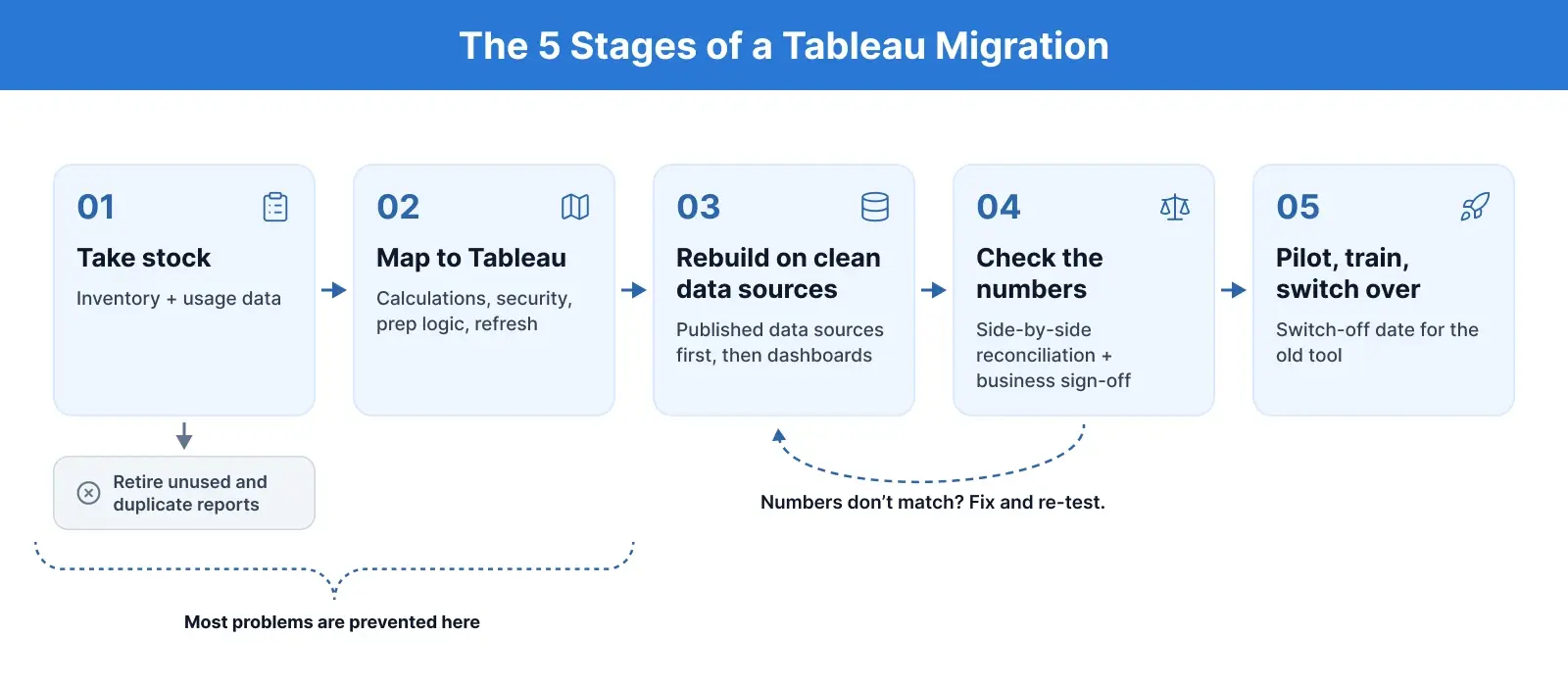
Each stage builds on the one before it, and most problems found late can be traced back to a skipped step in stages 1 or 2.
1. Take stock of what exists
List every report, dashboard and data source in the current tool and check how often each is used. Most BI platforms expose usage or activity data you can mine. Reports nobody has opened in months can be retired instead of moved, and this step alone often cuts the workload sharply. This is also the time to agree on goals, success measures, and the target platform: Tableau Cloud, Tableau Server, or Tableau Next. If you are also moving from Tableau Server to the cloud, plan it alongside the migration; see our Tableau Cloud migration services.
2. Map the old tool to Tableau
Decide how datasets, calculations, security rules, prep logic, and refresh schedules will be handled, using a mapping like the table above. Flag anything that will not carry over cleanly, such as paginated reports, custom extensions or write-back.
3. Rebuild on clean data sources
Create shared, published data sources first, then build dashboards on top of them. The aim is not to copy the old layout screen by screen but to rebuild in a way that suits Tableau and the people using it. There is no magic converter: plan it as a rebuild and estimate the effort accordingly.
4. Check that the numbers match
Compare key figures in the old and new dashboards side by side, using identical filters, date ranges and fiscal calendars. When figures differ, the usual suspects are null handling, rounding, distinct counts, time zones and calculation context. Business users should sign off before anything goes live.
5. Pilot, train and switch over
Start with a small group, fix the issues they raise, then roll out to everyone with hands-on training. Once live, track adoption with Tableau usage reporting so you can see which dashboards people actually use. Set a clear date when the old tool will be switched off so people do not keep using both.
Should You Use an Automated Migration Tool?
Several vendors offer tools that promise to convert Qlik, MicroStrategy or Power BI content to Tableau automatically. They are genuinely useful for the inventory stage: extracting metadata, listing calculations and scoring complexity. Converting the calculations and security rules themselves is different. Each tool has its own calculation logic, so generated output still has to be checked line by line, and it is often faster to rebuild key measures by hand in Tableau-native patterns. A sensible split is automation for discovery, people for logic and reconciliation.
Common Tableau Migration Challenges and How to Handle Them
|
Challenge |
Why It happens |
How to handle it |
|---|---|---|
|
Too many reports |
Old tools collect years of unused or duplicate content |
Use usage data to decide what to keep, merge or retire |
|
Numbers don't match |
Each tool calculates in its own way |
Rewrite key measures carefully and test against the old results |
|
Prep logic is lost |
ETL lived inside the old tool |
Move it to Tableau Prep or the warehouse |
|
Security gaps |
Row-level rules are built differently in Tableau |
Map every rule and test with real user accounts |
|
Slow dashboards |
Wide data sources, too many filters, heavy nested calculations |
Keep only the columns you need, push heavy logic upstream and review filters |
|
User resistance |
People know the old tool and its layouts |
Involve users early, run a pilot, give hands-on training |
|
Two tools for too long |
No firm end date for the old tool |
Agree a switch-off date at the start |
|
Sprawl returns |
Self-service without governance |
Use projects, certified data sources and clear ownership |
Most of these can be avoided with good planning in the first two stages. If performance is the issue after go-live, see our Tableau dashboard optimization service.
What a Well-Run Tableau Migration Delivers
When the migration is done well, you can expect to end up with:
- Fewer reports, with a higher share of them actually used
- One trusted set of data sources behind every dashboard
- Users who explore data themselves instead of requesting new reports
- Potentially lower costs from running one BI tool instead of several
These are goals, not guarantees. They depend on the discipline you bring to the audit and the rebuild. For an example, see how we migrated a solar company's reporting from Power BI to Tableau after an acquisition.
Tableau Migration Checklist
☐ Inventory complete, with usage data for every report
☐ Unused and duplicate content retired or merged
☐ Target platform (Cloud, Server or Next) and licence roles confirmed
☐ Calculations, security rules and prep logic mapped
☐ Paginated or operational reports given a clear destination
☐ Published data sources built and certified
☐ Row-level security tested with real user accounts
☐ Key figures reconciled and signed off by business owners
☐ Pilot group trained and feedback addressed
☐ Switch-off date for the old tool announced
For a wider pre-project list, download our BI implementation checklist.
Final Thoughts
A successful move to Tableau is decided before the first dashboard is rebuilt. The teams that get it right treat the inventory as a chance to cut their reporting estate, build governed data sources before any visuals, and refuse to go live until the numbers and the security rules have been checked by the people who rely on them. Do that, and the migration leaves you with a smaller, cleaner, and more trusted reporting layer than the one you started with.
|
Planning a migration to Tableau? NeenOpal's certified Tableau consultants rebuild dashboards, data sources, and logic, then reconcile every number against the source before go-live. Explore our Tableau platform migration services or talk to a Tableau expert about a migration assessment. |
Frequently Asked Questions
1. Can I convert Qlik or Looker dashboards to Tableau automatically?
Not reliably. No tool opens a Qlik app or LookML project in Tableau. Automated tools can extract metadata and draft parts of the rebuild, but calculations and security rules still need to be rewritten and reconciled against the original numbers.
2. What is the first step in a migration to Tableau?
An inventory of every report, dashboard and data source with its usage data. Retiring unused content before rebuilding is usually the biggest single saving in the project.
3. What happens to row-level security when you migrate to Tableau?
It is rebuilt, not copied. Qlik section access, Looker access filters, and Power BI roles become Tableau user filters, entitlement-table filters, database security or data policies, and each rule should be tested with real user accounts before go-live.
4. Do I need Tableau Prep for a migration?
Only if transformation logic lived inside your old BI tool, such as Qlik load scripts or Power Query. That logic can move to Tableau Prep or, often better, to your data warehouse.
5. Should we move to Tableau Cloud or Tableau Server?
It depends on where your data lives, your security requirements, and how much infrastructure you want to run. Tableau Cloud removes server maintenance and uses Tableau Bridge for data on private networks; Tableau Server keeps everything in your own environment.