Most Microsoft Fabric projects do not stall on technology. They stall on planning: a capacity bought before anyone measured the workload, security bolted on after the first reports go live, or data sources that turn out to need access nobody arranged.
The short answer to "how do you implement Microsoft Fabric?" is five phases: discovery, architecture and capacity usage, a proof of concept on your own data, build and migration, and governance with adoption. Done well, your first data lands in a development workspace within a week, you have a go/no-go decision with real numbers in about four weeks, and a focused production rollout follows in roughly two to three months.
This guide walks through each phase, what it costs, how long it takes and where projects go wrong. It is based on what our team sees delivering Fabric as a Microsoft Fabric Featured Partner.
What Does a Microsoft Fabric Implementation Include?
A Microsoft Fabric implementation is the work of turning Fabric from a licence into a working data platform: connecting your sources to OneLake, designing capacity, workspaces and security, building the data layers and semantic models behind your reports, and putting deployment and governance in place so people can trust and use what you built.
Turning Fabric on takes minutes. Implementing it properly means getting nine pieces right:
| # | Building block | What it covers |
|---|---|---|
| 1 | Capacity | The F SKU that powers every workload, and a plan for scaling it |
| 2 | Workspaces and domains | How content is organised by team, project and environment |
| 3 | OneLake and medallion layers | One copy of your data, refined from raw (bronze) to clean (silver) to business-ready (gold) |
| 4 | Ingestion | Shortcuts, mirroring, pipelines or notebooks, chosen per source |
| 5 | Lakehouse or warehouse | Where data is organised and queried, including ad hoc queries |
| 6 | Semantic models and Power BI | The layer business users actually see (Fabric data apps vs Power BI reports) |
| 7 | Security and governance | Row-level security, access roles, lineage and monitoring |
| 8 | Deployment (CI/CD) | Moving changes safely from development to test to production |
| 9 | Adoption | Training, usage tracking and support after go-live |
Are You Ready for Fabric? A Quick Readiness Check
Before any capacity is bought, answer these ten questions. Each "no" is a decision you will have to make during the project anyway; making it now is cheaper.
| Area | Question | ✓ |
|---|---|---|
| Goal | Is there one clear first use case with a business owner? | ☐ |
| Data | Have you listed every data source, where it lives and who controls access? | ☐ |
| Do you know how each source will come into Fabric (shortcut, mirroring, pipeline or notebook)? | ☐ | |
| Do you know whether you need data from other tenants or clouds, such as AWS or Google Cloud? | ☐ | |
| Do you know what you are migrating (Synapse, Azure Data Factory, a legacy warehouse or Power BI reports)? | ☐ | |
| Access | Do you know who needs to see what, including external users through an app or portal? | ☐ |
| Is a tenant admin available to set up service principals and admin settings? | ☐ | |
| Budget | Do you know your current Power BI licensing (Pro, Premium Per User or capacity)? | ☐ |
| Is there a capacity budget, and a plan to measure usage before buying a reservation? | ☐ | |
| Team | Does your team have SQL, Spark and DAX skills, or a plan to cover them? | ☐ |
Answered "no" to three or more? Start with a Fabric architecture review before you commit to capacity or a build plan.
From our Fabric team: "We start with the data sources: what they are, where they live, and the best way to bring each one into Fabric. Fabric gives you a lot of options, including shortcuts, mirroring, pipelines and notebooks, so this step is about matching each source to the right one early. Next we look at who needs to see what. Getting that clear upfront lets us design row-level security and the workspace structure once and apply it everywhere, rather than retrofitting it later."
The item clients most often have not planned for is access across tenants or clouds. It is very achievable in Fabric, but it goes smoothest when a tenant admin is involved from day one to set up service principal access and the relevant admin settings. We build that into the first week of every project.
The 5-Phase Microsoft Fabric Implementation Roadmap
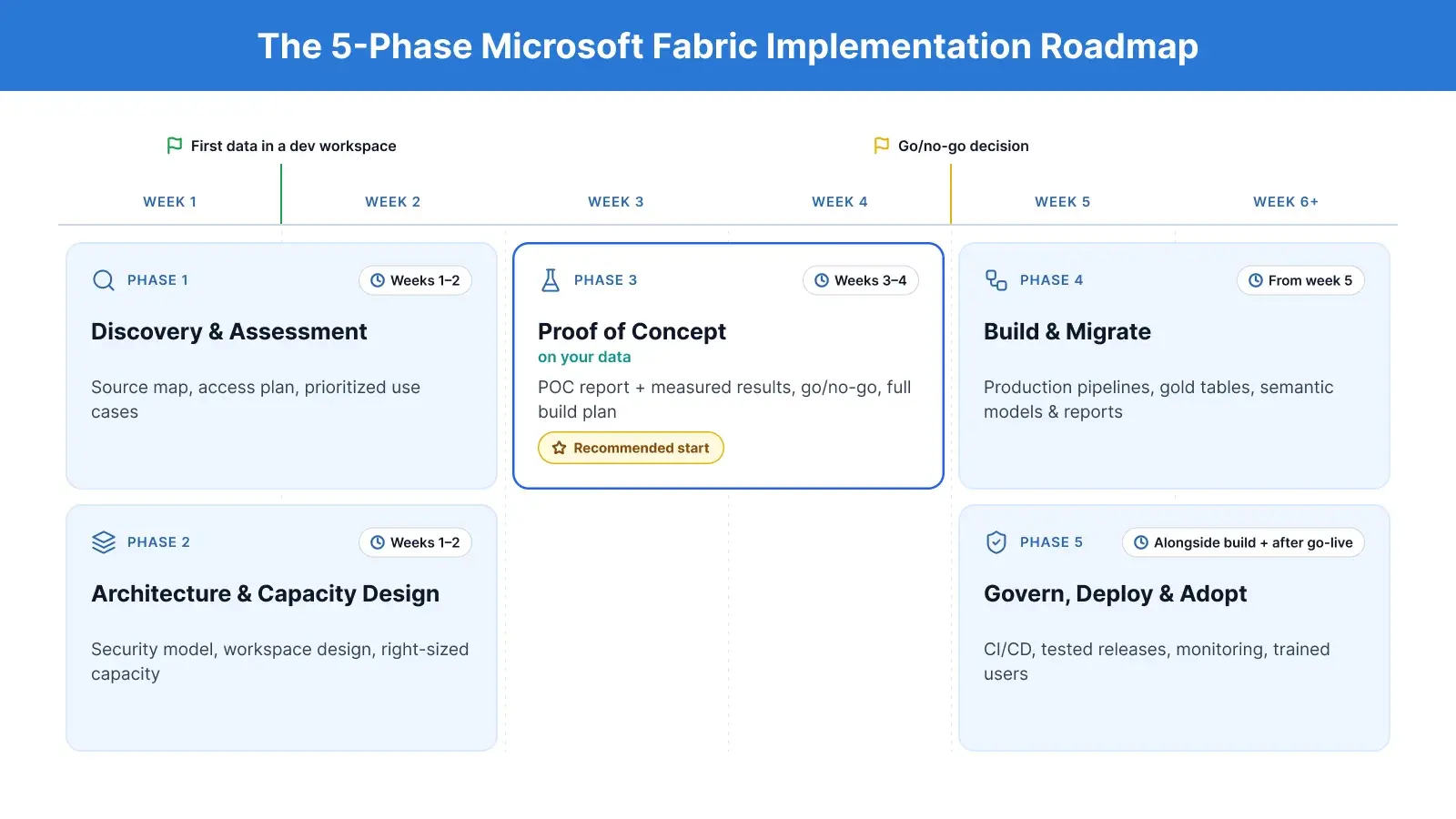
A Fabric implementation moves through five phases, and the first four weeks decide most of the outcome. Here is how the phases line up on a typical focused project.
|
Phase |
When |
What you get at the end |
|---|---|---|
|
1. Discovery and assessment |
Weeks 1 to 2 |
Source map, access plan, prioritised use cases |
|
2. Architecture and capacity design |
Weeks 1 to 2 |
Security model, workspace design, right-sized capacity provisioned |
|
3. Proof of concept on your data |
Weeks 3 to 4 |
POC report with measured results, go/no-go, full build plan |
|
4. Build and migrate |
From week 5 |
Production pipelines, gold tables, semantic models and reports |
|
5. Govern, deploy and adopt |
Alongside the build and after go-live |
CI/CD, tested releases, monitoring, trained users |
Phase 1: Discovery and Assessment
Discovery starts with your data sources: what they are, where they live, and the best way to bring each one into Fabric. Fabric offers shortcuts, mirroring, pipelines and notebooks, and the right choice depends on the source.
For Google Analytics 4, for example, we use a Spark notebook with the BigQuery connector, because it handles GA4's daily-table export pattern cleanly and scales as the history grows and stores the data in one unified table along with handling the nested rows.
The same weeks cover who needs to see what, whether reports will reach external users through an app or portal, and whether any data sits in another tenant or cloud. A tenant admin joins in week one to set up service principal access.
You leave this phase with a source map, an access plan and a prioritised list of use cases. If you want a structured version of this step, see our data strategy and architecture services.
Phase 2: Architecture and Capacity Design
This phase decides the lakehouse or warehouse pattern, the medallion layers, the workspace and domain structure, and the security model. Designing row-level security and workspaces once, up front, means they apply to everything you build later.
It also decides capacity, which is where many teams overspend. The common mistake is buying a large SKU such as F64 on day one and running it at peak around the clock.
How we size capacity: "We size capacity from the workload, then plan for it to scale up and down, not run at peak 24/7. We also project from historical trends and compare dynamic sizing against a three-year reservation."
Two anonymised examples from our projects show what that means in practice:
|
Scenario |
Dynamic plan |
Monthly cost |
Fixed alternative |
Saving |
|---|---|---|---|---|
|
Embedded reporting product |
F4 and F8, about half the month on each |
About $788 |
F8 all month, about $1,051 |
About 25% |
|
Larger data platform |
F128 at peak, F64 for moderate hours, F32 the rest |
About $8.8k |
F128 all month, about $16.8k |
About 50% |
Note: Costs shown are based on Microsoft’s published pay-as-you-go prices. In practice, we have seen actual Azure bills run about 20% higher once ad hoc usage and taxes are added.
We set a clear trigger for stepping up a size: sustained utilisation above 70 to 80%, or reports slowing under peak concurrency. And when capacity looks too small, resizing is the last lever, not the first. We fix the query, run OPTIMIZE and Z-order on the table, and adjust partitioning before we touch the SKU. For the full pricing picture, see our guide to Fabric capacity pricing.
Phase 3: Proof of Concept on Your Own Data
The proof of concept is the lowest-risk way to commit. In week three, we connect one source end to end, build one gold table and test the actual security model on a real report. In week four, you receive the POC report with measured performance and cost, a go/no-go recommendation and the full build plan with phases and dates.
Because the POC runs on your data and your capacity, the numbers it produces are the ones your production platform will see. That is also when capacity sizing gets confirmed with evidence rather than estimates.
Want to see Fabric working on your own data? Ask us about a proof of concept sized to your capacity.
Phase 4: Build and Migrate
The build brings the remaining sources into OneLake, builds the bronze, silver and gold layers, and publishes the semantic models and reports, often with Direct Lake. If you are moving from another platform, this is also where reports and pipelines migrate; our guide to Azure Synapse to Microsoft Fabric migration covers that path.
We build on reusable frameworks rather than one-off notebooks. Our transformation framework defines silver-to-gold logic declaratively in YAML and handles dependencies automatically, and we have tooling for Delta table replication between lakehouses and automated table registration. Where Data Factory connectors fall short, we write custom ingestion code so data arrives efficiently and accurately.
In one project, we moved a B2B HR technology company onto Fabric with a single semantic model serving every downstream client and dynamic row-level security for external portal users (read the case study).
Phase 5: Govern, Deploy and Drive Adoption
Governance covers row-level security, access roles, lineage and monitoring. Deployment covers how changes move from development to test to production without breaking anything.
We prove correctness before anything ships. Our test harness runs full, incremental and soft-delete loads, then compares a control gold lakehouse against the test one by hash. For a SaaS product built on Fabric, we built a custom CI/CD pipeline with GitHub Actions and the Fabric REST APIs that delivered 8x faster customer deployments and 80% faster rollbacks (read the case study).
Adoption is the last step and the one most often skipped. Training, usage tracking and a clear owner for each report are what turn a working platform into one people use. Our guide to Power BI implementation covers the adoption side in more depth.
Microsoft Fabric Architecture: What a Good Setup Looks Like
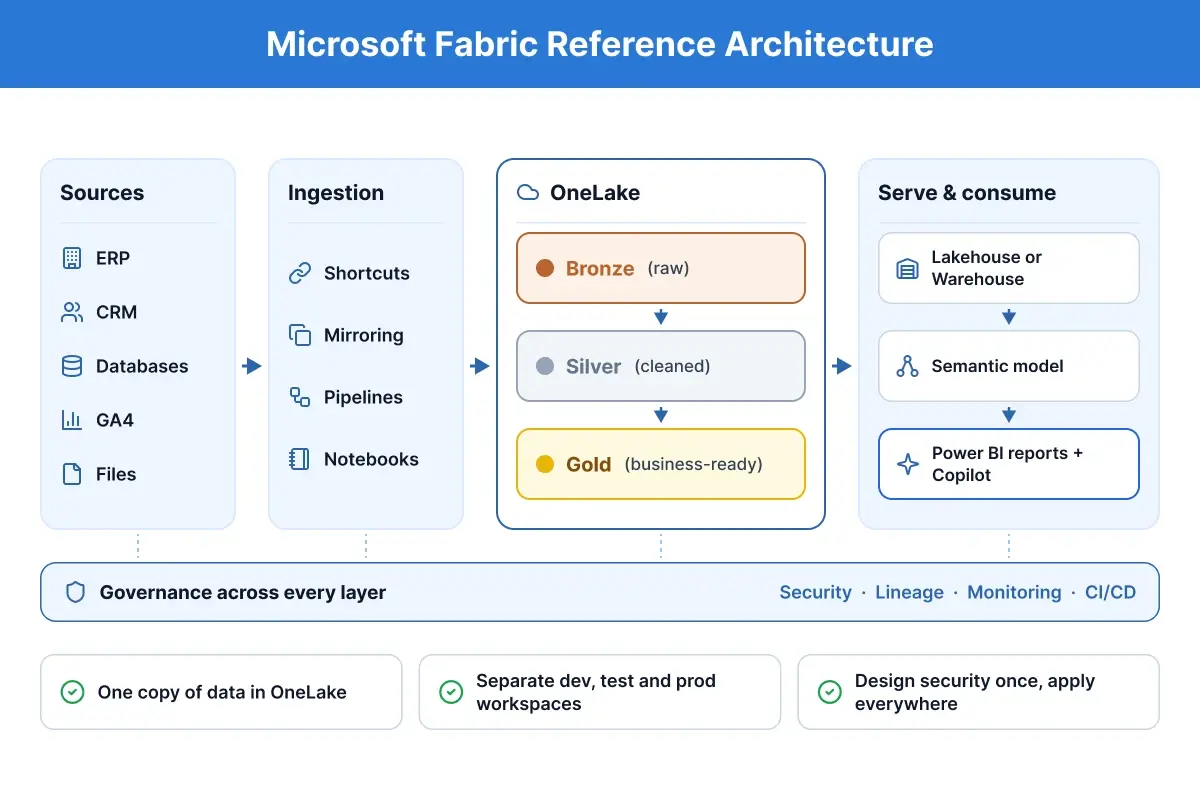
A good Fabric architecture keeps one copy of your data in OneLake and refines it in layers, so every report draws from the same trusted source.
Data flows from your sources into the bronze layer as it arrives, is cleaned and joined in silver, and is shaped into business-ready tables in gold. Semantic models sit on the gold layer, and Power BI reports and Copilot sit on the semantic models. Governance is not a final layer; it runs underneath all of them.
Three design rules keep this architecture healthy as it grows:
-
One copy of data in OneLake. Use shortcuts and mirroring where they fit, instead of copying the same data into several places that drift apart.
-
Separate development, test and production workspaces. Changes are built and tested away from the reports people rely on, then promoted through a deployment pipeline.
-
Design security once and apply it everywhere. Row-level security and workspace roles defined in the architecture phase follow the data into every report, instead of being rebuilt report by report.
The same pattern scales from a single department to an enterprise platform; see how we applied it for an enterprise data platform on Fabric and for real-time data ingestion. Our data platform engineering team designs these foundations.
How Long Does a Microsoft Fabric Implementation Take?
A focused Fabric implementation takes about two to three months from kickoff to go-live, with first data visible in week one and a go/no-go decision in week four. Larger rollouts take longer, mainly because of the number of sources, migrations and security requirements.
|
Milestone or scope |
Typical timeline |
Source |
|---|---|---|
|
First batch of data in a development workspace |
Within 1 week |
NeenOpal projects |
|
Proof of concept with go/no-go and build plan |
About 4 weeks |
NeenOpal projects |
|
Focused migration with embedded reporting and row-level security |
About 10 weeks, kickoff to go-live, including a 1-week POC |
NeenOpal project |
|
Growth project across several use cases |
About 2.5 to 3 months |
Industry estimate (MyData Insights, 2026) |
|
Enterprise platform or large migration |
About 4 to 18 months |
Industry estimate (MyData Insights, 2026) |
What stretches a timeline is rarely the build itself. It is waiting for access to a source in another tenant, discovering late that external users need row-level security, or hitting a connector that cannot pull the data reliably. Each of those is cheaper to resolve in week one than in week eight, which is why the first two weeks focus on sources, access and security.
What Does a Microsoft Fabric Implementation Cost?
The cost of a Fabric implementation has three parts: the capacity you run every month, the Power BI licences your users need, and the services to design and build the platform.
1. Fabric capacity (monthly). Capacity is billed per hour by size. In US regions, pay-as-you-go prices run from about $263 a month for an F2 to about $8,410 for an F64 left on all month, and a one- or three-year reservation saves about 41%. Capacity can also be scaled up and down: in the examples above, planning for that cut monthly capacity cost by 25% to 50% compared with running one large SKU all the time.
2. Power BI licences. Below F64, everyone who creates or views shared Power BI content needs a Pro (or Premium Per User) licence. At F64 and above, viewers can use a free licence. For organisations with many report viewers, this can decide the capacity size on its own.
3. Implementation services. Market estimates for a first project range from about $10,000 for a fixed-scope foundation to $20,000 to $40,000 for a two to three month implementation, and more for enterprise programmes. The biggest drivers are the number of sources, migrations, security complexity and how much reusable tooling your partner brings.
The most expensive mistake is committing to capacity before you have measured anything. Right-size it after the proof of concept, when you have real usage data, and decide between dynamic sizing and a reservation on those numbers.
7 Microsoft Fabric Implementation Challenges (and How to Avoid Them)
Most Fabric problems we are asked to fix come from a handful of avoidable decisions. Here are the seven we see most often.
| # | Challenge | What goes wrong | How to avoid it |
|---|---|---|---|
| 1 | Unoptimised Delta tables and Spark jobs | Skipped best practices and untuned jobs burn through capacity fast | Run OPTIMIZE and Z-order on large tables, partition sensibly and tune jobs before buying a bigger SKU |
| 2 | Capacity sized by guesswork | Teams overbuy, or hit throttling on day one | Size from the measured workload, plan to scale up and down, and step up only when utilisation stays above 70 to 80% |
| 3 | Unoptimised reports | Heavy visuals and inefficient semantic models slow Fabric down and use capacity pipelines need | Treat report performance as part of the build, not an afterthought |
| 4 | Security and workspaces designed late | Retrofitting row-level security and workspaces after go-live means reworking every report | Decide who sees what, including external users, in the first two weeks |
| 5 | Connector gaps in Data Factory | Built-in connectors don’t cover some sources well | Choose the right ingestion route per source, and use custom code where connectors fall short (we do this when Data Factory can’t fetch data reliably) |
| 6 | Building everything from scratch | Fabric gives you the platform, not the framework, so teams write one-off notebooks that are hard to maintain | Use reusable patterns for transformations, table registration and environment deployment |
| 7 | Deployment and adoption left to the end | Native deployment pipelines don’t fit every case (such as multi-tenant SaaS), and platforms without training or owners go unused | Plan CI/CD and adoption from the start; we built a custom CI/CD pipeline for exactly this |
Is Microsoft Fabric production-ready?
Yes, for well-scoped workloads, provided you design around its current limits from day one. Fabric is moving quickly, and some areas, such as certain connectors and deployment scenarios, still need custom work. The teams that succeed are upfront about those limits and plan for them in the architecture, rather than discovering them in production.
Should You Hire a Microsoft Fabric Implementation Partner?
You can implement Fabric in-house if you have the skills and time; a partner makes sense when speed, a migration or security complexity raises the cost of getting it wrong.
|
Situation |
In-house |
With a partner |
|---|---|---|
|
One department, a few cloud sources, an experienced data team |
Often a good fit |
Useful for a short architecture review |
|
Migration from Synapse, Azure Data Factory or a legacy warehouse |
Possible, but slow without prior migrations |
Faster, with fewer surprises |
|
External users, multi-tenant reporting or strict row-level security |
High risk of rework |
Designed correctly from the start |
|
Sources across tenants or clouds, or weak connectors |
Often stalls on access and custom code |
Handled in the first weeks |
|
Tight deadline or no SQL, Spark and DAX skills on the team |
Hard |
Recommended |
If you decide on a partner, check these six things before you sign:
-
Microsoft status: Fabric Featured Partner or Solutions Partner designation for Data and AI.
-
Certified engineers: people with Fabric certifications such as DP-600 and DP-700 on your project, not just on the website.
-
Real Fabric case studies with numbers, not generic data platform stories.
-
A proof of concept on your own data, sized to your capacity, before the full build.
-
Reusable frameworks and accelerators, so you are not paying to build everything from scratch.
-
Capacity advice based on measured usage, not "start with F64".
How NeenOpal Implements Microsoft Fabric
NeenOpal is a Microsoft Fabric Featured Partner with the Analytics on Microsoft Azure specialization, 25+ Microsoft-certified engineers, 30+ reusable accelerators and 40+ Fabric and data workflows shipped. Three things shape how we work:
-
Reusable frameworks, not one-off notebooks. Silver-to-gold logic is defined declaratively in YAML with dependencies handled automatically, alongside tooling for Delta table replication, automated table registration and API-driven environment deployment.
-
Proven correctness. Our test harness runs full, incremental and soft-delete loads and compares a control gold lakehouse against the test one by hash before anything ships.
-
Honesty about Fabric's limits. We design around them from day one, with custom ingestion code and custom CI/CD where the native options fall short.
Your first 30 days with NeenOpal
-
Weeks 1 to 2: discovery, architecture and capacity setup. We map sources and access, design the security model and provision a right-sized capacity.
-
Week 3: a proof of concept on your own data. One source connected end to end, one gold table, and your real security model tested on a real report.
-
Week 4: the POC report with measured results and a go/no-go, plus the full build plan with phases and dates.
Results from our Fabric projects
|
Client |
What we built |
Result |
|---|---|---|
|
Fabric and Power BI platform for K-12 school data |
25% cost savings; reporting cut from days to under an hour |
|
|
Custom multi-tenant CI/CD pipeline |
8x faster deployments; 80% faster rollbacks |
|
|
Fabric migration with dynamic row-level security |
One semantic model for every client; 100% role-based access |
You can start with an architecture review, a proof of concept, a managed team or staff augmentation. Planning a Fabric implementation? Talk to a Microsoft Fabric expert or explore our Microsoft Fabric consulting services.
Frequently Asked Questions
1. How long does a Microsoft Fabric implementation take?
A focused implementation takes about two to three months from kickoff to go-live. In our projects, the first data reaches a development workspace within a week and a proof of concept delivers a go/no-go decision in about four weeks. A focused migration with embedded reporting and row-level security took 10 weeks. Enterprise platforms can take many months.
2. How much does it cost to implement Microsoft Fabric?
There are three costs: monthly capacity (from about $263 for an F2 to about $8,410 for an F64 on US pay-as-you-go, about 41% less with a reservation), Power BI licences, and implementation services. Market estimates for a first project start around $10,000 and commonly run $20,000 to $40,000.
3. What are the steps to implement Microsoft Fabric?
There are five phases: discovery and assessment; architecture and capacity design; a proof of concept on your own data; build and migration of pipelines, data layers and reports; and governance, deployment and adoption. The first three can be completed in about four weeks.
4. Do I need F64 to implement Microsoft Fabric?
No. Many implementations start smaller and scale up and down with the workload. F64 matters mainly because, at that size, people who only view Power BI content can use free licences. Size capacity from measured usage after a proof of concept, not before.
5. Is Microsoft Fabric production-ready?
Yes, for well-scoped workloads, as long as you design around its current limits from the start. Some connectors and deployment scenarios still need custom work, so plan for them in the architecture rather than discovering them in production.
What should I look for in a Microsoft Fabric implementation partner?
Look for Fabric Featured or Solutions Partner status, certified engineers on your project, real Fabric case studies with numbers, a proof of concept on your own data, reusable frameworks, and capacity advice based on measured usage rather than a default SKU.