


Building a Validated Conversational Sales Analyst on Amazon Quick for a Managed IT Provider
Get in touchOverview
Our client, a managed IT services provider delivering all-inclusive computer, internet and help desk support to small and mid-sized businesses, already monitored sales opportunities across eight funnel stages in an established Power BI dashboard. Answering deeper questions about stage duration, win rates and trends still meant stacking filters and interpreting the resulting measures. NeenOpal extended that environment with a conversational AI Analyst Agent built on Amazon Quick, connected to the client's opportunity stage funnel dataset in Amazon RDS. Teams now ask questions in plain language and receive summaries, charts and the supporting SQL, cutting the time to a routine answer by 75% and the number of analysis steps by 60%. The depth sits in the foundation: a curated opportunity-stage data model, documented business rules, and answers reconciled with the existing Power BI dashboard month by month and filter by filter, which matched on every indicator tested. Power BI stays exactly where it was.
- 75%
- Less Time to Insight on Routine Plain-Language Questions
- 60%
- Fewer Analysis Steps Across Multiple Dimensions
- ~90%
- Self-Service Resolution Target for Routine Questions
- 2x
- Faster Bottleneck Spotting Across Funnel Stages, Up To
Customer Challenges
The existing dashboard already held the answers, but reaching the detailed ones took several filtering steps and careful interpretation of the calculations underneath.

Deeper Analysis Required Multiple Filtering Steps
Investigating a question that spanned a specific month, account, sales representative, opportunity cohort and funnel stage meant understanding the dashboard's structure and applying the right combination of filters before an answer appeared. Every additional dimension added effort to what was, in business terms, a single question.

Stage-Duration Analysis Depended on Consistent Calculations
Sales velocity is not simply the number of opportunities sitting in each stage. The analysis has to separate time spent within a stage from time taken to progress between stages, and distinguish typical durations from unusually long-running cases. Averages and medians also tell different stories, because a handful of stalled opportunities can pull an average well away from the typical observation.

Funnel Metrics Rested on Precise Business Definitions
Because the dataset represented opportunities across multiple funnel stages, a single opportunity could appear in several rows. Counting rows as though each were a unique deal would have inflated deal counts and distorted every measure derived from them, and a win rate calculated against the wrong population of deals would have been misleading. The model also had to separate real stage events from rows introduced to represent skipped stages.

Recent Results Needed Maturity-Aware Interpretation
Opportunities created in recent months are often still open and progressing through the sales process. Treating their current outcomes as final makes recent cohorts look weaker than they may ultimately prove to be, so the agent had to surface that limitation concisely rather than either hiding it or burying each answer in caveats.

Answers Had to Stay Consistent With Established Reporting
The existing Power BI dashboard was already the reference for sales funnel analytics. An agent that produced plausible but inconsistent answers would have undermined confidence in both systems, so it needed to follow the same tested KPI definitions and filtering logic rather than arriving at its own.
Validated Conversational Sales Analytics
Solutions
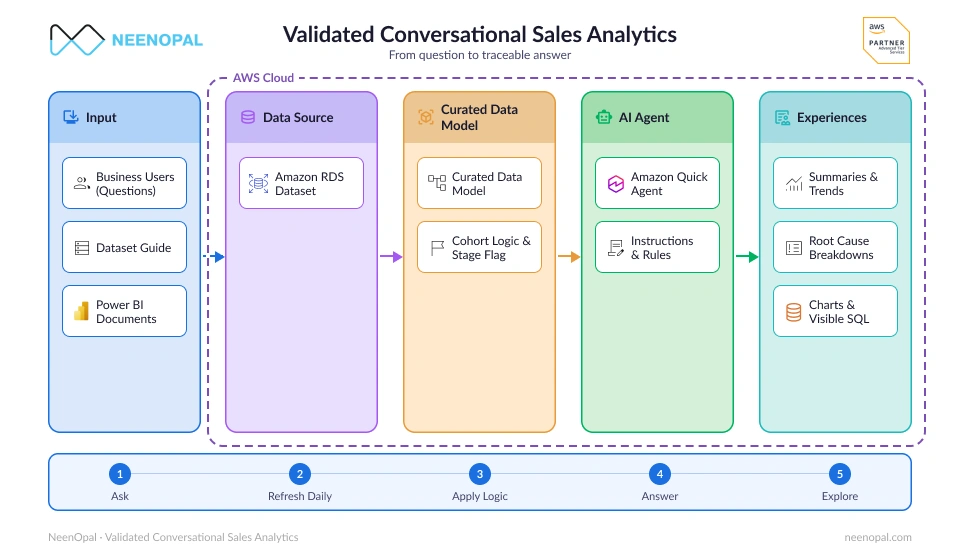
NeenOpal built a conversational AI Analyst Agent on Amazon Quick over a curated funnel dataset, documented business definitions and a validation process reconciled against the existing dashboard.
Conversational AI Analyst Agent on Amazon Quick
NeenOpal built the agent in Amazon Quick over the client's opportunity stage funnel dataset and the documentation underlying its Power BI reporting. Users ask questions in everyday language and receive executive summaries, month-over-month comparisons, stage-velocity analysis and root-cause breakdowns by sales representative, lead source and industry, with charts included alongside the explanation where they help.
Curated Opportunity-Stage Data Model
The data was structured at the level of one row per opportunity per stage, the grain that makes progression and duration analysis possible. Cohort logic was implemented on opportunity creation dates, rows were filled in for skipped stages, and a dedicated flag marks those rows so that they are never mistaken for actual stage events.
A Dataset Guide Encoding the Business Definitions
NeenOpal prepared a Dataset Guide describing the available fields, what they mean and the calculations required for reliable analysis. It sets out opportunity identifiers and distinct deal counts, funnel stages and progression, cohort membership by creation date, average and median duration logic, actual events versus skipped-stage rows, the win-rate denominator, and opportunity-level duration measures.
A Three-Layer Instruction Architecture
During implementation the team identified that Amazon Quick could rewrite persona instructions. Rules that must not change were therefore moved out of the persona prompt and into reference documentation, leaving three separate layers: dataset documentation for field meanings and row grain, reference documentation for critical business rules and calculation requirements, and communication instructions for tone, response structure and chart presentation.
Opportunity-Level Analytical Measures
The implementation adds measures for total deals and for median, average, maximum and minimum duration at the opportunity level. Together these describe typical stage duration, how much variation sits across opportunities, and where unusually long-running cases are concentrated. Instructions were refined so that distinct opportunity counts and win rates follow the intended definitions.
Dashboard Reconciliation and SQL Traceability
Validation was treated as engineering work rather than a final prompt-tuning exercise. The team compared the agent’s answers with the existing Power BI dashboard month by month and filter by filter for the KPIs evaluated, revising calculation instructions wherever a discrepancy appeared. The agent can also show the SQL query behind an answer, so a number can be inspected rather than taken on trust.
Daily Refresh Aligned to the Existing Dashboard
A daily data refresh was configured against Amazon RDS to match the client’s existing dashboard refresh schedule, so the agent answers from refreshed data on the same cadence as the reporting it was reconciled against, rather than working from a static extract.
Services
 Amazon Quick
 AWS S3
 Amazon RDS
Benefits

More Accessible Sales Funnel Analysis
Users can ask for executive summaries, monthly trends, stage velocity and breakdowns by sales representative, lead source and industry in plain language, creating an additional route to information that previously required navigating the dashboard’s filter structure.

A More Structured Foundation for Funnel Analysis
The opportunity-stage data model and explicit cohort logic give the agent a defined structure for interpreting how opportunities progress. Separating skipped-stage rows from real events also means stage-duration calculations run only against observations that actually occurred.

More Responsible Interpretation of Provisional Results
The agent flags immature cohorts rather than presenting a provisional win rate as a final outcome, and identifies when a duration average rests on only a few actual events, so that those figures are read with the caution they warrant.

Greater Transparency and a Maintainable Configuration
Exposing the SQL behind an answer gives users and technical reviewers a direct way to inspect a calculation. Keeping dataset definitions, critical reference rules and communication style in separate layers also makes the agent easier to maintain as fields, labels and business requirements change.

More Consistent KPI Interpretation
Early errors around row counting and the win-rate denominator were corrected and the rules for duration measures were refined. The agent then matched the existing Power BI dashboard on every indicator tested, month by month and filter by filter, providing evidence of consistency within the validated scope.

Lower Cost to Start and a Reusable Blueprint
AWS funding programs reduced the initial cost of ownership, lowering the barrier to starting a first generative AI initiative on real business data. The resulting configuration also stands as a reusable blueprint for further AI opportunities across the business, rather than a one-off experiment that has to be rebuilt from scratch next time.
Conclusion
NeenOpal enhanced an existing Power BI sales funnel with a conversational AI Analyst Agent on Amazon Quick, connected to opportunity-stage data in Amazon RDS. The agent answers natural-language queries in roughly 25% of the time, reducing analysis steps by 60%. Key work included data curation, cohort logic, skipped-stage detection, and defining business rules for counts, win rates, and durations. Daily data refreshes, documented rules, dashboard reconciliation across tested indicators and filters, and on-demand SQL traceability ensure reliable, transparent results. The solution provides a reusable blueprint for future AI-driven analytics.
FAQ
Common questions about building a validated conversational analytics agent on Amazon Quick
What is Amazon Quick and how does it support conversational analytics?
Amazon Quick is the AWS service that provides the conversational interface in this solution. It lets users ask questions about a connected dataset in everyday language and returns analytical answers, charts and, where configured, the SQL behind the result. In this engagement it was connected to an opportunity stage funnel dataset in Amazon RDS and configured with the client's own documented business definitions.
Did the AI Analyst Agent replace the existing Power BI dashboard?
No. Power BI remained the established reporting environment throughout. The agent was built as an additional, conversational route into the same business domain, and its answers were reconciled against the dashboard rather than offered as a replacement for it.
How was the agent validated against existing reporting?
NeenOpal compared the agent's answers with the existing Power BI dashboard month by month and filter by filter for the KPIs evaluated. Where discrepancies appeared, such as dataset rows being counted in place of distinct opportunities or an incorrect win-rate denominator, the calculation instructions and data interpretation rules were revised. The agent matched the dashboard on the KPIs tested.
Why does the data model use one row per opportunity per stage?
A sales opportunity moves through several funnel stages, so a stage-level grain is what makes progression and duration analysis possible. It also means a single opportunity appears in multiple rows, which is why distinct opportunity counts, the win-rate denominator and duration rules had to be defined explicitly before the agent was configured.
Which AWS services does the conversational analytics solution use?
Amazon Quick provides the conversational AI Analyst Agent, and Amazon RDS holds the opportunity stage funnel dataset it queries, refreshed daily in step with the existing dashboard. Microsoft Power BI remains in place as the existing reporting environment and served as the reference for validation. The agent itself is configured in three layers: a Dataset Guide for field meanings and row grain, reference rules for the business logic that must not change, and communication instructions for tone, structure and chart presentation.
Authors
 Ayush GuptaData Scientistin
Case studies
Related case studies

Unifying Eight Disconnected Business Systems into Centralized Power BI Dashboards
Our client, a managed technology services provider (MSP), partnered with NeenOpal to replace a fragmented, siloed reporting process with a centralized Power BI dashboard environment. Business-critical data was scattered across multiple disconnected systems, from the CRM and PSA to the service desk, client surveys data, and network monitoring tools, leaving leadership without a single view of sales, customers, operations, or the workforce. NeenOpal designed and delivered a centralized Power BI reporting solution that unifies data from all of these sources into an automated, daily-refreshed analytics layer on AWS. By ingesting each source, staging it in a PostgreSQL warehouse, and modeling it into governed Power BI dashboards across every business function, the team turned manual, spreadsheet-bound reporting into interactive, self-service insight the client can filter and act on in seconds.
Read case study
Building a Multi-Capability Retail Customer Support Assistant on Amazon Connect
Our client, a large retail group selling consumer goods, approached NeenOpal for a customer support assistant for its website, along the lines of the conversational shopping assistants the major online marketplaces now offer. The brief arrived as an exhaustive list of capabilities the assistant had to cover, spanning product research, cart building, order tracking, warranty and complaint handling, post-purchase care, and escalation to a human agent. NeenOpal built the assistant as a working proof of concept on Amazon Connect, the first time the team had taken Connect into a customer engagement. A conversational layer handles the dialogue, a governed tool layer gives the assistant controlled access to customer and product information, verified sign-in gates anything account specific, and a handover path passes the full conversation to a live agent when a person is needed. The build went from brief to working demonstration in four weeks.
Read case study
Automating Signed Credit Application PDFs with HubSpot Webhooks and AWS Serverless
Our client, a managed technology services provider, partnered with NeenOpal to automate the business credit application its customers complete when applying for credit terms. Until then the whole process ran over email. The team sent the customer a Word form as an attachment, the customer filled in their details and emailed it back, and someone then filed the completed form against the right account in Salesforce. Every application involved a round of back and forth correspondence, manual handling at both ends, and a record that existed only as a document attached to an account. NeenOpal designed and delivered HubSpot form to PDF automation on AWS, a serverless document automation pipeline that replaced the email exchange with a single link on the client's website. A customer opens the form, enters their details, and signs, and a branded PDF is generated automatically, emailed to the address captured on the form and to the client's own team, and archived in encrypted Amazon S3, while the submission itself is recorded field by field in HubSpot. Nobody sends a form out, chases it back, or files it by hand.
Read case study
Modernizing Finance Data Integration & Analytics Using AWS, Snowflake, and Power BI
A global manufacturing organization with regional headquarters in the United States operates across various sectors, including agriculture, construction, marine, and industrial. The company produces advanced diesel engines, diesel-powered equipment, and gas engine-based energy systems, with finance operations supporting complex, high-volume ERP-driven reporting needs.
Read case study
Scalable ILI Dashboard with AWS Lambda and Tableau Integration
A leading DEI consultancy was struggling with slow, outdated reporting systems, scattered data sources, and a lack of scalability. Their legacy database caused delays in processing survey data, leading to stale insights and a heavy manual reporting burden. NeenOpal’s Implementation Division stepped in to address these challenges by developing an Inclusive Leadership Index (ILI) dashboard using Tableau and AWS.
Read case study
Empowering a Texas-Based Real Estate Insurance Provider: A Redshift Data Warehouse Success Story
Our client, a real estate insurance provider, ensures protection for brokers, agents, and home sellers from legal liabilities. As it expanded across US locations, integrating various tools led to data silos, hampering information access. Leadership faced challenges in decision-making due to fragmented insights, while the technical team struggled to maintain 16 disparate data sources.
Read case study