
Composable data sources in Tableau, introduced in Tableau 2026.2, let you build a new data source by relating several existing published data sources into a single, governed model, then save and reuse that result without changing any of the originals. It is the feature that finally lets teams reuse trusted data models instead of rebuilding them.
What Are Composable Data Sources in Tableau?
Composable data sources are a Tableau feature (2026.2 and later) that lets you relate multiple published data sources into one reusable data model, without altering the source models it is built from.
The easiest way to picture it is building with Lego bricks. Each published data source is a finished, trusted brick, a customers list, a products catalog, a table of sales targets. Composing snaps those bricks together into something bigger, while the individual bricks stay exactly as they were, ready to be reused elsewhere. The feature shipped in Tableau 2026.2 (Tableau Cloud 262 and Tableau Server 2026.2).
Why Composable Data Sources Matter: Less Rework, More Consistency
Before this feature, you could not directly relate one published data source to another. If two governed, published sources needed to be analyzed together, your options were awkward: pull fresh extracts, physically join everything into one big flattened source, and republish it, duplicating logic that already lived in the originals. Organizations ended up with a sprawl of near-duplicate data sources that were hard to trust and harder to keep in sync.
Composable data sources fix this by letting you reuse governed building blocks instead of rebuilding them. The benefits are practical: far less duplicated work, a genuine single source of truth because everyone relates back to the same trusted bricks, and more transparency, you can now see and reuse the data model of a published source rather than treating it as a black box.
Composable Data Sources Requirements (Tableau 2026.2 and Later)
Composing and extending published data sources requires Tableau Cloud (version 262) or Tableau Server 2026.2 or later, plus publish permission and access to every source you intend to combine.
There is no partial access. If you cannot see one of the building blocks, you cannot compose with it, so confirm permissions across the whole chain before you start, not just on the top-level source.
Compose vs. Extend in Tableau: What’s the Difference?
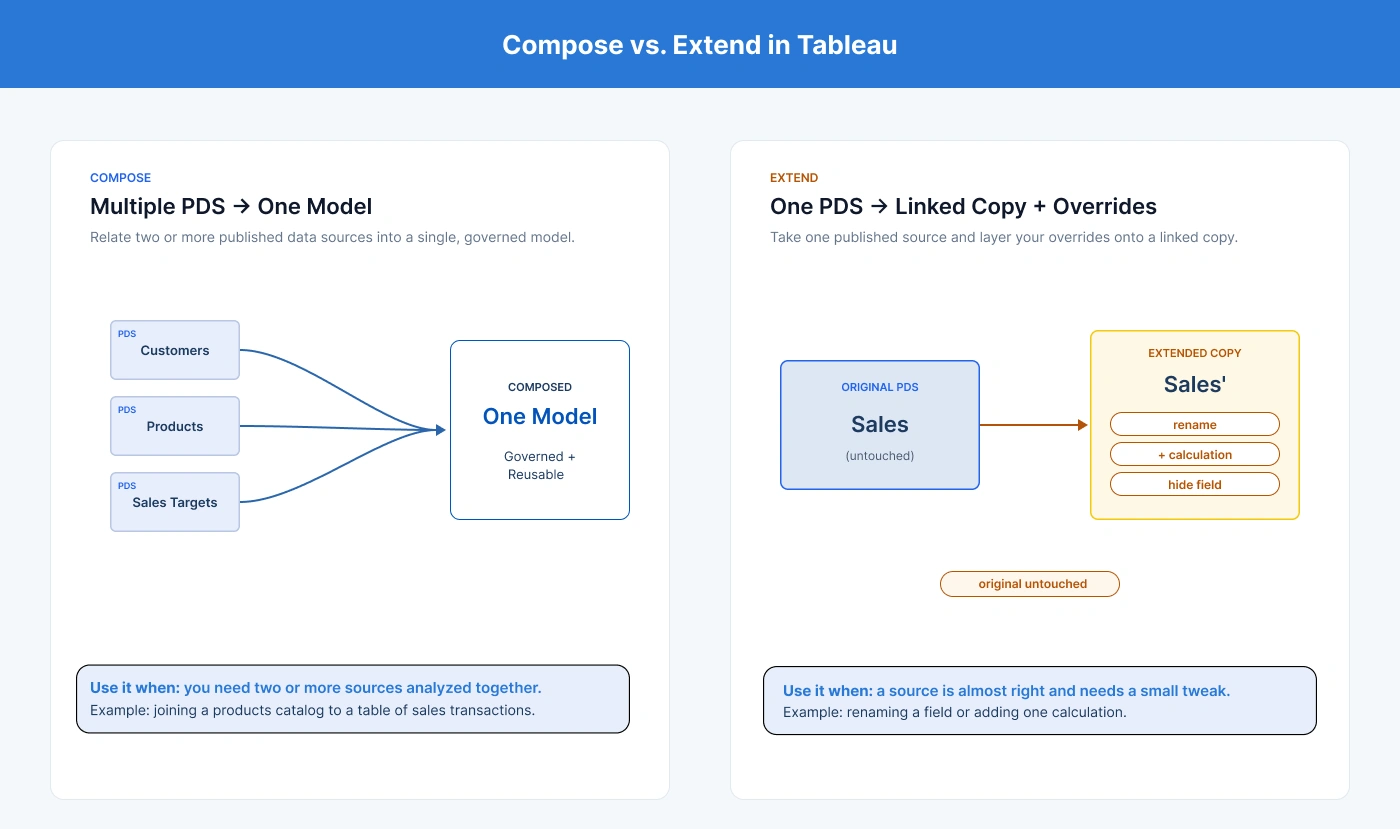
Compose relates two or more published data sources into one model; Extend layers your own changes onto a new copy of a single published source while staying linked to the original.
These two words describe the whole feature, so it is worth pinning them down before you touch Tableau:
- Compose: relate two or more published data sources into one model. This is the “combine multiple bricks” move, for example, joining a products catalog to a table of sales transactions.
- Extend: take a single published data source and layer your own changes onto a new copy of it, rename a field, add a calculation, hide or group fields, while staying linked to the original. The original is untouched; your overrides live in the new, extended source.
Key Tableau Composable Data Source Terminology
A handful of terms show up throughout this guide and in Tableau’s own screens. Keep this glossary handy:
|
Term |
What it means |
|---|---|
|
Published data source (PDS) |
A data source saved to Tableau Cloud or Server that other people can connect to and reuse. |
|
Local data source |
A data source that lives only inside your workbook, for example, an Excel file you just connected to. |
|
Composed data source |
A new data source built by relating two or more published data sources into one model. |
|
Extended data source |
A copy of a single published source with your overrides layered on, still linked to the original. |
|
Override |
A change you layer on top, rename, calculation, group, hide, without editing the underlying source. |
|
Relationship (“noodle”) |
The flexible link drawn between two tables on a shared key. |
|
Dependency / lineage |
The chain of published sources that a composed or extended source is built from. |
How to Use Composable Data Sources in Tableau: 10 Best Practices
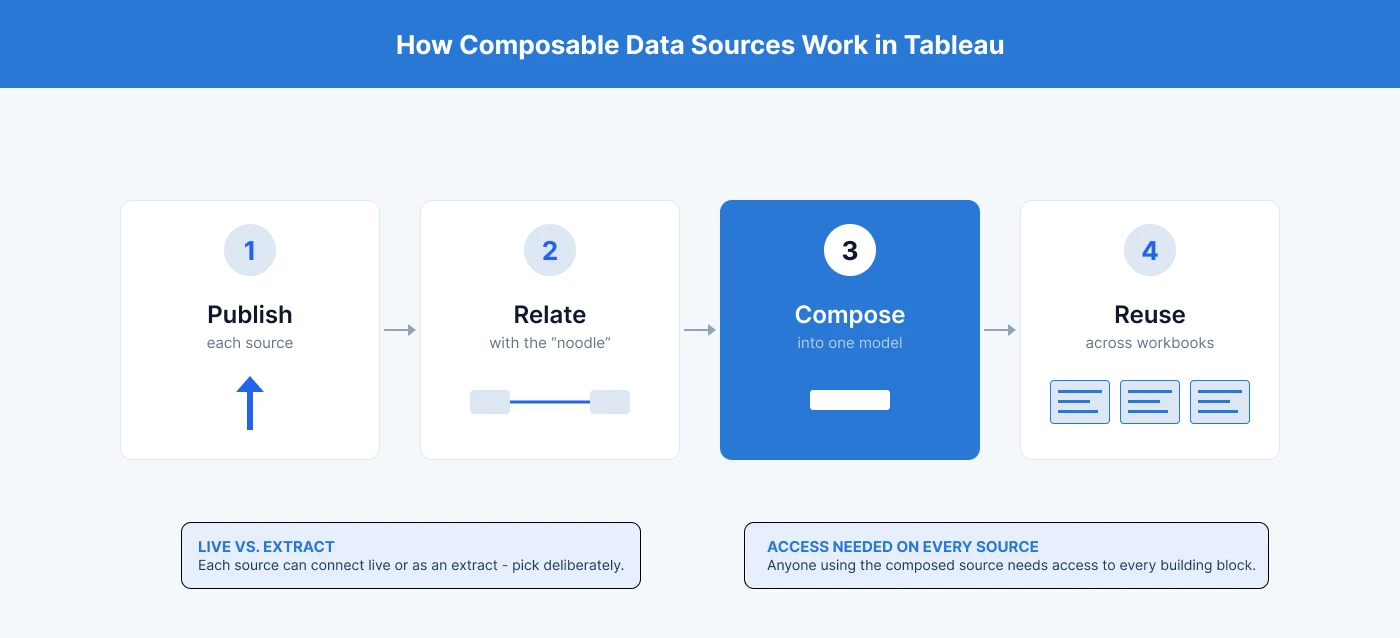
Read these top to bottom the first time, they roughly follow the order you will meet them in real work. If you are still getting the most out of the platform, our guide to essential Tableau features, tips and tricks pairs well with the practices below.
1. Publish Your Data Sources First
Composable data sources only work between published data sources, you cannot compose a raw Excel file or CSV directly. So the very first step is always to publish each building block: connect to the file, drag the table you want onto the canvas, and publish it to your Tableau site with a clear name. Once each piece is a published data source, it becomes available to compose.
2. Relate Your Sources with Relationships (Not Blends)
When you bring published sources together, use relationships (dragging the noodle between tables). Relationships keep each source at its own grain and let Tableau compute the correct results per view, which avoids the aggregation limits and quirks that blending is known for.
3. Use the Canvas Containers to Stay Organized
On the Data Source page, each published source you add appears in its own container. That visual separation is Tableau reminding you these are distinct, independently governed sources. Lay them out cleanly and name things well; a tidy canvas is much easier to reason about later.
4. Choose the Right Relationship Keys
A relationship needs a shared field whose values line up on both sides. Three things make this smooth: the key values actually match, the key columns are the same data type (you cannot relate a number to text), and ideally the columns share a name so Tableau can auto-detect the link. If a relationship refuses to connect, a data-type mismatch is the usual culprit.
5. Extend with Overrides Instead of Rebuilding
If a published source is almost right but needs a small tweak (a clearer field name, or one extra calculation), do not clone and rebuild it. Extend it: layer your overrides onto a new source that stays linked to the original. You get your change, and the original keeps serving everyone else unchanged.
6. Keep Calculations Portable Across Sources
One of the most powerful moments is a calculation that pulls a field from each composed source. For example, a Sale Price that multiplies a Unit Price from the catalog by a Discount from the transactions. Tableau resolves the fields across both sources for you. This is composition doing real analytical work, not just stitching tables side by side.
7. Track and Reset Changes with Review Overrides
When you extend a source, use the Review Overrides view to see exactly what you have changed on top of the original. It keeps your layered edits visible and easy to undo, so an extended source never becomes a mystery.
8. Pick the Right Connection Type: Live vs. Extract
Each source can connect live or as an extract, and the choice affects freshness. A live connection reflects new data in the upstream source whenever your composed source is reloaded or refreshed; an extract is a snapshot taken at a point in time. Neither is “better,” but you should choose deliberately.
9. Plan for Data Freshness and Refresh Behavior
Freshness follows from the connection type. If an upstream catalog adds new rows, a live connection will surface them on the next reload, while an extract will keep showing the snapshot until that extract is refreshed. When numbers look stale, the first question is: which upstream source is an extract, and when was it last refreshed?
10. Manage Access and Permissions Across Every Source
Because a composed source depends on several published sources, anyone using it needs access to all of them. Plan permissions for the whole chain, not just the top-level source, or colleagues will hit access errors on pieces they cannot see. To see who is actually connecting to each source, run a Tableau usage report and review access before you scale a composed source across teams.
Bringing It All Together
Composable data sources turn Tableau’s published sources from static, black-box assets into reusable building blocks, less rework, a real single source of truth, and full lineage you can see and trust. The feature is simple to start with and surprisingly deep once permissions, freshness, and cross-source calculations enter the picture at scale.
Planning a governed Tableau data model your whole team can reuse? NeenOpal helps enterprise teams design composable, lineage-aware Tableau data sources that scale. Talk to our Tableau consulting team.
Composable Data Sources in Tableau: FAQs
1. What are composable data sources in Tableau?
They are a Tableau 2026.2 feature that lets you relate several published data sources into one reusable model, and layer overrides onto a single source, without changing the originals.
2. What’s the difference between compose and extend in Tableau?
Compose combines two or more published data sources into one model. Extend takes one published source and adds your overrides (renames, calculations, groupings) on a new, linked copy.
3. Which Tableau version has composable data sources?
Tableau Cloud version 262 and Tableau Server 2026.2 (and later). Earlier versions cannot relate one published data source to another.
4. Can you relate two published data sources in Tableau?
Yes, that is exactly what composing does. You need publish permission and access to every source in the chain.
5. Do composable data sources replace data blending?
For most cases where you need governed, reusable models, yes, relationships between published sources avoid the aggregation limits of blending. Blending still has niche uses, but composition is the governed, reusable path.