Microsoft has been steadily moving customers onto its newer platform, Microsoft Fabric. While some have little choice amid their contracts ending and Microsoft stopping the sale of the old Power BI Premium plans, others are willingly choosing to combine their older, fragmented tool setup under a unified roof of Fabric. Moving Power BI Premium capabilities requires reassigning workspaces to a Fabric F SKU. Older setups like Azure Data Factory, Synapse, and SQL Server require tooling, mirroring, and rebuilding the pipeline.
Regardless of the method, moving data is barely an issue. The real challenges lie in designing security, sizing capacity, and matching the numbers before the migration ends.
This guide maps each path, drawn from proven delivery experience of NeenOpal as a Microsoft Fabric Featured Partner offering Microsoft Fabric consulting services.
Which Platform Are You Migrating From?
When it comes to Fabric migration, each source platform has its own deadline, Microsoft tooling, and default decision. This practically looks somewhat like below:
|
Source platform |
What sets the timeline |
Main Microsoft route |
Usual decision |
|
Power BI Premium (P SKU) |
Your P SKU agreement term ends |
Reassign workspaces to an F SKU |
Move |
|
Azure Synapse Analytics |
Your roadmap; new Spark and Delta features ship to Fabric |
Migration Assistant for Data Warehouse, Spark migration assistant |
Move, workload by workload |
|
Azure Data Factory |
Your roadmap |
Migration assessment (preview) and built-in upgrade experience; Azure Data Factory item (Mount) |
Migrate, rebuild or retire, pipeline by pipeline |
|
SQL Server, SSIS, legacy warehouses |
Server retirement or renewal |
Mirroring, copy job, Migration Assistant, Invoke SSIS Package activity |
Move, domain by domain |
|
Databricks or Snowflake |
Platform strategy |
Mirroring, OneLake shortcuts |
Move, connect or stay per workload; connect where mature |
|
Tableau, Qlik, other BI |
BI standardization |
Report rebuild in Power BI |
Move reports |
Not sure which path fits your estate? Get a Fabric migration assessment, and we will map every workload for you.
Power BI to Fabric Migration
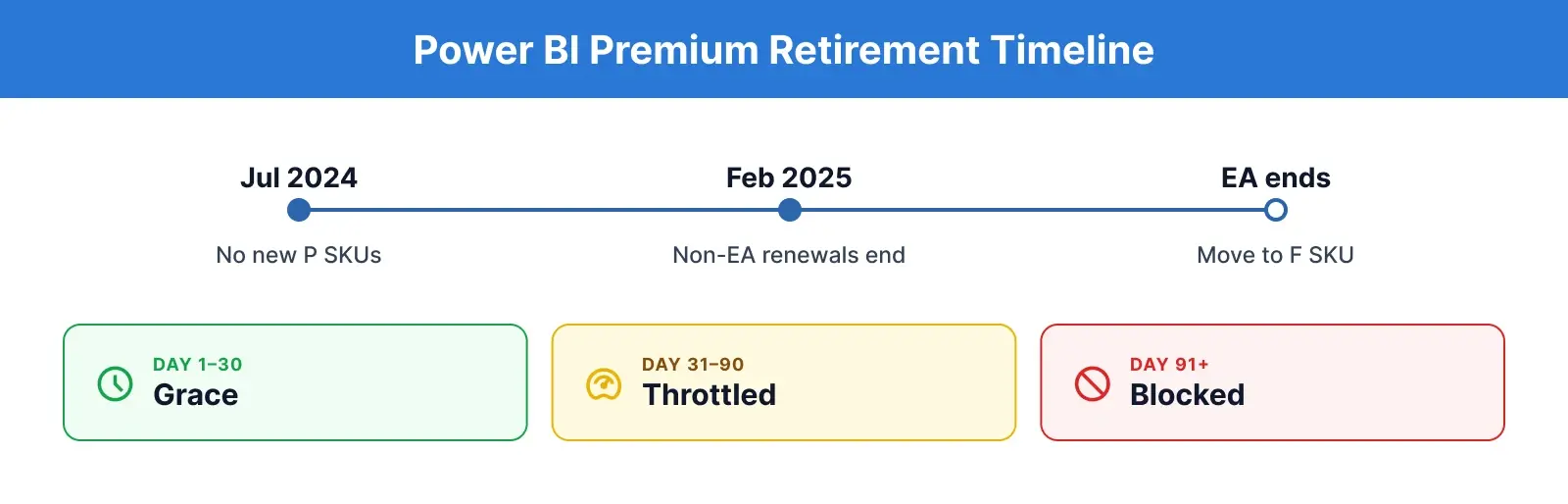
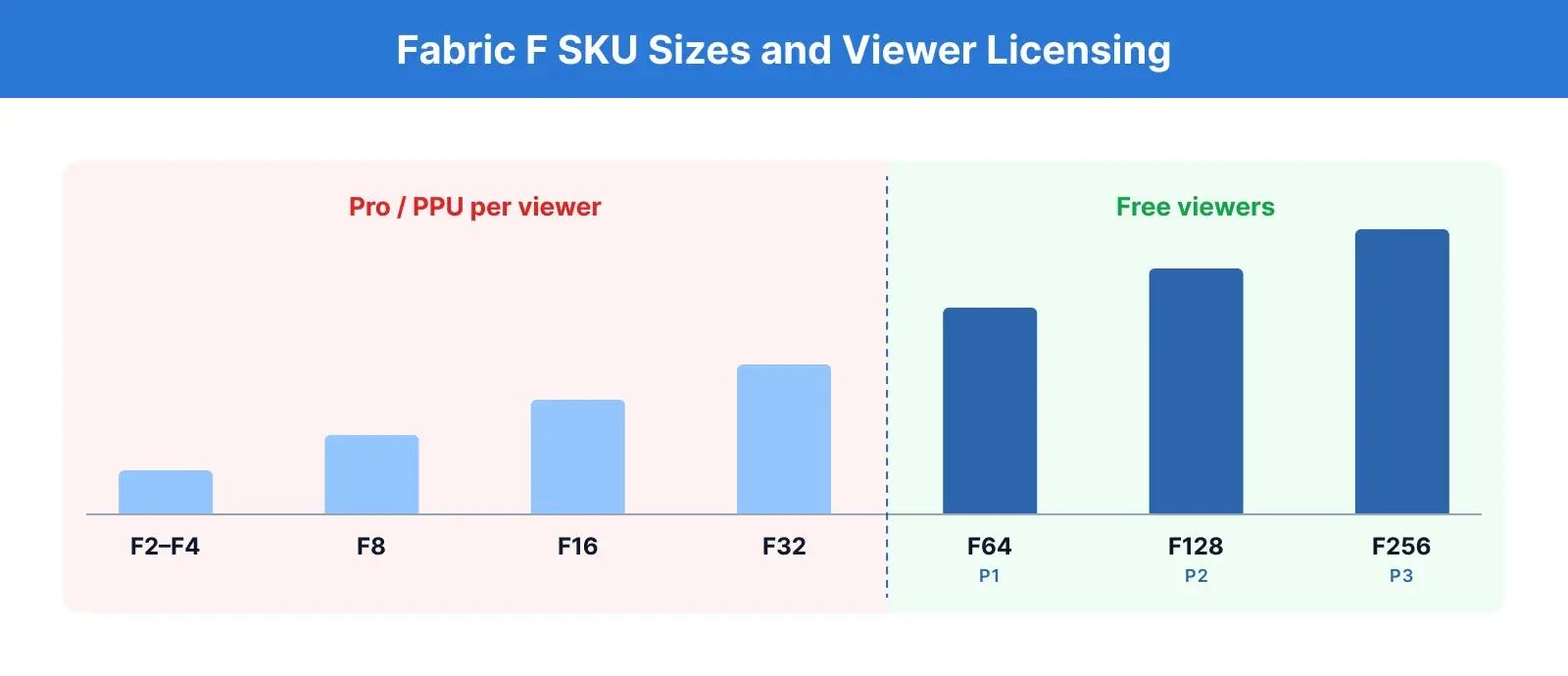
So far, firms have been using Power BI Premium plans to run Power BI at scale on dedicated capacity, so large numbers of employees could view reports without each needing a paid licence. However, Microsoft stopped selling new Premium plans in July 2024 and ended most renewals in February 2025. Customers on an Enterprise Agreement can renew until that agreement ends. The new plans are Fabric capacities, called F SKUs. The old P1 plan is the same size as F64, P2 as F128, and so on.
Luckily for most estates, a Power BI Premium to Fabric migration means reassigning workspaces to new capacity in the same region without moving the data. Reports, semantic models, dashboards, workspace apps, Git integration, deployment pipelines, and refresh schedules are designed to keep working after reassignment, and Microsoft's migration guide lists them for validation after each batch. Most gateway configurations carry over, but some may need updating. However, a refresh that is running during the switch can be interrupted, so it’s best done at a quiet time.
Where NeenOpal rebuilds models, for example on Direct Lake, continuity comes first: existing Import models keep running, reports are repointed model by model only after parity testing, and production connections, gateways, identities and permissions are verified at deployment, backed by runbooks for gateway failure, reruns and backfills.
- New P SKU purchases ended on 1 July 2024.
- Non-EA renewals were available only until 1 February 2025.
- Enterprise Agreement customers can renew P SKUs until their agreement ends, then must buy Fabric capacity instead.
- After a P SKU ends, capacity runs for a 30-day grace period. From day 31, interactive operations are throttled, and from day 91, all operations are rejected until workspaces move to an F SKU.
Power BI Premium (P SKU) to Fabric (F SKU): What Changes
-
New plan names, same size: P1 becomes F64, P2 becomes F128, and so on. The computing power is the same. Only the name changes.
-
Billing moves to Azure: you pay for Fabric through your Azure account, either monthly as you go or with a discounted reservation. If your company has an Azure spending commitment (MACC), Fabric counts toward it.
-
Some settings need redoing: a few capacity settings may not carry over, so recheck them on the new capacity. Examples include capacity administrators, who can manage the capacity (Azure RBAC), custom limits such as semantic model memory, the “Users can create Fabric items” setting, and the Azure tags used to split costs between teams.
-
Cancel the old plan yourself: buying an F SKU doesn’t switch off your P SKU. Once everything works on Fabric, cancel the P SKU in the Microsoft 365 admin center.
-
Moving regions takes more work: if your new capacity is in a different region, some items can’t be moved across. Lakehouses, Warehouses, Notebooks, and pipelines have to be rebuilt, and large semantic models need a backup and restore.
Choosing the Right Size
The common mistake: buying F64 just because you had P1. Many teams used only part of their old plan, so measure first. Microsoft’s Fabric Capacity Metrics app shows how much of the old capacity was actually used, and the Fabric SKU Estimator helps pick a size. At NeenOpal, we never swap P1 for F64 by default: measured usage feeds the SKU Estimator, so the new size comes from evidence, not from the old SKU name.
The catch: on F64 and above, a free Fabric license and the Viewer role are enough to view reports. Below F64, on F2 to F32, every report viewer needs a paid Pro or Premium Per User (PPU) license. A smaller plan can cut the capacity bill but add a license fee for every viewer, so compare both costs before you decide. We weigh both and record the decision with the client, because a smaller capacity is a licensing decision as much as a sizing one.
|
Moving Power BI Pro Workloads into Fabric
Teams on Pro or shared capacity don’t need F64 to start using Fabric. The smallest plan is F2, and a small F SKU can run lakehouses, notebooks, and pipelines while reports stay on Pro licenses.
-
Viewers: below F64, every viewer of shared Power BI content still needs Pro or PPU.
-
Pipeline builders: need at least a free Microsoft Fabric license to build in a capacity workspace.
-
Start small: on one EdTech engagement, NeenOpal started at F4 and scaled up only when usage stayed high. F64 has 16 times the CUs of F4.
The cost section of our Fabric implementation roadmap covers reserved versus pay-as-you-go pricing in detail.
Azure Synapse to Fabric
Synapse is several migrations at once. It involves dedicated SQL pools moving to Fabric Data Warehouse, Spark to Fabric Data Engineering, pipelines to Fabric Data Factory, and Data Explorer to Eventhouse.
Microsoft's migration assistants handle schema translation and notebook conversion. Custom Spark configurations, library dependencies, and mssparkutils references still need hands-on work, and VNet-bound workspaces are blocked from the assistant entirely. Our Azure Synapse to Microsoft Fabric migration guide walks through all four workloads.
Azure Data Factory to Fabric Data Factory
You have two ways to migrate Azure Data Factory to Fabric, and you decide the route pipeline by pipeline.
-
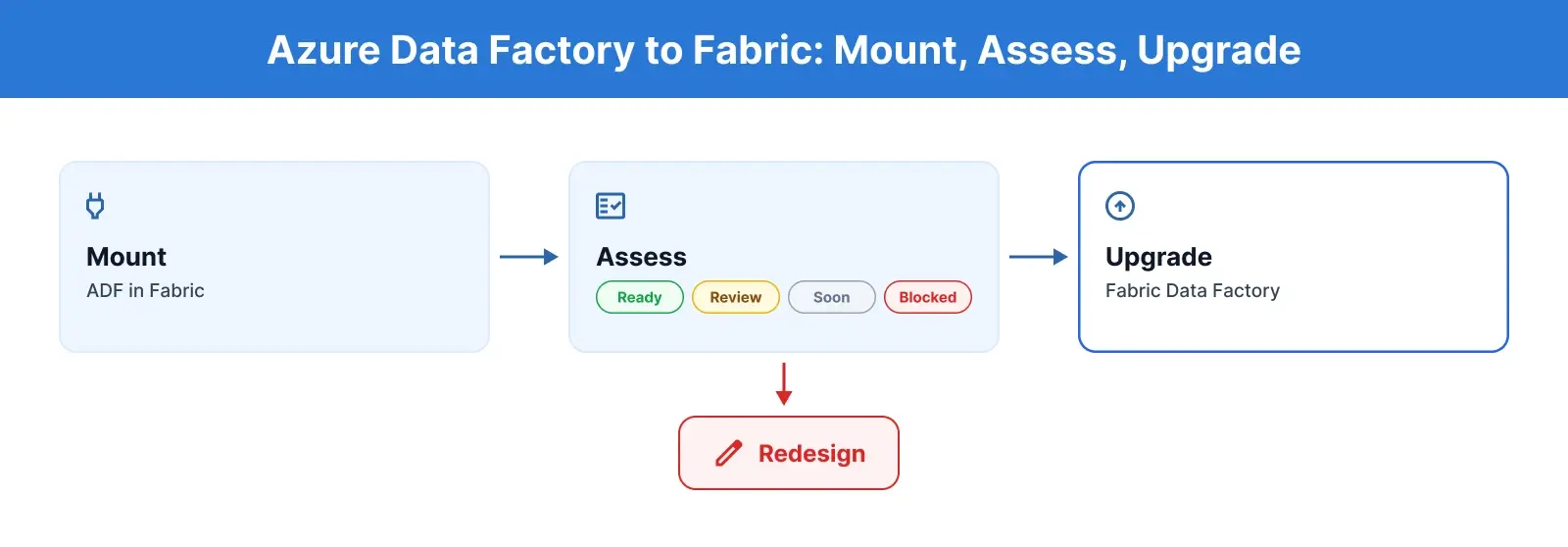
Mount the existing factory: the Azure Data Factory item adds your factory to a Fabric workspace, where you can view, monitor, and edit it. Pipelines and integration runtimes still execute in your Azure resources, so nothing is converted yet.
-
Rebuild or upgrade natively: the built-in upgrade experience assesses each pipeline in ADF as Ready, Needs review, Coming soon, or Not compatible, then moves supported pipelines to Fabric. For scripted, at-scale moves, Microsoft offers the Microsoft.FabricPipelineUpgrade PowerShell module.
Mounting buys time to plan. Upgrading is where the gaps surface.
Microsoft's ADF migration planning guide lists what does not carry over cleanly:
|
ADF feature |
In Fabric Data Factory |
|
Centralized triggers |
One or more schedules per pipeline, no shared triggers |
|
Self-hosted integration runtime |
On-premises data gateway; VNet IR becomes a virtual network data gateway |
|
Linked services |
Connections; connection properties can't be dynamic, but pipeline activities can use dynamic content for the connection object |
|
Datasets |
Defined inline inside each activity |
|
Mapping data flows (Spark) |
Dataflow Gen2 with Spark-based Mapping Data Flow transforms (preview); eligible flows migrate through the upgrade experience, and the rest need redesign |
|
Global parameters |
Variable Libraries |
|
Custom activity |
Azure Batch activity |
An Informatica to Microsoft Fabric data migration has no mount option, and neither do other third-party ETL tools. Treat each job as a rebuild into a Fabric pipeline, Dataflow Gen2, or Spark notebook.
Connectors are the other gap. Where Data Factory connectors fall short, NeenOpal writes custom ingestion in Fabric Python notebooks that lands raw data in OneLake. For example, for Google Analytics 4, we load data through a Spark notebook with the BigQuery connector. Our Azure consulting services team handles both routes when you migrate ADF to Fabric.
|
On-Prem SQL Server, SSIS and Legacy Data Warehouses to Fabric
A legacy data warehouse to Fabric migration has four entry routes. Pick by latency needs and by how much T-SQL you are carrying.
Before picking a route, assess each source on five points: where it is hosted and how it can be reached, its authentication method, whether it is eligible for Mirroring, whether change data capture is available, and any maintenance windows or rate limits. On-premises sources connect through the on-premises data gateway, clustered for high availability.
-
Mirroring for SQL Server: replicates tables into OneLake in near real time. For SQL Server 2016 to 2022, it relies on Change Data Capture (CDC) in the source database. Use it for near-real-time replication where the source is supported.
-
Pipelines and copy job: batch and incremental loads through the on-premises data gateway, which replaces the ADF self-hosted integration runtime. Use them for batch loads and incremental or CDC patterns.
-
Migration Assistant for Data Warehouse: migrates schema from a DACPAC file or a live connection (preview), translates T-SQL metadata, flags objects it could not convert, and copies data with a copy job.
-
Streaming CDC: for sub-hour freshness at high volume, stream change events into a Lakehouse. For high-velocity events, Eventstreams into Eventhouse also fit, with a latency target defined per use case.
Where data must stay where it is, OneLake shortcuts make it available in Fabric without copying it.
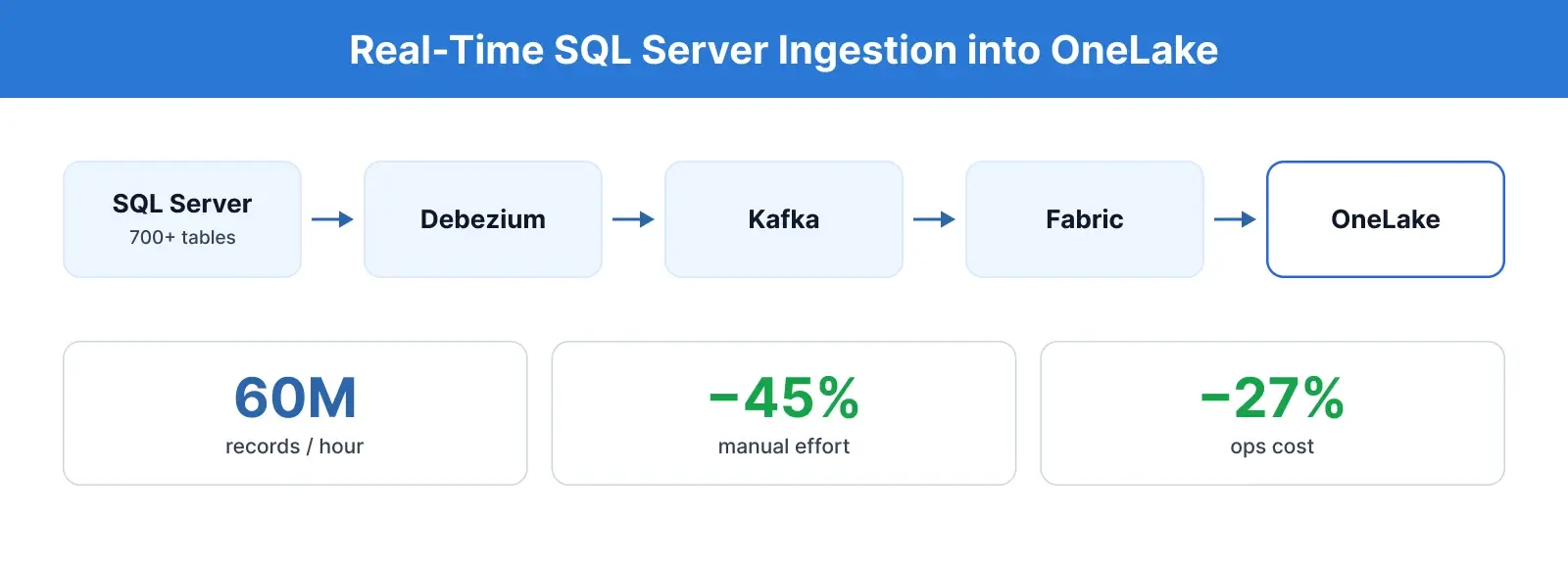
NeenOpal used the streaming route for a leading EdTech company. Debezium captured CDC events from more than 700 SQL Server tables into Kafka, and Fabric streaming landed them in a OneLake Lakehouse at 60 million records per hour. The client cut manual effort by 45% and operational cost by 27% (read the real-time ingestion case study).
What to Do with SSIS Packages
The Invoke SSIS Package activity (preview) runs existing .dtsx packages from OneLake inside a Fabric pipeline, billed on SSIS runtime uptime. During preview, it can't connect to on-premises or private-network sources and doesn't support custom or third-party components, so it suits cloud-only packages. Microsoft's ADF planning guide also supports keeping packages on the Azure-SSIS integration runtime and calling them from Fabric, which remains the route for packages that read from on-premises SQL Server. Use either as a bridge, and rebuild high-value packages natively over time.
Fabric Warehouse Is Not SQL Server
This is the biggest change for SQL teams. Microsoft's T-SQL surface area documentation lists features Fabric Warehouse does not support, including:
- Triggers and synonyms
- Materialized views and recursive queries
- SET TRANSACTION ISOLATION LEVEL and SET ROWCOUNT
- CREATE USER, FOR XML, and manually created multi-column statistics
Identity columns, MERGE, and session-scoped #temp tables are supported, and ALTER TABLE supports only a subset of operations. Every stored procedure needs a review before cutover.
|
Databricks or Snowflake to Fabric: Should You Migrate at All?
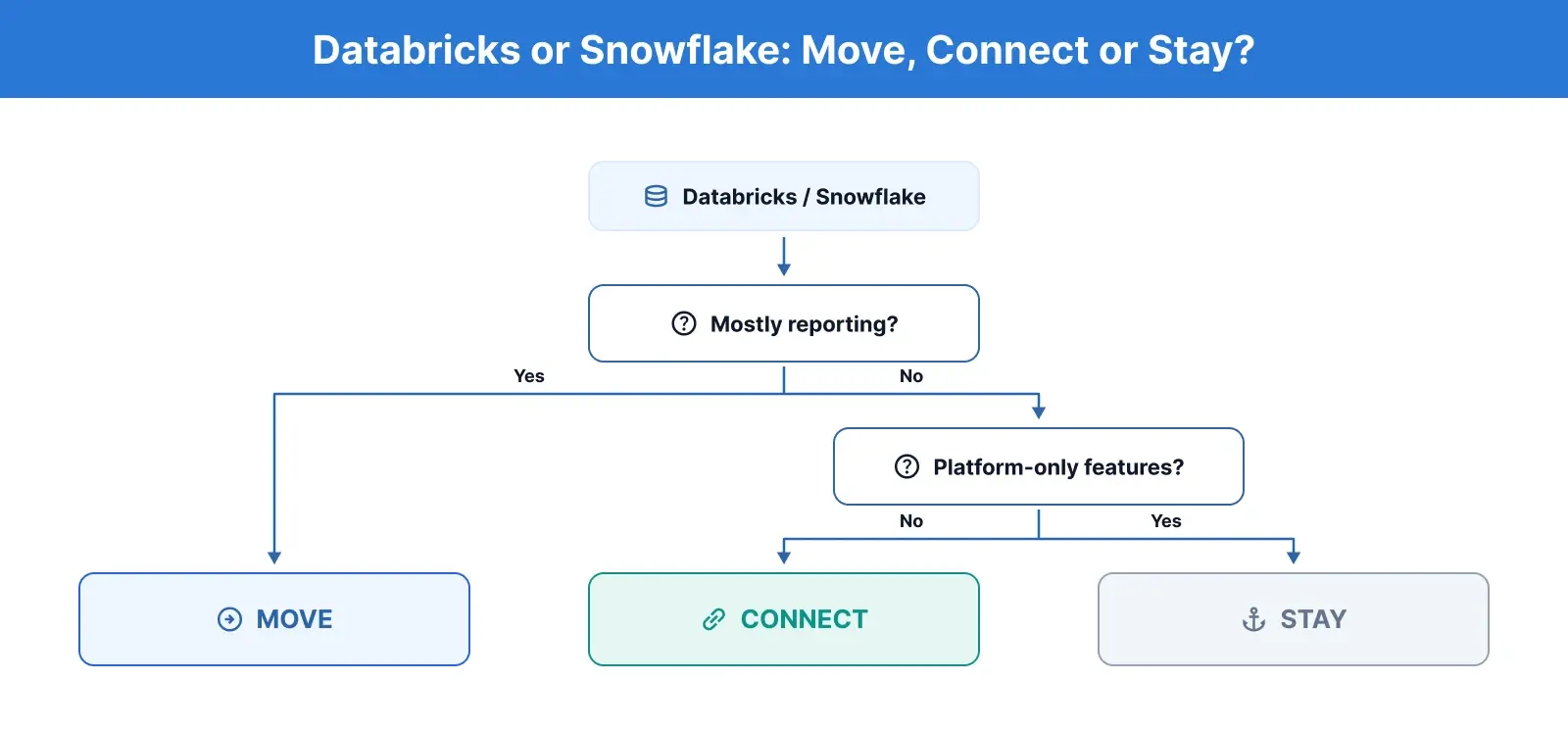
A Databricks to Fabric migration or a Snowflake to Fabric migration rewrites working pipelines and retrains engineers. Before committing, check whether connecting the platform to Fabric already gives Power BI what it needs. NeenOpal’s approach is to put Fabric at the core and integrate existing systems only where they add value, deciding to move, connect, or stay for each workload instead of starting from migrate everything”.
Microsoft now offers two production-ready connection paths:
-
Mirroring for Snowflake: generally available; replicates Snowflake databases into OneLake for every Fabric workload.
-
Mirroring for Azure Databricks Unity Catalog: generally available since July 2025. Data stays in Databricks storage, and Fabric reads it through OneLake shortcuts, including from Direct Lake semantic models.
Check the documented limits first. Databricks mirroring covers tables only, not views, materialized views, or streaming tables. Snowflake mirroring supports materialized views and regular views as a paid preview add-on.
Move, connect or stay checklist:
-
Move when the platform hosts mainly reporting pipelines, your team's skills are Microsoft-centric, and a single Fabric capacity would replace a separate compute bill and an assessment shows the code and skills effort is acceptable. Even then, migrate domain by domain with old and new running side by side, not in one switch.
-
Connect when Databricks or Snowflake runs mature engineering or ML workloads, but Power BI users need the data in OneLake.
-
Stay when the workloads depend on platform-specific features with no Fabric equivalent and Power BI already performs on DirectQuery or import.
Tableau, Qlik and Other BI Tools to Power BI on Fabric
Moving Tableau or Qlik reports to Fabric is a Power BI migration first. Plan it as a rebuild of semantic models, calculations, and visuals in Power BI. Where data lands in OneLake, build the new semantic models on Direct Lake. One NeenOpal Direct Lake redesign cut a production dashboard refresh from 1.5 hours to 15 seconds. See our Power BI migration services.
Fabric Migration Tools: What the Migration Assistant Does and Does Not Do
Every Fabric migration tool moves objects. None of them redesign security, capacity, or reports.
|
Tool |
What it moves |
What you still do by hand |
|
Migration Assistant for Data Warehouse |
Schema via DACPAC or live connection; T-SQL translation; AI-assisted fixes; data through copy job |
Rewrite unsupported T-SQL; repoint every connected report and pipeline |
|
Azure Data Factory item (Mount) |
A live view of your factory inside Fabric |
Everything: pipelines still run in Azure |
|
ADF upgrade experience and FabricPipelineUpgrade |
Pipelines, activities, parameters |
Triggers, connections, mapping data flow redesign |
|
Spark migration assistant (Synapse) |
Notebooks, Spark job definitions, pools, lake database metadata |
Custom Spark configs, libraries, mssparkutils to notebookutils, data movement |
|
Copy job |
Bulk and incremental data movement |
Modeling, validation |
|
Mirroring |
Continuous table replication into OneLake |
Views, transformations, security model |
After the Migration Assistant finishes, Microsoft recommends using the List Connections REST API to find every connection still pointing at the old source.
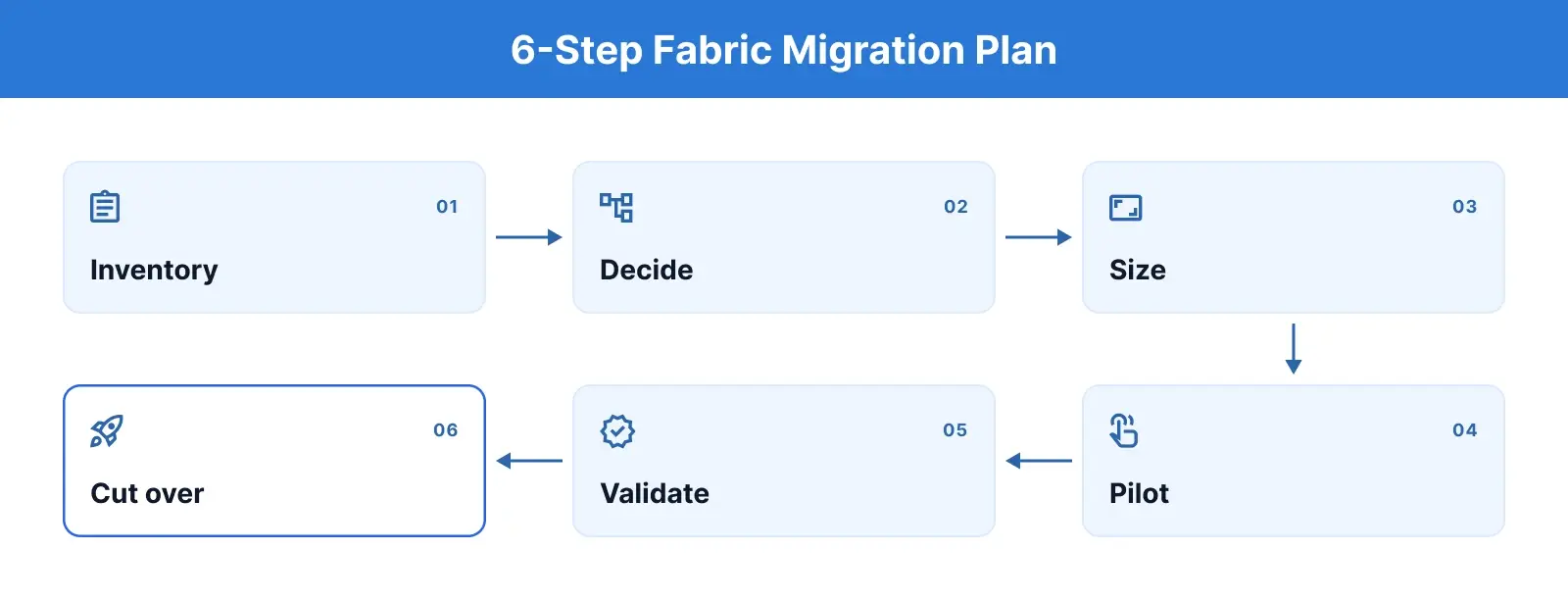
A 6-Step Fabric Migration Plan for Any Source
Whatever you migrate to Fabric from, these six steps cover the move itself. For the full platform build, use our Microsoft Fabric implementation roadmap. In NeenOpal projects, the indicative end-to-end effort from Discover to handover is about 9 to 12 weeks, depending on scope and what the assessment finds.
1. Inventory every workload, report, and user. List workspaces, pipelines, gateways, semantic models, and stored procedures. Count report viewers too, because that number decides whether F64 licensing pays off.
2. Pick move, connect, or stay for each workload. Use the platform table above. Mirroring or shortcuts often cover a source that does not justify a rewrite.
3. Size capacity from measured usage. Baseline with the Fabric Capacity Metrics app, then test on a 60-day Fabric trial capacity if needed. NeenOpal tunes queries, runs OPTIMIZE and Z-order, and adjusts partitioning before resizing; a dynamic F4/F8 plan has saved about 25% against a fixed F8.
4. Pilot one workload. Take one source end to end into one gold table. In NeenOpal projects, Discover, Assess, and Design take about 3 to 5 weeks combined, so the pilot starts from a measured plan, and it runs to a go/no-go decision before the wider build.
5. Run old and new side by side and validate the numbers. NeenOpal's test harness runs full, incremental, and soft-delete loads, then compares a control gold lakehouse against the test lakehouse by hash before anything ships.
6. Cut over and switch off the old platform. Repoint connections, retire old schedules, and cancel the P SKU or Azure resources manually. Finish before any P SKU grace period runs out.
|
How NeenOpal Migrates Teams to Microsoft Fabric
NeenOpal is a Microsoft Fabric Featured Partner and holds Microsoft Solutions Partner designations for Data & AI (Azure) and Digital & App Innovation, plus the Analytics on Microsoft Azure specialization. Our 25+ Microsoft-certified engineers have shipped 40+ Fabric and data workflows under ISO 27001, ISO/IEC 42001, and SOC 2 controls.
How We Keep Access Right from Day One
We design access before we move data and treat security as part of the build itself. Access is layered with identity, then network, then workspace, then item, then data, so no single setting is the only thing protecting the data.
-
Groups, not people: all access goes to Entra ID security groups, never to individuals. Onboarding a new user means adding them to the right group.
-
Row- and column-level security defined once: where possible with OneLake security, which applies across engines; otherwise with Warehouse SQL security (RLS, CLS, dynamic data masking) or RLS in the semantic model.
-
Viewers stay viewers: report consumers get the Viewer role and access through Power BI apps, never Admin, Member, or Contributor, because those roles bypass OneLake security rules.
-
Verified before go-live, kept correct after: RLS is tested persona by persona and signed off in UAT; role-based training, access-request runbooks and periodic access reviews catch drift.
Three migrations show the approach:
-
Four-week Fabric migration with RLS: a B2B financial wellness and HR technology company maintained a separate dashboard and semantic model for each client, fed by MongoDB, AWS RDS, Google Sheets, and HubSpot. We rebuilt it on a medallion Lakehouse with one governed semantic model and dynamic row-level security in four weeks.
-
Automated cross-tenant semantic model migration: Fabric has no built-in way to move a semantic model between tenants. A Fabric Notebook using .bim files and semantic-link-labs made the move about 72% faster than a manual rebuild, with 99.99% error-free deployment.
-
Multi-tenant Fabric CI/CD: for a SaaS company on Fabric, an API-first pipeline on GitHub Actions and the Fabric REST APIs delivered 8x faster customer deployments and 80% faster rollbacks.
Plan your move to Microsoft Fabric with a Featured Partner. Start with an architecture review or a scoped proof of concept on your own data through our Microsoft Fabric consulting services, or talk to our team.
Frequently Asked Questions
1. Is Power BI Premium being retired?
Yes, for purchasing. Microsoft stopped selling new Power BI Premium P SKUs on 1 July 2024 and ended non-EA renewals on 1 February 2025. Enterprise Agreement customers can renew until their agreement ends, then must move to Fabric F SKUs.
2. Is P1 the same as F64?
In compute, yes. Both provide 64 capacity units, and both let users with a free license view Power BI content. The F64 is billed through Azure as a pay-as-you-go or reserved resource, while P1 was a Microsoft 365 subscription.
3. How long does a Microsoft Fabric migration take?
It depends on the source and scope. A Power BI Premium move is a workspace reassignment. For a full platform migration, NeenOpal’s indicative effort from discovery through handover is about 9 to 15 weeks, and the real duration depends on what the assessment finds. A focused migration with embedded reporting and row-level security took about 10 weeks, including a one-week proof of concept, while a smaller, tightly scoped multi-source migration took four weeks.
4. Can I migrate to Microsoft Fabric for free?
You can test for free. The Microsoft Fabric trial runs 60 days on an F4 or F64 trial capacity and requires a Fabric (Free) license. When it ends, non-Power BI items become inaccessible until the workspace is assigned to a paid F or P capacity.
5. Should I move from Databricks or Snowflake to Fabric?
Connect first. Mirroring for Snowflake and Mirroring for Azure Databricks Unity Catalog are both generally available and bring data into OneLake without a rewrite. Run a full migration only when the platform mainly serves reporting and a single Fabric capacity would replace its compute costs, and an assessment confirms the code and skills effort is acceptable.